3-report
bernard-liew
2020-10-09
Last updated: 2020-11-04
Checks: 6 1
Knit directory: 2020_ODI_network/
This reproducible R Markdown analysis was created with workflowr (version 1.6.2). The Checks tab describes the reproducibility checks that were applied when the results were created. The Past versions tab lists the development history.
The R Markdown file has unstaged changes. To know which version of the R Markdown file created these results, you’ll want to first commit it to the Git repo. If you’re still working on the analysis, you can ignore this warning. When you’re finished, you can run wflow_publish to commit the R Markdown file and build the HTML.
Great job! The global environment was empty. Objects defined in the global environment can affect the analysis in your R Markdown file in unknown ways. For reproduciblity it’s best to always run the code in an empty environment.
The command set.seed(20201008) was run prior to running the code in the R Markdown file. Setting a seed ensures that any results that rely on randomness, e.g. subsampling or permutations, are reproducible.
Great job! Recording the operating system, R version, and package versions is critical for reproducibility.
Nice! There were no cached chunks for this analysis, so you can be confident that you successfully produced the results during this run.
Great job! Using relative paths to the files within your workflowr project makes it easier to run your code on other machines.
Great! You are using Git for version control. Tracking code development and connecting the code version to the results is critical for reproducibility.
The results in this page were generated with repository version 9e388e3. See the Past versions tab to see a history of the changes made to the R Markdown and HTML files.
Note that you need to be careful to ensure that all relevant files for the analysis have been committed to Git prior to generating the results (you can use wflow_publish or wflow_git_commit). workflowr only checks the R Markdown file, but you know if there are other scripts or data files that it depends on. Below is the status of the Git repository when the results were generated:
Ignored files:
    Ignored:    .Rhistory
    Ignored:    .Rproj.user/

Unstaged changes:
    Modified:   analysis/1-Explore.Rmd
    Modified:   analysis/2-network.Rmd
    Modified:   analysis/3-report.Rmd
    Modified:   analysis/4-inference.Rmd
    Modified:   analysis/index.Rmd
Note that any generated files, e.g. HTML, png, CSS, etc., are not included in this status report because it is ok for generated content to have uncommitted changes.
These are the previous versions of the repository in which changes were made to the R Markdown (analysis/3-report.Rmd) and HTML (docs/3-report.html) files. If you’ve configured a remote Git repository (see ?wflow_git_remote), click on the hyperlinks in the table below to view the files as they were in that past version.
| File | Version | Author | Date | Message |
|---|---|---|---|---|
| Rmd | 9e388e3 | Liew | 2020-11-03 | tidied reporting |
| Rmd | 5f1623a | bernard-liew | 2020-10-13 | initial network analysis |
Load package
if (!require("pacman")) install.packages("pacman")Loading required package: pacmanWarning: package 'pacman' was built under R version 3.6.1pacman::p_load(tidyverse,
qgraph,
stats,
bootnet,
igraph,
plotrix,
mgm,
NetworkComparisonTest,
rio,
furrr,
cowplot,
doParallel,
huge,
EGAnet)Report network without group as variable
ODI labels
# ODI custom figure
nodeLabels <- c("Pain Intensity", "Personal Care", "Lifting", "Walking", "Sitting",
                "Standing", "Sleeping", "Sex life", "Social life", "Travelling")
ques <- paste0("Q", 1:10)

node_df <- data.frame("Item" = ques,
                      "Variable" = nodeLabels)
Load models
# Model with missing data as input
res <- readRDS("output/raw.RDS")
# Model with complete imputed data as input
#res <- readRDS("output/com.RDS")
Plot network
Blue edges - positive correlation
Red edges - negative correlation
The thickness of the edges indicate the magnitude of correlation.
#tiff(width = 15, height = 15, units = "in", res = 100, file = "output/odi_network.tiff")
par (mfrow = c(2,3))
p1 <- plot (res$nw[[1]], title = "Baseline", label.cex = 1.5, vsize = 10)
plot (res$nw[[2]], title = "Week 5", layout = p1$layout, label.cex = 1.5, vsize = 10)
plot (res$nw[[3]], title = "Week 10", layout = p1$layout, label.cex = 1.5, vsize = 10)
plot (res$nw[[4]], title = "Week 26", layout = p1$layout, label.cex = 1.5, vsize = 10)
plot (res$nw[[5]], title = "Week 52", layout = p1$layout, label.cex = 1.5, vsize = 10)
plot.new()
addtable2plot(0,0,node_df,
              xpad=1, ypad=1,
              bty='o',
              display.rownames = FALSE,
              hlines = TRUE,
              vlines = TRUE)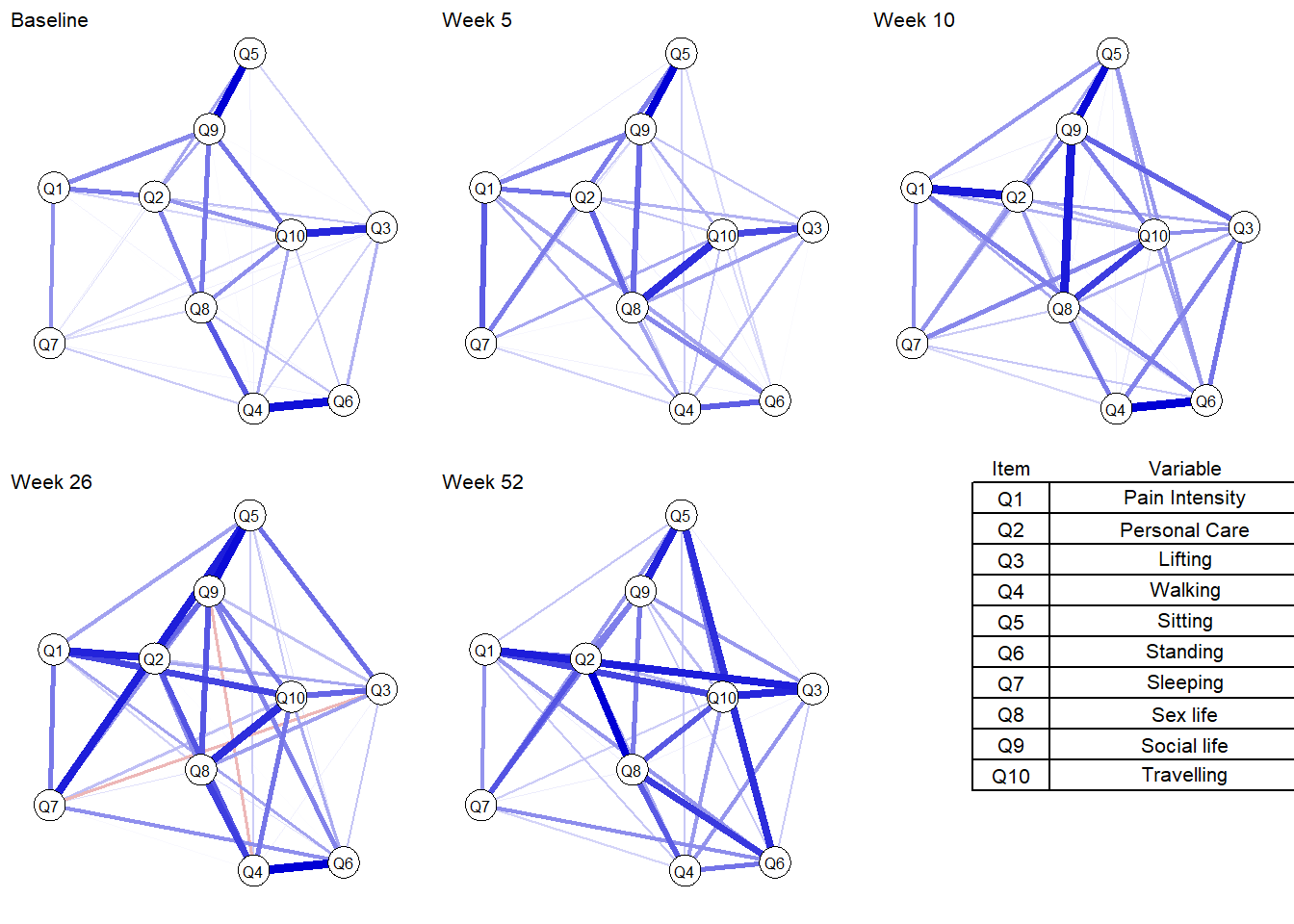
#dev.off()Plot centrality
Strength - sum of direct connections a given node has in the network
Betweenness - shortest paths that go through the node under investigation
Closeness - sum of shortest paths from the node under investigation to all other nodes in the network
Expected influence - sum of a node’s connections and represents the relative importance of a node in a network
# Plot centrality
c_fig <- map (res$nw, centralityPlot, include = "all", print = FALSE)
Note: z-scores are shown on x-axis rather than raw centrality indices.
Note: z-scores are shown on x-axis rather than raw centrality indices.
Note: z-scores are shown on x-axis rather than raw centrality indices.
Note: z-scores are shown on x-axis rather than raw centrality indices.
Note: z-scores are shown on x-axis rather than raw centrality indices.#tiff(width = 15, height = 15, units = "in", res = 100, file = "output/odi_strength.tiff")
cowplot::plot_grid(plotlist = c_fig, labels = c("Wk0","Wk 5", "Wk 10", "Wk 26", "wk52" ), vjust = 1, hjust = 0)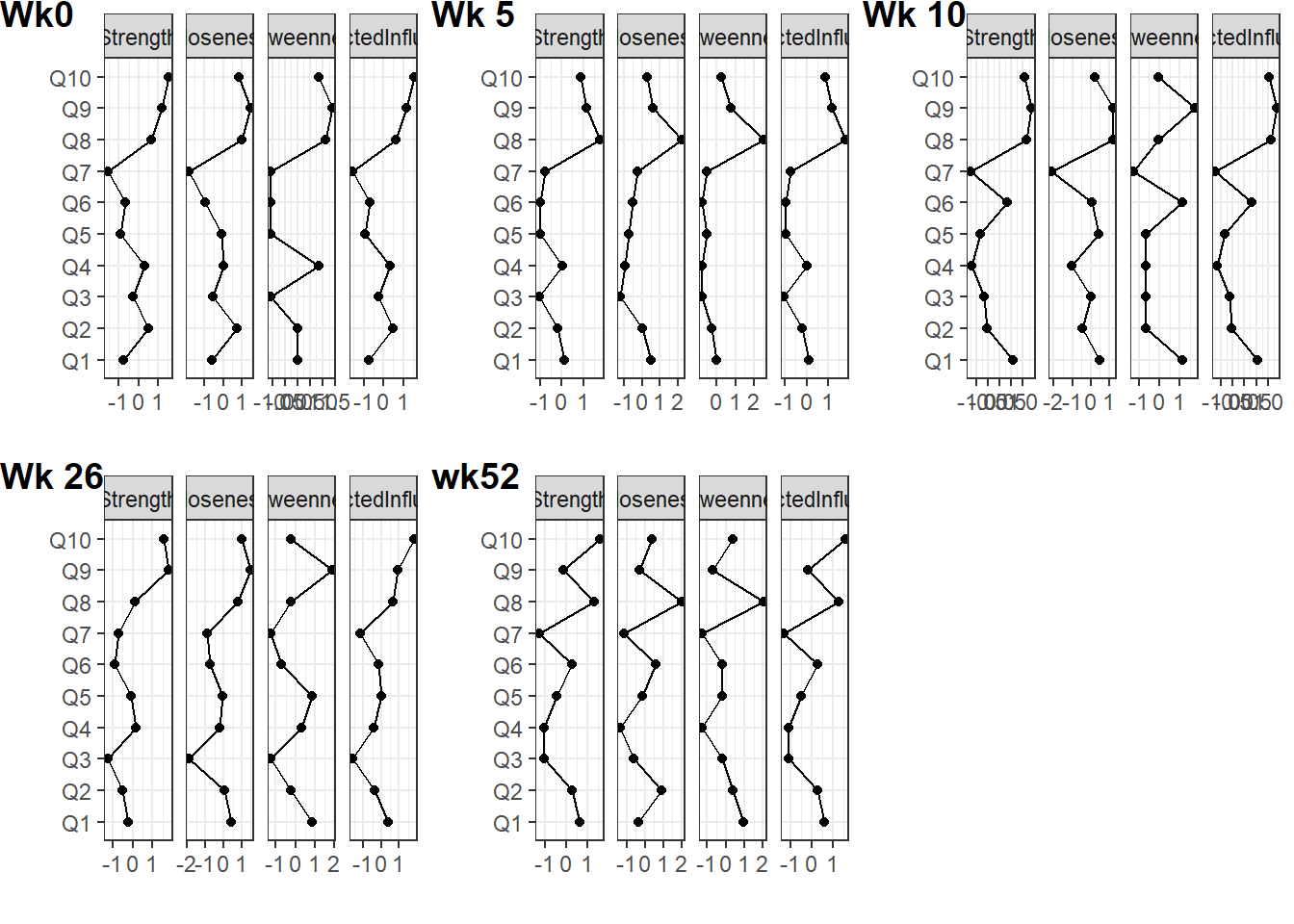
#dev.off()Plot centrality stability
Is the centrality order stable?
# Plot centrality stability
s_fig <- map (res$centr_stb, plot, statistics = c("closeness", "strength", "betweenness"))
Warning: `filter_()` is deprecated as of dplyr 0.7.0.
Please use `filter()` instead.
See vignette('programming') for more help
This warning is displayed once every 8 hours.
Call `lifecycle::last_warnings()` to see where this warning was generated.Warning: `select_()` is deprecated as of dplyr 0.7.0.
Please use `select()` instead.
This warning is displayed once every 8 hours.
Call `lifecycle::last_warnings()` to see where this warning was generated.Warning: `group_by_()` is deprecated as of dplyr 0.7.0.
Please use `group_by()` instead.
See vignette('programming') for more help
This warning is displayed once every 8 hours.
Call `lifecycle::last_warnings()` to see where this warning was generated.Warning: `summarise_()` is deprecated as of dplyr 0.7.0.
Please use `summarise()` instead.
This warning is displayed once every 8 hours.
Call `lifecycle::last_warnings()` to see where this warning was generated.Warning: `arrange_()` is deprecated as of dplyr 0.7.0.
Please use `arrange()` instead.
See vignette('programming') for more help
This warning is displayed once every 8 hours.
Call `lifecycle::last_warnings()` to see where this warning was generated.#tiff(width = 15, height = 15, units = "in", res = 100, file = "output/odi_stability.tiff")
cowplot::plot_grid(plotlist = s_fig, labels = c("Wk0","Wk 5", "Wk 10", "Wk 26", "wk52" ), vjust = 1, hjust = -1)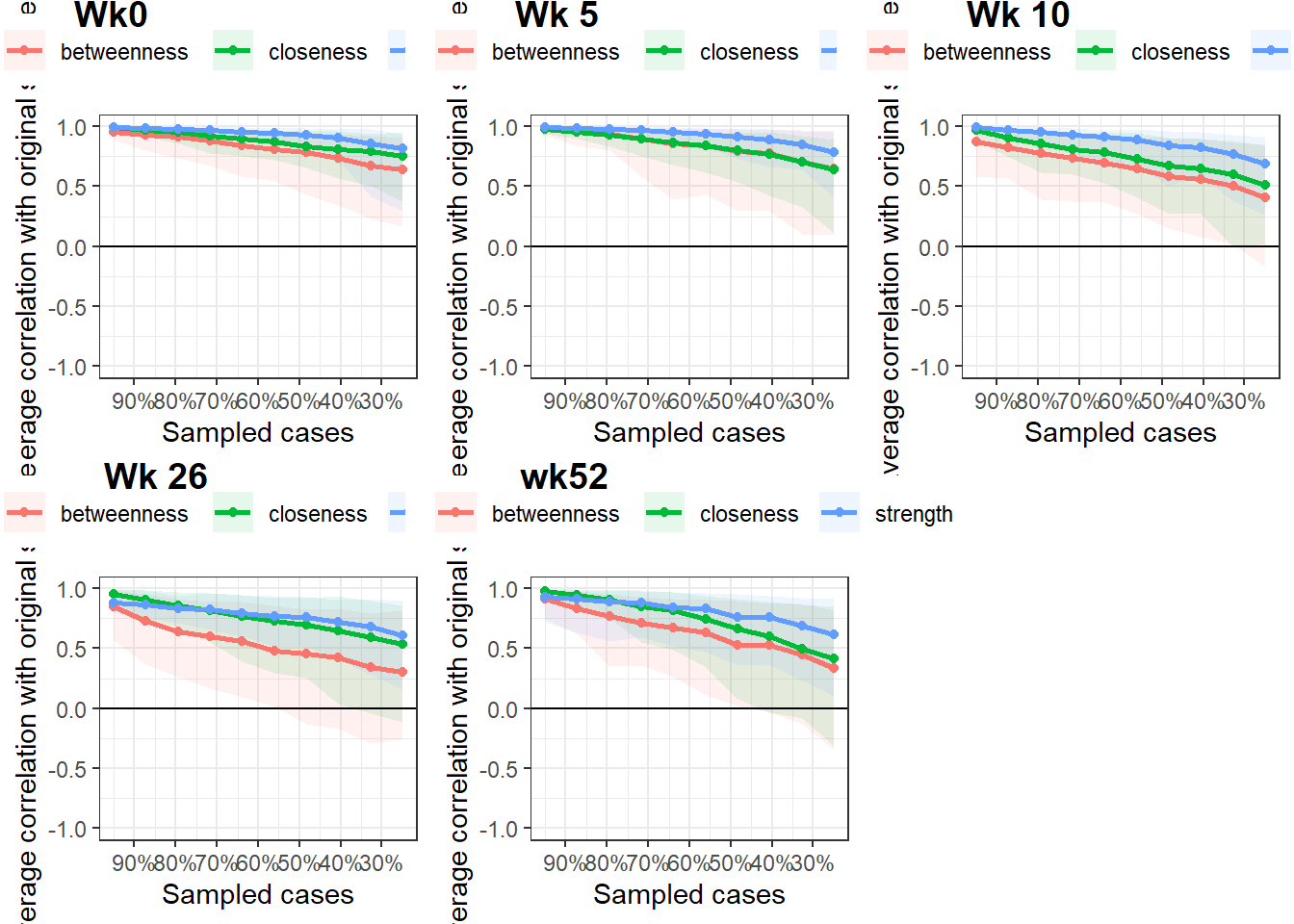
#dev.off()Get CS coefficient
The stability of centrality estimation, and results in a centrality-stability coefficient (CS-coefficient) that should not be lower than 0.25 and preferably above 0.5
cs_coef <- res %>%
  select (time, cor_stb) %>%
  unnest () %>%
  ungroup() %>%
  mutate (measure = rep (c("betweenness", "closeness", "edge", "expectedInfluence", "strength"), 5))
Warning: `cols` is now required.
Please use `cols = c(cor_stb)`Plot edge weights stability
See which edges differ from each other in size significantly (to answer the question is edge A significantly larger than edge B).
w_fig <- map (res$edgewts, plot, labels = FALSE)Warning: `mutate_()` is deprecated as of dplyr 0.7.0.
Please use `mutate()` instead.
See vignette('programming') for more help
This warning is displayed once every 8 hours.
Call `lifecycle::last_warnings()` to see where this warning was generated.cowplot::plot_grid(plotlist = w_fig, labels = c("Wk0","Wk 5", "Wk 10", "Wk 26", "wk52" ), vjust = 1, hjust = -1)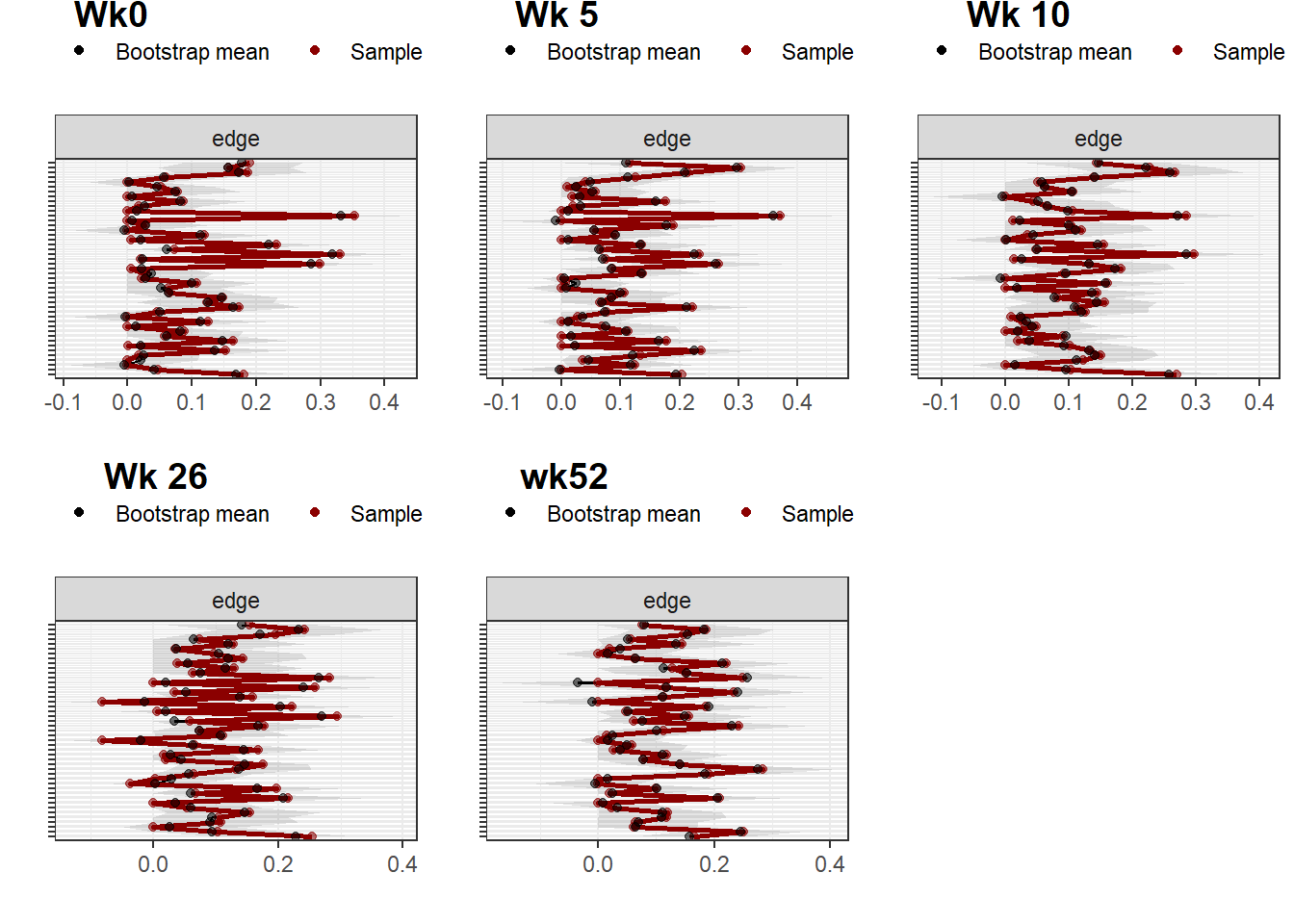
Report network with group as variable
Load models
# Model with missing data as input
res <- readRDS("output/mgm_raw.RDS")
# Model with complete imputed data as input
#res <- readRDS("output/com.RDS")
Plot network
Blue edges - positive correlation
Red edges - negative correlation
The thickness of the edges indicate the magnitude of correlation.
#tiff(width = 15, height = 15, units = "in", res = 100, file = "output/odi_network.tiff")
par (mfrow = c(2,3))
p1 <- plot (res$nw[[1]], title = "Baseline", label.cex = 1.5, vsize = 10)
plot (res$nw[[2]], title = "Week 5", layout = p1$layout, label.cex = 1.5, vsize = 10)
plot (res$nw[[3]], title = "Week 10", layout = p1$layout, label.cex = 1.5, vsize = 10)
plot (res$nw[[4]], title = "Week 26", layout = p1$layout, label.cex = 1.5, vsize = 10)
plot (res$nw[[5]], title = "Week 52", layout = p1$layout, label.cex = 1.5, vsize = 10)
plot.new()
addtable2plot(0,0,node_df,
              xpad=1, ypad=1,
              bty='o',
              display.rownames = FALSE,
              hlines = TRUE,
              vlines = TRUE)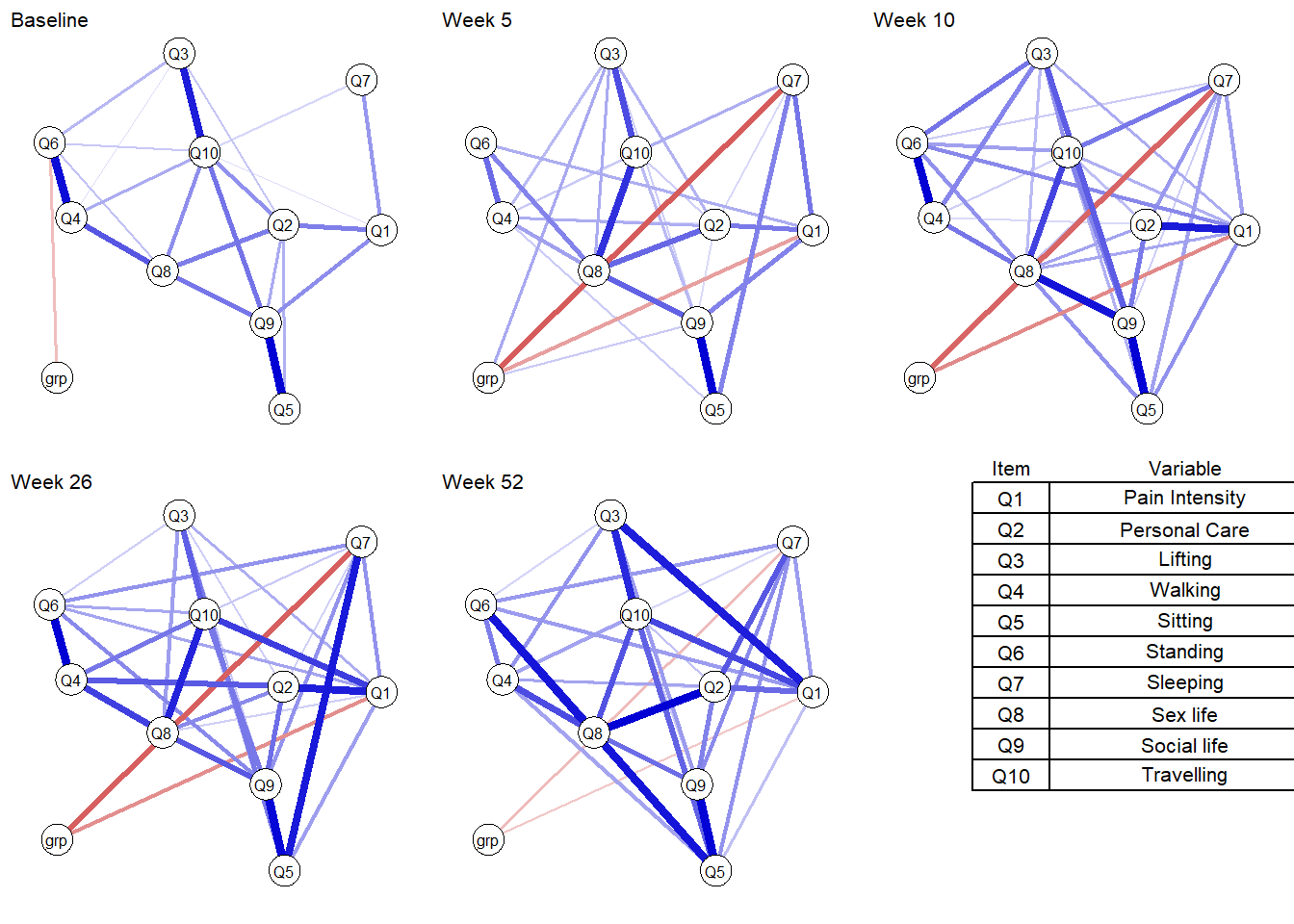
#dev.off()Plot centrality
Strength - sum of direct connections a given node has in the network
Betweenness - shortest paths that go through the node under investigation
Closeness - sum of shortest paths from the node under investigation to all other nodes in the network
Expected influence - sum of a node’s connections and represents the relative importance of a node in a network
# Plot centrality
c_fig <- map (res$nw, centralityPlot, include = "all", print = FALSE)
Note: z-scores are shown on x-axis rather than raw centrality indices.
Note: z-scores are shown on x-axis rather than raw centrality indices.
Note: z-scores are shown on x-axis rather than raw centrality indices.
Note: z-scores are shown on x-axis rather than raw centrality indices.
Note: z-scores are shown on x-axis rather than raw centrality indices.#tiff(width = 15, height = 15, units = "in", res = 100, file = "output/odi_strength.tiff")
cowplot::plot_grid(plotlist = c_fig, labels = c("Wk0","Wk 5", "Wk 10", "Wk 26", "wk52" ), vjust = 1, hjust = 0)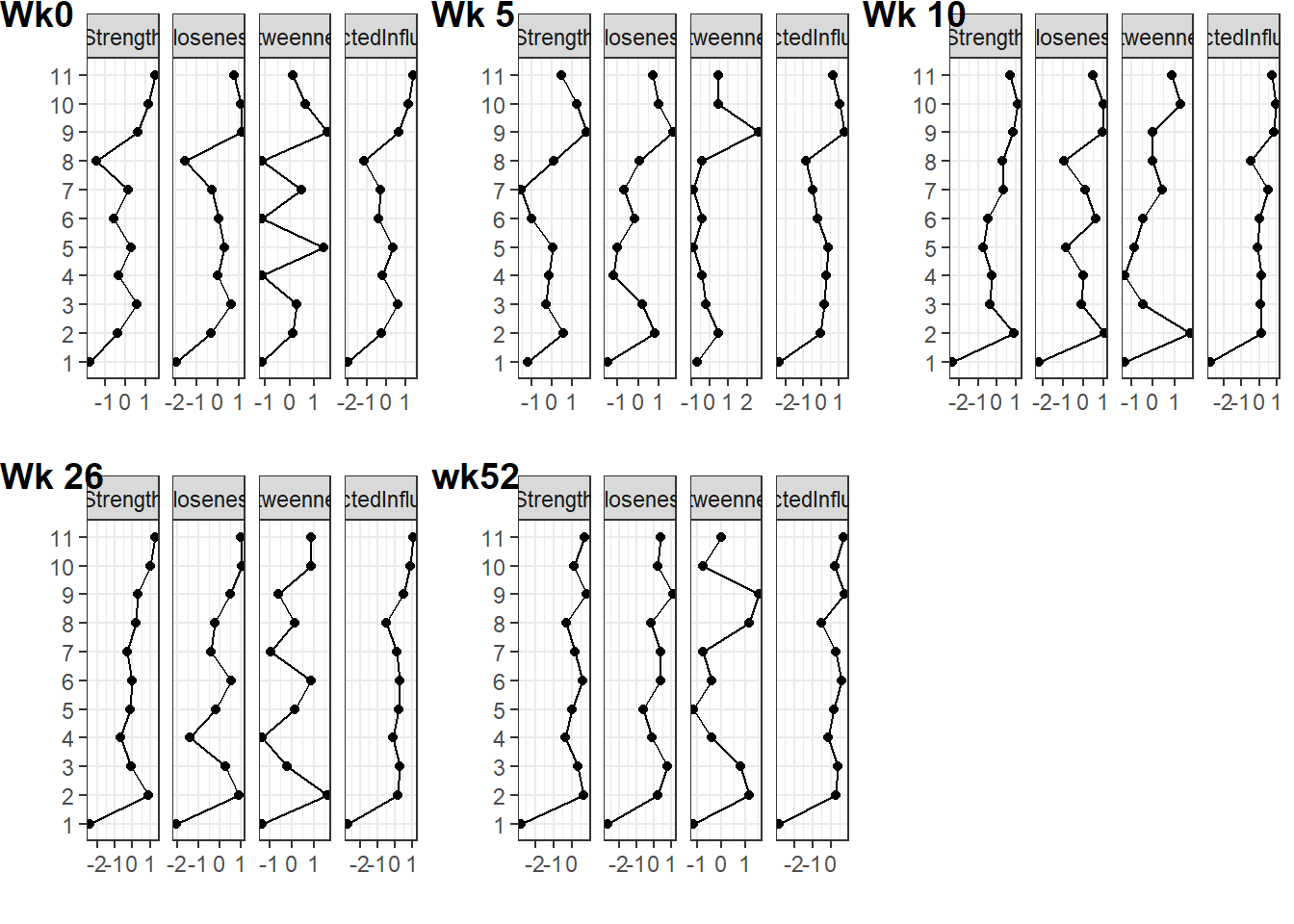
#dev.off()Plot centrality stability
Is the centrality order stable?
# Plot centrality stability
s_fig <- map (res$centr_stb, plot, statistics = c("closeness", "strength", "betweenness"))
Warning in plot.bootnet(.x[[i]], ...): Statistic closeness does not contain any
variance and is therefore not shown.#tiff(width = 15, height = 15, units = "in", res = 100, file = "output/odi_stability.tiff")
cowplot::plot_grid(plotlist = s_fig, labels = c("Wk0","Wk 5", "Wk 10", "Wk 26", "wk52" ), vjust = 1, hjust = -1)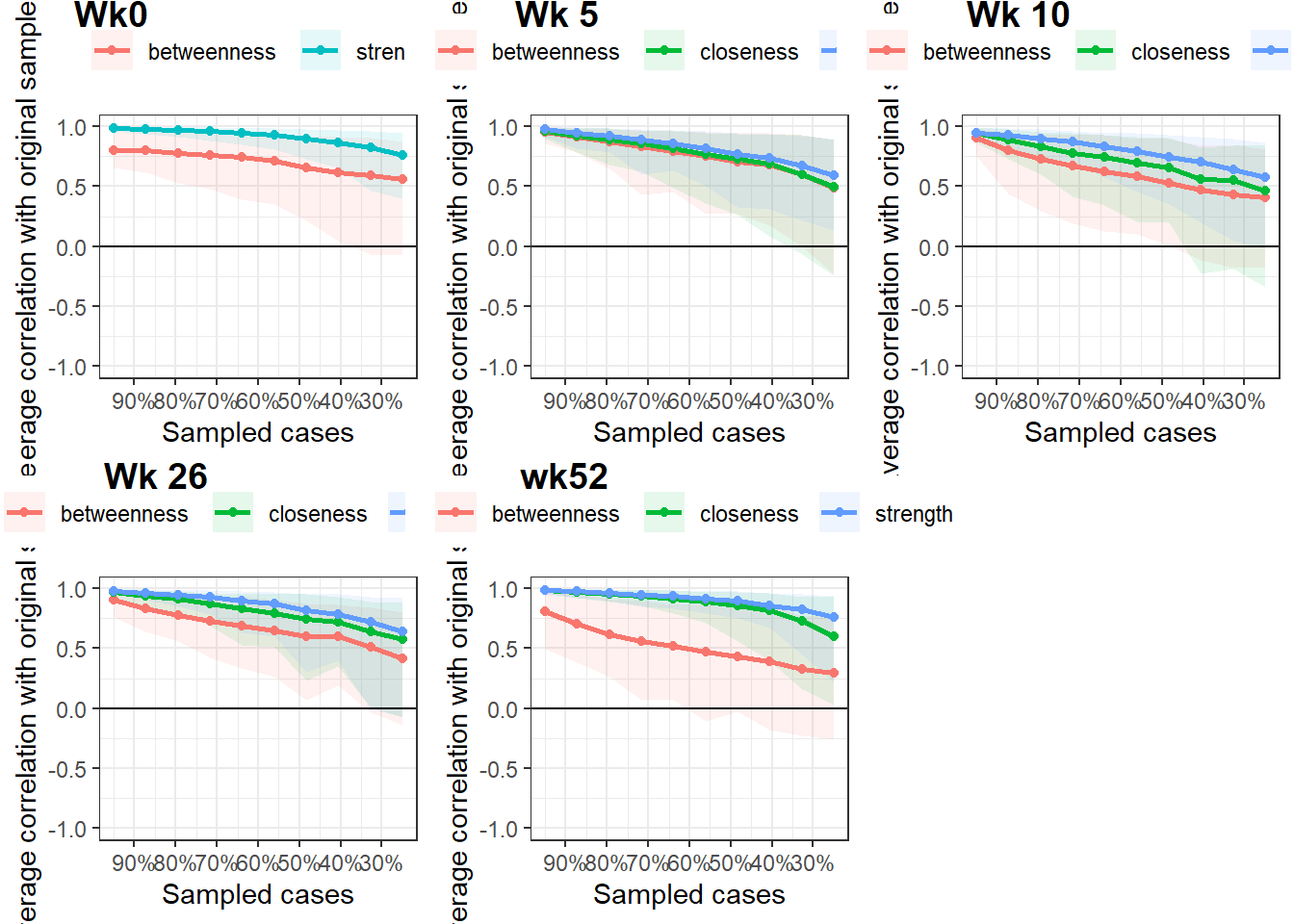
#dev.off()Get CS coefficient
The stability of centrality estimation, and results in a centrality-stability coefficient (CS-coefficient) that should not be lower than 0.25 and preferably above 0.5
cs_coef <- res %>%
  select (time, cor_stb) %>%
  unnest () %>%
  ungroup() %>%
  mutate (measure = rep (c("betweenness", "closeness", "edge", "expectedInfluence", "strength"), 5))
Warning: `cols` is now required.
Please use `cols = c(cor_stb)`Plot edge weights stability
See which edges differ from each other in size significantly (to answer the question is edge A significantly larger than edge B).
w_fig <- map (res$edgewts, plot, labels = FALSE)
cowplot::plot_grid(plotlist = w_fig, labels = c("Wk0","Wk 5", "Wk 10", "Wk 26", "wk52" ), vjust = 1, hjust = -1)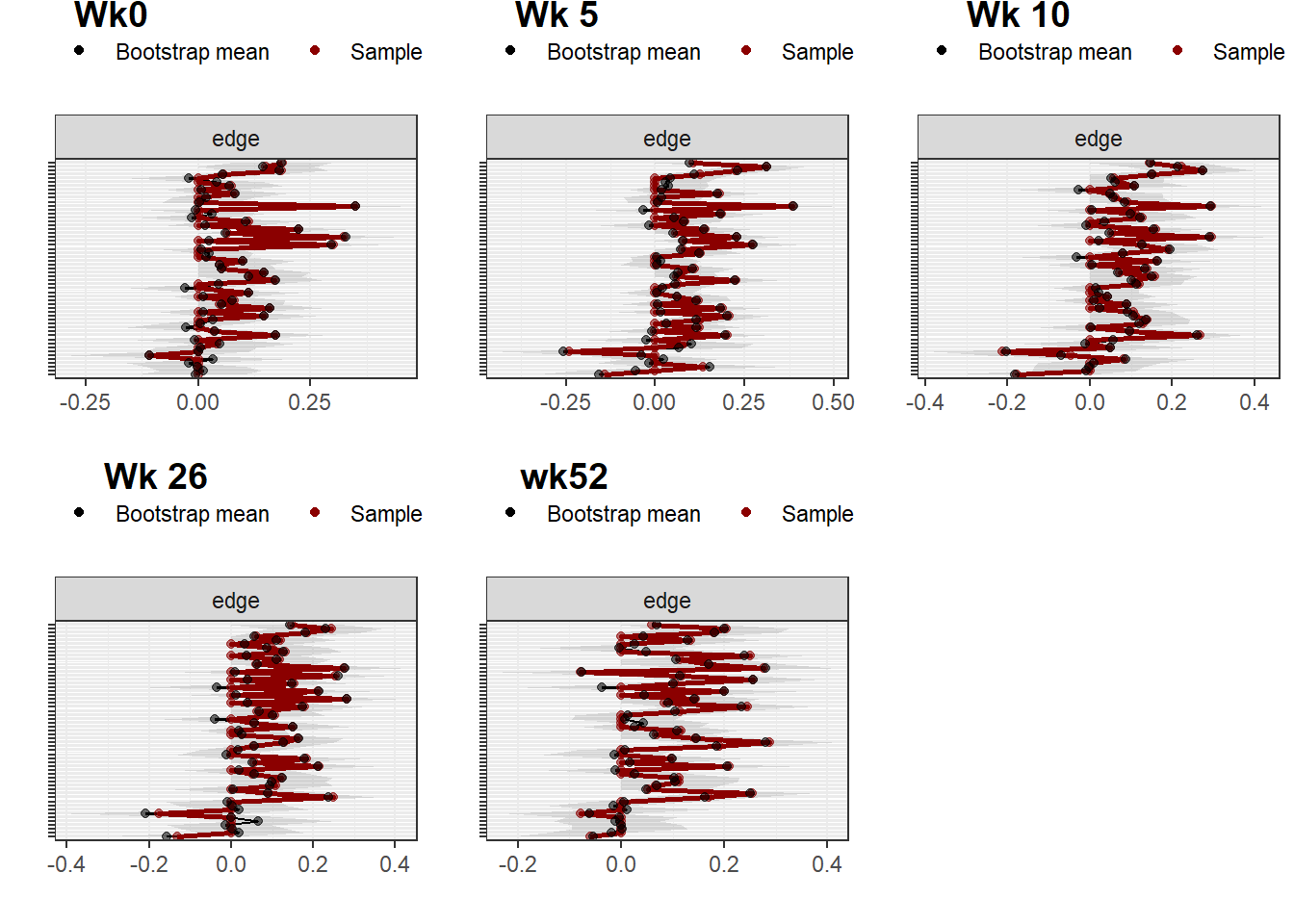
sessionInfo()R version 3.6.0 (2019-04-26)
Platform: x86_64-w64-mingw32/x64 (64-bit)
Running under: Windows 10 x64 (build 18362)
Matrix products: default
locale:
[1] LC_COLLATE=English_United Kingdom.1252
[2] LC_CTYPE=English_United Kingdom.1252
[3] LC_MONETARY=English_United Kingdom.1252
[4] LC_NUMERIC=C
[5] LC_TIME=English_United Kingdom.1252
attached base packages:
[1] parallel stats graphics grDevices utils datasets methods
[8] base
other attached packages:
[1] EGAnet_0.9.6 huge_1.3.4.1
[3] doParallel_1.0.15 iterators_1.0.10
[5] foreach_1.4.4 cowplot_1.0.0
[7] furrr_0.1.0 future_1.12.0
[9] rio_0.5.16 NetworkComparisonTest_2.2.1
[11] mgm_1.2-10 plotrix_3.7-5
[13] igraph_1.2.4.2 bootnet_1.4.3
[15] qgraph_1.6.5 forcats_0.4.0
[17] stringr_1.4.0 dplyr_1.0.2
[19] purrr_0.3.3 readr_1.3.1
[21] tidyr_1.0.2 tibble_3.0.3
[23] ggplot2_3.2.1 tidyverse_1.3.0
[25] pacman_0.5.1
loaded via a namespace (and not attached):
[1] R.utils_2.8.0 tidyselect_1.1.0 lme4_1.1-21
[4] htmlwidgets_1.5.1 grid_3.6.0 munsell_0.5.0
[7] codetools_0.2-16 withr_2.1.2 colorspace_1.4-1
[10] NetworkToolbox_1.4.0 knitr_1.27 rstudioapi_0.11
[13] stats4_3.6.0 listenv_0.7.0 labeling_0.3
[16] git2r_0.27.1 mnormt_1.5-5 farver_2.0.3
[19] rprojroot_1.3-2 vctrs_0.3.4 generics_0.0.2
[22] xfun_0.7 R6_2.4.0 smacof_2.1-1
[25] assertthat_0.2.1 promises_1.0.1 scales_1.1.1
[28] nnet_7.3-12 gtable_0.3.0 globals_0.12.4
[31] weights_1.0.1 workflowr_1.6.2 rlang_0.4.7
[34] splines_3.6.0 lazyeval_0.2.2 acepack_1.4.1
[37] wordcloud_2.6 broom_0.5.4 checkmate_1.9.3
[40] yaml_2.2.0 reshape2_1.4.3 abind_1.4-5
[43] modelr_0.1.5 d3Network_0.5.2.1 backports_1.1.4
[46] httpuv_1.5.2 Hmisc_4.2-0 tools_3.6.0
[49] psych_1.8.12 lavaan_0.6-5 ellipsis_0.3.0
[52] RColorBrewer_1.1-2 polynom_1.4-0 Rcpp_1.0.2
[55] plyr_1.8.4 base64enc_0.1-3 rpart_4.1-15
[58] pbapply_1.4-0 haven_2.2.0 cluster_2.0.9
[61] fs_1.3.0 survey_3.36 magrittr_1.5
[64] data.table_1.12.8 openxlsx_4.1.4 reprex_0.3.0
[67] mvtnorm_1.0-10 matrixcalc_1.0-3 whisker_0.3-2
[70] mitml_0.3-7 hms_0.5.3 evaluate_0.14
[73] jpeg_0.1-8 readxl_1.3.1 gridExtra_2.3
[76] shape_1.4.4 compiler_3.6.0 ellipse_0.4.1
[79] mice_3.7.0 crayon_1.3.4 minqa_1.2.4
[82] R.oo_1.22.0 htmltools_0.4.0 corpcor_1.6.9
[85] later_0.8.0 Formula_1.2-3 lubridate_1.7.4
[88] DBI_1.0.0 relaimpo_2.2-3 dbplyr_1.4.4
[91] MASS_7.3-51.4 boot_1.3-22 IsingSampler_0.2.1
[94] Matrix_1.2-17 IsingFit_0.3.1 car_3.0-2
[97] cli_2.0.1 heplots_1.3-5 mitools_2.4
[100] R.methodsS3_1.7.1 gdata_2.18.0 pan_1.6
[103] BDgraph_2.63 pkgconfig_2.0.2 foreign_0.8-71
[106] xml2_1.2.2 pbivnorm_0.6.0 rvest_0.3.5
[109] digest_0.6.19 rmarkdown_2.3 cellranger_1.1.0
[112] htmlTable_1.13.1 curl_4.3 gtools_3.8.1
[115] jomo_2.6-7 rjson_0.2.20 nloptr_1.2.1
[118] lifecycle_0.2.0 nlme_3.1-139 glasso_1.11
[121] jsonlite_1.6 carData_3.0-2 fansi_0.4.0
[124] pillar_1.4.3 lattice_0.20-38 httr_1.4.1
[127] survival_2.44-1.1 glue_1.4.2 networktools_1.2.3
[130] zip_2.0.4 fdrtool_1.2.15 png_0.1-7
[133] candisc_0.8-3 glmnet_3.0-1 class_7.3-15
[136] stringi_1.4.3 nnls_1.4 blob_1.2.1
[139] latticeExtra_0.6-28 eigenmodel_1.11 e1071_1.7-1