from IPython.display import Image, display, HTML
css_link_fontawesome = '<link rel="stylesheet" href="https://cdnjs.cloudflare.com/ajax/libs/font-awesome/6.2.0/css/all.min.css">'
css_rise = '<link rel="stylesheet" href="rise.css">'
display(HTML(css_link_fontawesome))
display(HTML(css_rise))
Florian Bayer, PhD in Public Health, MSc in Geography
Health geographer at Agence de la biomédecine, University lecturer at Paris Panthéon Sorbonne and ENSG
The aim of this workshop is to deliver an overview of spatial analysis tools that enable leveraging spatial dimension in your analyses.
Our primary focus will revolve around examining the spatial distribution of self-employed general practitioners (GPs), distinct from those employed by healthcare institutions, within the Paris metropolitan area and its surrounding regions.
The primary objective is to ascertain the presence of spatial disparities in the distribution of general practitioners throughout the Parisian region.
The data comes from the french health ministry.
import pandas as pd
import matplotlib.pyplot as plt
import os
import warnings
warnings.filterwarnings("ignore", category=UserWarning)
class Colors:
white = '#eee8d5'
red = '#e63946'
blue = '#152744'
gray = "#777777"
lightgray="#F4F4F4"
darkgray="#4d4d4d"
legend_text = '#002b36'
This workshop requires Python 3.x (specifically tested with version 3.9). The primary packages utilized in this workshop include:
Feel free to clone the repository : https://github.com/fbxyz/SDS_Bootcamp
Data have been preprocessed, see BC_0_data_processing.ipynb for more details
data_dir = "data"
file="data_bootcamp.pckl"
pckl_path = os.path.join(data_dir, file)
gp_data = pd.read_pickle(pckl_path)
gp_data.head()
| GPid | lastname | firstname | name | citycode | state | q | |
|---|---|---|---|---|---|---|---|
| 0 | 810000231778 | SENBEL | CLAUDE | CDS MEDIKSANTE | 75117 | 75 | 206 Boulevard PEREIRE 75017 PARIS Paris |
| 1 | 810000459833 | DAVEAU | PASCALE | CABINET DU DR PASCALE DAVEAU | 75056 | 75 | 11 RUE DE REIMS 75013 PARIS Paris |
| 2 | 810000556125 | PENDOLA-LUCHEL | ISABELLE | CABINET DU DR ISABELLE PENDOLA-LUCHEL | 75056 | 75 | 37 RUE CHARCOT 75013 PARIS Paris |
| 3 | 810000571660 | CHIAVERINI | PHILIPPE | CABINET DU DR PHILIPPE CHIAVERINI | 75056 | 75 | 52 RUE MADEMOISELLE 75015 PARIS Paris |
| 4 | 810000582683 | GUEDJ | CHANTAL | CABINET DU DR CHANTAL GUEDJ | 92051 | 92 | 113 AVENUE CHARLES DE GAULLE 92200 NEUILLY SUR... |
For geocoding, we employ the free addok service, which is particularly optimized for French adresses. It is also possible to use OSM's Nominatim.
To speed up geocoding, we use the CSV plugin of addok. An intermediate CSV file is required. However, it is also possible to use the /search/ endpoint for more options (result types, filters, etc.).
Only the 'q' column is utilized for geocoding.
This consists of a combination of the building number, street name, postal code, city, and department. Additional addressing elements can be incorporated for enhanced functionality.
source_path = os.path.join(data_dir, 'GP_adress.csv')
gp_data.q.to_csv(source_path, index=False)
gp_data.head()
| GPid | lastname | firstname | name | citycode | state | q | |
|---|---|---|---|---|---|---|---|
| 0 | 810000231778 | SENBEL | CLAUDE | CDS MEDIKSANTE | 75117 | 75 | 206 Boulevard PEREIRE 75017 PARIS Paris |
| 1 | 810000459833 | DAVEAU | PASCALE | CABINET DU DR PASCALE DAVEAU | 75056 | 75 | 11 RUE DE REIMS 75013 PARIS Paris |
| 2 | 810000556125 | PENDOLA-LUCHEL | ISABELLE | CABINET DU DR ISABELLE PENDOLA-LUCHEL | 75056 | 75 | 37 RUE CHARCOT 75013 PARIS Paris |
| 3 | 810000571660 | CHIAVERINI | PHILIPPE | CABINET DU DR PHILIPPE CHIAVERINI | 75056 | 75 | 52 RUE MADEMOISELLE 75015 PARIS Paris |
| 4 | 810000582683 | GUEDJ | CHANTAL | CABINET DU DR CHANTAL GUEDJ | 92051 | 92 | 113 AVENUE CHARLES DE GAULLE 92200 NEUILLY SUR... |
We use the example from addok doc to geocode 'GP_adress.csv'.
Note: on 24/10/2023, the http://api-adresse.data.gouv.fr/search/csv/ API appears to be broken.
You can easily deploy ADDOK with Docker https://github.com/BaseAdresseNationale/addok-docker
import requests
addok_url = 'http://api-adresse.data.gouv.fr/search/csv/'
def geocode(filepath_in):
output_dir = os.path.dirname(filepath_in)
with open(filepath_in, 'rb') as f:
filename, response = post_to_addok(filepath_in, f.read())
output_path = os.path.join(output_dir, filename)
write_response_to_disk(output_path, response)
def write_response_to_disk(filename, response, chunk_size=1024):
with open(filename, 'wb') as fd:
for chunk in response.iter_content(chunk_size=chunk_size):
fd.write(chunk)
def post_to_addok(filename, filelike_object):
files = {'data': (filename, filelike_object)}
response = requests.post(addok_url, files=files)
content_disposition = response.headers['content-disposition']
filename = content_disposition[len('attachment; filename="'):-len('"')]
return filename, response
geocode_path = os.path.join(data_dir, 'geocoded.csv')
if not os.path.exists(geocode_path) :
geocode(source_path)
A significant number of users tend to neglect the post-processing of geocoding results. It is imperative to assess the quality of geocoding
ADDOK offers several tools for this purpose, with result_score being one of them.
This score ranges from 0 to 1, where a score of 1 indicates a perfect match between the input string and the one stored in the database.
geocoded = pd.read_csv(geocode_path,dtype={"result_citycode":object, 'result_oldcitycode':object})
geocoded["result_score"] = round(geocoded["result_score"],2)
geocoded.head()
| q | latitude | longitude | result_label | result_score | result_score_next | result_type | result_id | result_housenumber | result_name | result_street | result_postcode | result_city | result_context | result_citycode | result_oldcitycode | result_oldcity | result_district | result_status | |
|---|---|---|---|---|---|---|---|---|---|---|---|---|---|---|---|---|---|---|---|
| 0 | 206 Boulevard PEREIRE 75017 PARIS Paris | 48.880461 | 2.288405 | 206 Boulevard Pereire 75017 Paris | 0.84 | NaN | housenumber | 75117_7258_00206 | 206 | 206 Boulevard Pereire | Boulevard Pereire | 75017 | Paris | 75, Paris, Île-de-France | 75117 | NaN | NaN | Paris 17e Arrondissement | ok |
| 1 | 11 RUE DE REIMS 75013 PARIS Paris | 48.828374 | 2.371458 | 11 Rue de Reims 75013 Paris | 0.80 | NaN | housenumber | 75113_8109_00011 | 11 | 11 Rue de Reims | Rue de Reims | 75013 | Paris | 75, Paris, Île-de-France | 75113 | NaN | NaN | Paris 13e Arrondissement | ok |
| 2 | 37 RUE CHARCOT 75013 PARIS Paris | 48.829844 | 2.369682 | 37 Rue Charcot 75013 Paris | 0.80 | NaN | housenumber | 75113_1786_00037 | 37 | 37 Rue Charcot | Rue Charcot | 75013 | Paris | 75, Paris, Île-de-France | 75113 | NaN | NaN | Paris 13e Arrondissement | ok |
| 3 | 52 RUE MADEMOISELLE 75015 PARIS Paris | 48.843300 | 2.299716 | 52 Rue Mademoiselle 75015 Paris | 0.83 | NaN | housenumber | 75115_5893_00052 | 52 | 52 Rue Mademoiselle | Rue Mademoiselle | 75015 | Paris | 75, Paris, Île-de-France | 75115 | NaN | NaN | Paris 15e Arrondissement | ok |
| 4 | 113 AVENUE CHARLES DE GAULLE 92200 NEUILLY SUR... | 48.881485 | 2.269683 | 113 Avenue Charles de Gaulle 92200 Neuilly-sur... | 0.77 | NaN | housenumber | 92051_1436_00113 | 113 | 113 Avenue Charles de Gaulle | Avenue Charles de Gaulle | 92200 | Neuilly-sur-Seine | 92, Hauts-de-Seine, Île-de-France | 92051 | NaN | NaN | NaN | ok |
We can represent the results using a box plot. Some of the matches have scores that fall below 0.5. Let's search deeper into this.
import matplotlib.pyplot as plt
def customize_axes(_ax, _fig):
for spine in ['top', 'right']:
_ax.spines[spine].set_visible(False)
for spine in _ax.spines.values():
spine.set_edgecolor(Colors.white)
_ax.tick_params(axis='x', colors=Colors.white, rotation=45)
_ax.tick_params(axis='y', colors=Colors.white)
_ax.set_facecolor('none')
_fig.patch.set_facecolor('none')
fig_box, ax_box = plt.subplots()
boxplot = geocoded.boxplot(column=['result_score'], vert=False, grid=False, ax=ax_box,
flierprops={'marker': 'o', 'markersize': 5, 'markerfacecolor': Colors.red, 'markeredgecolor': 'none'},
boxprops={'color': Colors.white}, medianprops={'color': Colors.red}, whiskerprops={'color': Colors.white})
ax_box.set_xlabel('')
ax_box.set_yticklabels([])
ax_box.set_xlim(0, 1)
ax_box.set_title('Geocoding results scores', color=Colors.white)
customize_axes(ax_box,fig_box)
fig_box.set_size_inches(fig_box.get_size_inches()[0]*1.5, fig_box.get_size_inches()[1] / 3)
plt.show()
These are false negatives. Noise in the character strings (e.g., CEDEX) is causing the matching to decrease.
geocoded[['q','result_label','result_score']].sort_values("result_score", ascending=True).query("result_score<0.5")
| q | result_label | result_score | |
|---|---|---|---|
| 1242 | 48 Avenue DU PRESIDENT ROOSEVELT 94320 THIAIS ... | 48 Av du Pdt Franklin Roosevelt 94320 Thiais | 0.47 |
| 4890 | 48 Avenue DU PRESIDENT ROOSEVELT 94320 THIAIS ... | 48 Av du Pdt Franklin Roosevelt 94320 Thiais | 0.47 |
| 603 | 2 Boulevard DE L'EUROPE 91022 EVRY CEDEX Essonne | 2 Boulevard de l'Europe - Valéry Giscard d'Est... | 0.47 |
| 9806 | 2 Boulevard DE L'EUROPE 91022 EVRY CEDEX Essonne | 2 Boulevard de l'Europe - Valéry Giscard d'Est... | 0.47 |
| 2722 | 2 Boulevard DE L'EUROPE 91022 EVRY CEDEX Essonne | 2 Boulevard de l'Europe - Valéry Giscard d'Est... | 0.47 |
| 7092 | 2 Boulevard DE L'EUROPE 91022 EVRY CEDEX Essonne | 2 Boulevard de l'Europe - Valéry Giscard d'Est... | 0.47 |
| 2224 | 2 Boulevard DE L'EUROPE 91022 EVRY CEDEX Essonne | 2 Boulevard de l'Europe - Valéry Giscard d'Est... | 0.47 |
| 212 | Allee D'ESTIENNE D ORVES 93701 DRANCY CEDEX Se... | Rue d’Estienne d’Orves 93700 Drancy | 0.48 |
| 330 | Allee D'ESTIENNE D ORVES 93701 DRANCY CEDEX Se... | Rue d’Estienne d’Orves 93700 Drancy | 0.48 |
| 5255 | Allee D'ESTIENNE D ORVES 93701 DRANCY CEDEX Se... | Rue d’Estienne d’Orves 93700 Drancy | 0.48 |
| 6963 | Allee D'ESTIENNE D ORVES 93701 DRANCY CEDEX Se... | Rue d’Estienne d’Orves 93700 Drancy | 0.48 |
| 5377 | Allee D'ESTIENNE D ORVES 93701 DRANCY CEDEX Se... | Rue d’Estienne d’Orves 93700 Drancy | 0.48 |
| 554 | Allee D'ESTIENNE D ORVES 93701 DRANCY CEDEX Se... | Rue d’Estienne d’Orves 93700 Drancy | 0.48 |
| 5003 | Allee D'ESTIENNE D ORVES 93701 DRANCY CEDEX Se... | Rue d’Estienne d’Orves 93700 Drancy | 0.48 |
| 7399 | LIEU DIT FORCILLES 77150 FEROLLES ATTILLY Sein... | Chemin de Forcil 77150 Férolles-Attilly | 0.49 |
| 9977 | 8 PLACE DES TOULEUSES 95011 CERGY PONTOISE CED... | 8 Place des Touleuses 95000 Cergy | 0.49 |
| 4178 | 20 R H BENEDICT DE SAUSSURE 94000 CRETEIL Val-... | 20 Rue Saussure 94000 Créteil | 0.49 |
| 10442 | LIEU DIT FORCILLES 77150 FEROLLES ATTILLY Sein... | Chemin de Forcil 77150 Férolles-Attilly | 0.49 |
Geocoding accuracy is often crucial regardless of the purpose of your project.
For our GPs, the vast majority of the results are localized at the house number :
result_counts = geocoded['result_type'].value_counts()
fig_bar, ax_bar = plt.subplots()
bars = result_counts.plot(kind='bar', color=Colors.red, edgecolor=Colors.white, ax=ax_bar)
customize_axes(ax_bar,fig_bar)
ax_bar.set_title('Geocoding accuracy (n)', color=Colors.white)
fig_bar;
Relying solely on the result score may not be adequate. There are instances where the scores seem acceptable, but the point is geocoded in the wrong city, especially in cases involving streets with identical names.
Hence, it's important to verify whether the points are correctly located within the municipalities. To accomplish this, we compare the citycodes from the input source with the geocoded citycodes.
gp_data_xy = pd.concat([gp_data,geocoded[['latitude','longitude','result_label','result_score','result_type', 'result_citycode','result_oldcitycode']]], axis = 1)
gp_data_xy.query("citycode!=result_citycode")
| GPid | lastname | firstname | name | citycode | state | q | latitude | longitude | result_label | result_score | result_type | result_citycode | result_oldcitycode | |
|---|---|---|---|---|---|---|---|---|---|---|---|---|---|---|
| 1 | 810000459833 | DAVEAU | PASCALE | CABINET DU DR PASCALE DAVEAU | 75056 | 75 | 11 RUE DE REIMS 75013 PARIS Paris | 48.828374 | 2.371458 | 11 Rue de Reims 75013 Paris | 0.80 | housenumber | 75113 | NaN |
| 2 | 810000556125 | PENDOLA-LUCHEL | ISABELLE | CABINET DU DR ISABELLE PENDOLA-LUCHEL | 75056 | 75 | 37 RUE CHARCOT 75013 PARIS Paris | 48.829844 | 2.369682 | 37 Rue Charcot 75013 Paris | 0.80 | housenumber | 75113 | NaN |
| 3 | 810000571660 | CHIAVERINI | PHILIPPE | CABINET DU DR PHILIPPE CHIAVERINI | 75056 | 75 | 52 RUE MADEMOISELLE 75015 PARIS Paris | 48.843300 | 2.299716 | 52 Rue Mademoiselle 75015 Paris | 0.83 | housenumber | 75115 | NaN |
| 20 | 810100025484 | YOKA | HUGUETTE | CABINET DU DR HUGUETTE YOKA | 75056 | 75 | 36 AVENUE NIEL 75017 PARIS Paris | 48.881717 | 2.296001 | 36 Avenue Niel 75017 Paris | 0.80 | housenumber | 75117 | NaN |
| 26 | 810101079472 | SOOBRON | Sarvesh | CABINET DU DR SARVESH SOOBRON | 75056 | 75 | 42 RUE CURIAL 75019 PARIS Paris | 48.892155 | 2.372772 | 42 Rue Curial 75019 Paris | 0.80 | housenumber | 75119 | NaN |
| ... | ... | ... | ... | ... | ... | ... | ... | ... | ... | ... | ... | ... | ... | ... |
| 10860 | 810100216117 | SAUVAGE-RIGAL | SOPHIE | CABINET DU DR SOPHIE SAUVAGE-RIGAL | 75056 | 75 | 1 RUE OLIVIER DE SERRES 75015 PARIS Paris | 48.837089 | 2.298739 | 1 Rue Olivier de Serres 75015 Paris | 0.85 | housenumber | 75115 | NaN |
| 10861 | 810100373447 | FIORINA | EMILY | CABINET DU DR EMILY FIORINA | 75056 | 75 | 47 RUE FESSART 75019 PARIS Paris | 48.876723 | 2.383698 | 47 Rue Fessart 75019 Paris | 0.80 | housenumber | 75119 | NaN |
| 10862 | 810100387579 | DUPUI | Julien | CABINET DU DR Julien DUPUI | 75056 | 75 | 38 BOULEVARD SAINT MARCEL 75005 PARIS Paris | 48.838847 | 2.357659 | 38 Boulevard Saint-Marcel 75005 Paris | 0.84 | housenumber | 75105 | NaN |
| 10863 | 810100413664 | DODILLE | LAURENCE | CABINET DU DR ALAIN AMSLEM | 75056 | 75 | 94 RUE BRILLAT SAVARIN 75013 PARIS Paris | 48.824532 | 2.343058 | 94 Rue Brillat-Savarin 75013 Paris | 0.84 | housenumber | 75113 | NaN |
| 10872 | 810101116308 | VERCOUSTRE | BEATRICE | CABINET DU DR BEATRICE VERCOUSTRE | 75056 | 75 | 105 RUE DE MAUBEUGE 75010 PARIS Paris | 48.881986 | 2.354295 | 105 Rue de Maubeuge 75010 Paris | 0.82 | housenumber | 75110 | NaN |
2286 rows × 14 columns
There seems to be a concern regarding the department of Paris. Specifically with the city code of Paris (75056) in comparison to the codes of the 20 districts (arrondissements) of Paris (751xx).
As a preliminary measure, we can manually inspect the results with the lowest scores to ascertain their accuracy in geocoding.
gp_data_xy[['q','result_label','result_score','state']].query("state=='75' and result_score<0.65").drop_duplicates()
| q | result_label | result_score | state | |
|---|---|---|---|---|
| 54 | 178 Rue DE VAUGIRARD 75738 PARIS CEDEX 15 Paris | 178 Rue de Vaugirard 75015 Paris | 0.63 | 75 |
| 321 | 12 Rue ARMAND MOISANT 75731 PARIS CEDEX 15 Paris | 12 Rue Armand Moisant 75015 Paris | 0.62 | 75 |
| 410 | 37 Rue DES VOLONTAIRES 75730 PARIS CEDEX 15 Paris | 37 Rue des Volontaires 75015 Paris | 0.63 | 75 |
| 525 | 18 Place LACHAMBEAUDIE 75570 PARIS CEDEX 12 Paris | 18 Place Lachambeaudie 75012 Paris | 0.63 | 75 |
| 542 | 44 Rue D AMSTERDAM 75311 PARIS CEDEX 09 Paris | 44 Rue d'Amsterdam 75009 Paris | 0.60 | 75 |
| 796 | 3 Rue DU MAROC 75954 PARIS CEDEX 19 Paris | 3 Rue du Maroc 75019 Paris | 0.56 | 75 |
| 997 | 2 Rue AMBROISE PARE 75462 PARIS CEDEX 10 Paris | 2 Rue Ambroise Paré 75010 Paris | 0.60 | 75 |
| 1166 | 20 BIS RUE DARU 75008 PARIS Paris | 20b Rue Daru 75008 Paris | 0.62 | 75 |
| 2729 | 29 BIS RUE MONGE 75005 PARIS Paris | 29b Rue Monge 75005 Paris | 0.64 | 75 |
| 3878 | 34 BIS RUE VIGNON 75009 PARIS Paris | 34b Rue Vignon 75009 Paris | 0.64 | 75 |
| 5007 | 211 Rue DE VAUGIRARD 75724 PARIS CEDEX 15 Paris | 211 Rue de Vaugirard 75015 Paris | 0.63 | 75 |
| 5374 | 26 RUE ARNOLD NETTER 75012 PARIS Paris | 26 Avenue du Docteur Arnold Netter 75012 Paris | 0.57 | 75 |
| 10450 | 71 BIS RUE PETIT 75019 PARIS Paris | 71b Rue Petit 75019 Paris | 0.64 | 75 |
Now let's check that the GPs coordinates outside of Paris are correctly assigned to the respective municipalities.
gp_data_xy[~((gp_data_xy['citycode'] == gp_data_xy['result_citycode']) | (gp_data_xy['citycode'] == gp_data_xy['result_oldcitycode'])) & (gp_data_xy['state'] != '75')]
| GPid | lastname | firstname | name | citycode | state | q | latitude | longitude | result_label | result_score | result_type | result_citycode | result_oldcitycode |
|---|
The geocoding appears to be exceptionally accurate, which is a rare occurrence.
It is highly likely that the source file has undergone a data management process, and the reference data for the source and ADDOK addresses are closely aligned
With the geocoding now validated, we can proceed to create geodataframes using GeoPandas.
These geodataframes are essentially Pandas dataframes with a 'geometry' column and a defined projection system.
They provide the capability to perform common GIS operations, including spatial joins, spatial clipping, entity merging, reprojections, and various other spatial analyses.
import geopandas as gpd
geo_gp = gpd.GeoDataFrame(
gp_data_xy[['GPid','lastname','firstname','name','result_label','result_citycode','state','latitude','longitude']],
geometry=gpd.points_from_xy(gp_data_xy.longitude, gp_data_xy.latitude),
crs="EPSG:4326" # ADDOK returns the results in the World Geodetic System 1984 coordinate system
)
geo_gp = geo_gp.to_crs(2154) # But we are reprojecting the geodataframe into the French Metropole coordinate system.
geo_gp['latitude'] = geo_gp.geometry.centroid.y
geo_gp['longitude'] = geo_gp.geometry.centroid.x
#To avoid any unpleasant surprises during the workshop, let's export the geocoded data...
source_path = os.path.join(data_dir, 'geocoded.geojson')
geo_gp.to_file(source_path)
geo_gp.head()
| GPid | lastname | firstname | name | result_label | result_citycode | state | latitude | longitude | geometry | |
|---|---|---|---|---|---|---|---|---|---|---|
| 0 | 810000231778 | SENBEL | CLAUDE | CDS MEDIKSANTE | 206 Boulevard Pereire 75017 Paris | 75117 | 75 | 6.864729e+06 | 647812.228635 | POINT (647812.229 6864728.696) |
| 1 | 810000459833 | DAVEAU | PASCALE | CABINET DU DR PASCALE DAVEAU | 11 Rue de Reims 75013 Paris | 75113 | 75 | 6.858885e+06 | 653857.025463 | POINT (653857.025 6858885.388) |
| 2 | 810000556125 | PENDOLA-LUCHEL | ISABELLE | CABINET DU DR ISABELLE PENDOLA-LUCHEL | 37 Rue Charcot 75013 Paris | 75113 | 75 | 6.859050e+06 | 653727.951994 | POINT (653727.952 6859049.875) |
| 3 | 810000571660 | CHIAVERINI | PHILIPPE | CABINET DU DR PHILIPPE CHIAVERINI | 52 Rue Mademoiselle 75015 Paris | 75115 | 75 | 6.860589e+06 | 648605.100157 | POINT (648605.100 6860589.305) |
| 4 | 810000582683 | GUEDJ | CHANTAL | CABINET DU DR CHANTAL GUEDJ | 113 Avenue Charles de Gaulle 92200 Neuilly-sur... | 92051 | 92 | 6.864855e+06 | 646440.264871 | POINT (646440.265 6864855.094) |
GeoPandas allows for direct exploration of the geodataframe on an interactive map.
import geopandas as gpd
style_kwdsdict = {
"fillOpacity": 0.5,
"fillColor": Colors.red,
"stroke": False,
}
geo_gp['geometry'].explore(tiles='CartoDB Dark-matter', style_kwds=style_kwdsdict)
Additionally, we will require a basemap of the municipalities in the Ile-de-France region.
This basemap is available in GeoJSON format and utilizes the WGS84 coordinate system (EPSG 4326).
For information on various projection systems, the website https://epsg.io/ serves as a valuable resource.
url_cities = "./data/com_idf.geojson"
# To simplify the workshop, we only load the municipalities near Paris with a bounding box
bbox_4326 = [2.08, 48.64, 2.7, 49.04]
b = (bbox_4326[0], bbox_4326[1], bbox_4326[2], bbox_4326[3])
gdf_cities = gpd.read_file(url_cities, bbox=(b), crs=4326)
gdf_cities = gdf_cities.to_crs(2154)
bbox_2154 = gdf_cities.total_bounds
gdf_cities.explore(tiles='CartoDB Dark-matter')
For this initial phase, we will retain only the municipalities located within the departments bordering the city of Paris.
Additionally, we will compute the coordinates of centroids, including longitude and latitude.
gdf_parispc = gdf_cities.query("insee_dep in ('75','92','93','94')").copy()
gdf_parispc["longitude"] = gdf_parispc.centroid.x
gdf_parispc["latitude"] = gdf_parispc.centroid.y
gdf_parispc.explore(tiles='CartoDB Dark-matter', column='insee_dep', legend=False)
Now, let's create a layer for the departments
gdf_dep = gdf_cities[['insee_dep','geometry']].dissolve(by='insee_dep')
bbox_parispc = gdf_parispc.buffer(1000).total_bounds
gdf_dep = gdf_dep.clip(bbox_parispc)
The bounding box will be precious for furthers analysis.
bbox_parispc
array([ 636299.0812222 , 6842146.01796456, 672750.28085618,
6880244.92629093])
Let's count and map the number of GPs per municipality.
city_gp = geo_gp.groupby(['result_citycode']).agg({'GPid':'count'}).reset_index()
city_gp.columns = ['insee_com','GPcount']
city_map = gdf_parispc.merge(city_gp,on='insee_com',how='left')
city_map.query("insee_com=='75101'")
| nom | insee_com | population | insee_dep | geometry | longitude | latitude | GPcount | |
|---|---|---|---|---|---|---|---|---|
| 137 | Paris 1er Arrondissement | 75101 | 15917 | 75 | MULTIPOLYGON (((651911.600 6861760.600, 651787... | 651316.800507 | 6.862706e+06 | 34.0 |
A spatial method with GeoPandas would have been :
result = gdf_parispc.sjoin(geo_gp).groupby('insee_com').size()
result
insee_com
75101 34
75102 37
75103 53
75104 33
75105 118
...
94077 10
94078 28
94079 11
94080 41
94081 65
Length: 142, dtype: int64
We will now use matplotlib to map the results.
The main_map() function will generate a basemap that encompasses Paris and the municipalities in its immediate suburbs. This basemap will serve as a foundation for creating multiple figures using Matplotlib.
from mpl_toolkits.axes_grid1.anchored_artists import AnchoredSizeBar
def main_map(bbox):
"""
Create a main map using Matplotlib.
Parameters:
bbox (list): A list containing the bounding box coordinates [left, bottom, right, top].
Returns:
fig (matplotlib.figure.Figure): The Matplotlib figure.
ax_main (matplotlib.axes.Axes): The main axis for the map.
"""
cm = 1 / 2.54
fig_main, ax_main = plt.subplots(sharex='all', sharey='all', figsize=(18 * cm, 18 * cm))
ax_main.axes.get_xaxis().set_visible(False)
ax_main.axes.get_yaxis().set_visible(False)
ax_main.set_xlim(left=bbox[0], right=bbox[2])
ax_main.set_ylim(bottom=bbox[1], top=bbox[3])
city_map.plot(ax=ax_main, color=Colors.lightgray, edgecolor=Colors.gray, linewidth=0.25, zorder=0)
gdf_dep.boundary.plot(ax=ax_main, color=Colors.darkgray, linewidth=0.35, linestyle='-', facecolor="none", zorder=5)
scalebar = AnchoredSizeBar(ax_main.transData,
2000, '2 km',
loc='lower right',
pad=1,
color=Colors.gray,
label_top=True,
frameon=False,
prop={'size': 6},
zorder=6)
ax_main.add_artist(scalebar)
ax_main.text(1.03, 0.01, 'Sources : IGN, INSEE, annuaire.sante.fr 2023', transform=ax_main.transAxes,
va='bottom', ha='right', fontsize=8, color=Colors.gray, rotation='vertical',
fontdict={'style': 'italic'})
return fig_main, ax_main
Our basemap
fig_gp, ax_gp = main_map(bbox_parispc)
plot_scattermap() adds a scattermap to an existing ax created with main_map().
from mpl_toolkits.axes_grid1.anchored_artists import AnchoredSizeBar
def plot_scattermap(ax, data, size_column, title, legend_title, text_color, scatter_color, scale=1, legend=True):
"""
Create a scatter plot and a custom legend on the given axis.
Parameters:
ax (matplotlib.axes.Axes): The axis where the scatter plot and legend will be created.
data (pandas.DataFrame): The data containing coordinates and size information.
size_column (str): The name of the column in 'data' that contains the point sizes.
title (str): The title for the scatter plot.
legend_title (str): The title for the legend.
text_color (str): The color of the text.
scatter_color (str): The fill color of the scatter plot.
scale (float): Scaling factor for point sizes in the scatter plot.
Returns:
scatter (matplotlib.collections.PathCollection): The scatter plot.
legend_points (list of matplotlib.collections.PathCollection): List of points in the legend.
"""
min_size = data[size_column].min()
median_size = data[size_column].median()
max_size = data[size_column].max()
data.sort_values(size_column, inplace=True, ascending=False)
scatter = ax.scatter(data['longitude'], data['latitude'], c=scatter_color,
edgecolor='w', linewidths=0.2,
s=data[size_column]*scale, label='Scatter Points', zorder=6)
ax.set_title(title, color=text_color)
if legend :
leg_val = [max_size, median_size, min_size]
legend_points = [
ax.scatter([], [], c=scatter_color, edgecolor='w', linewidths=0.2, s=size*scale, label=f'{int(size)}', zorder=2) for size in leg_val
]
legend_ax = ax.legend(handles=legend_points, title=legend_title, loc='lower left', frameon=True)
for text in legend_ax.get_texts():
text.set_color(text_color)
title_text = legend_ax.get_title()
title_text.set_position((0, 15))
title_text.set_color(text_color)
title_text.set_backgroundcolor('w')
legend_ax.get_frame().set_facecolor('w')
legend_ax.get_frame().set_edgecolor('w')
return scatter
fig_pop, ax_pop = main_map(bbox_parispc);
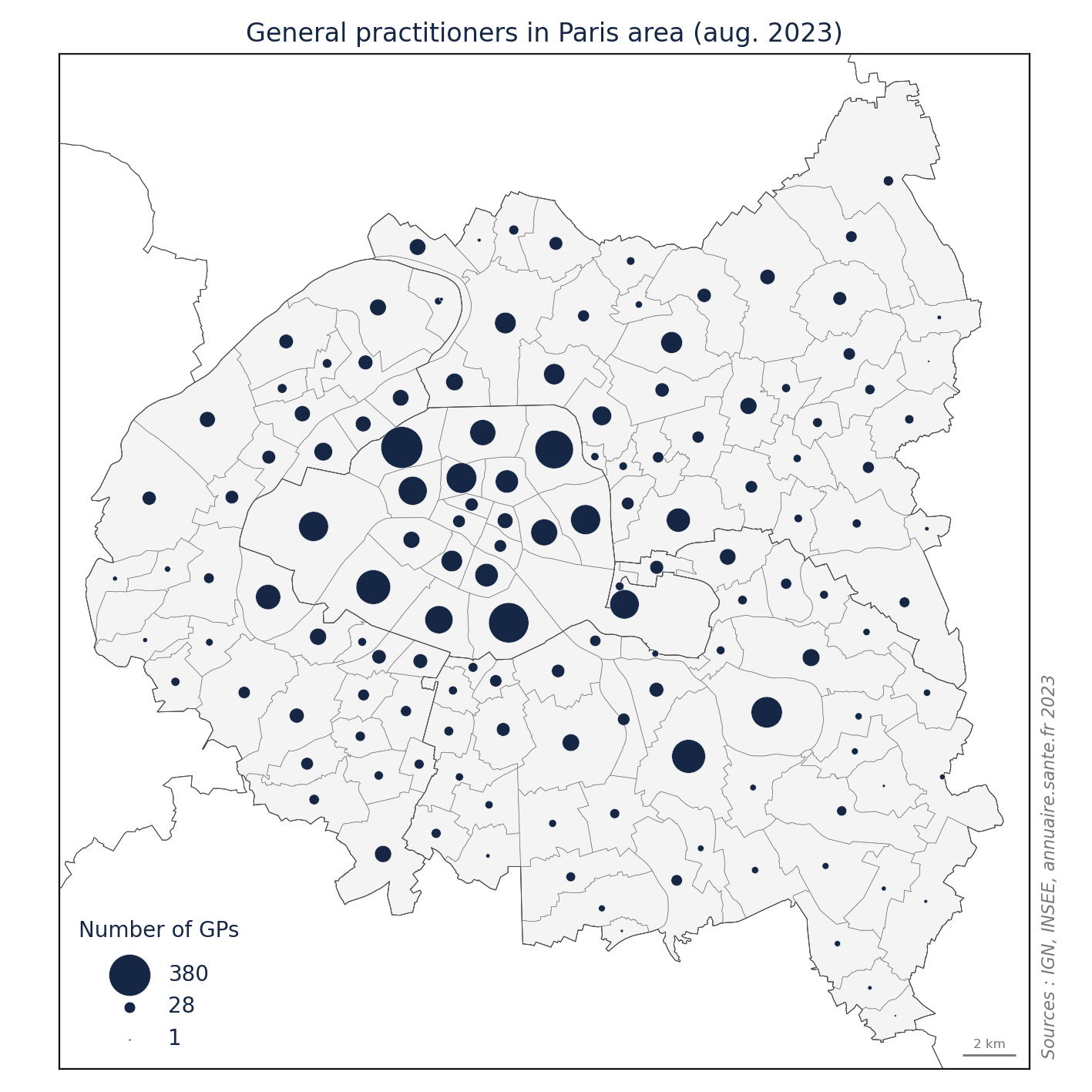
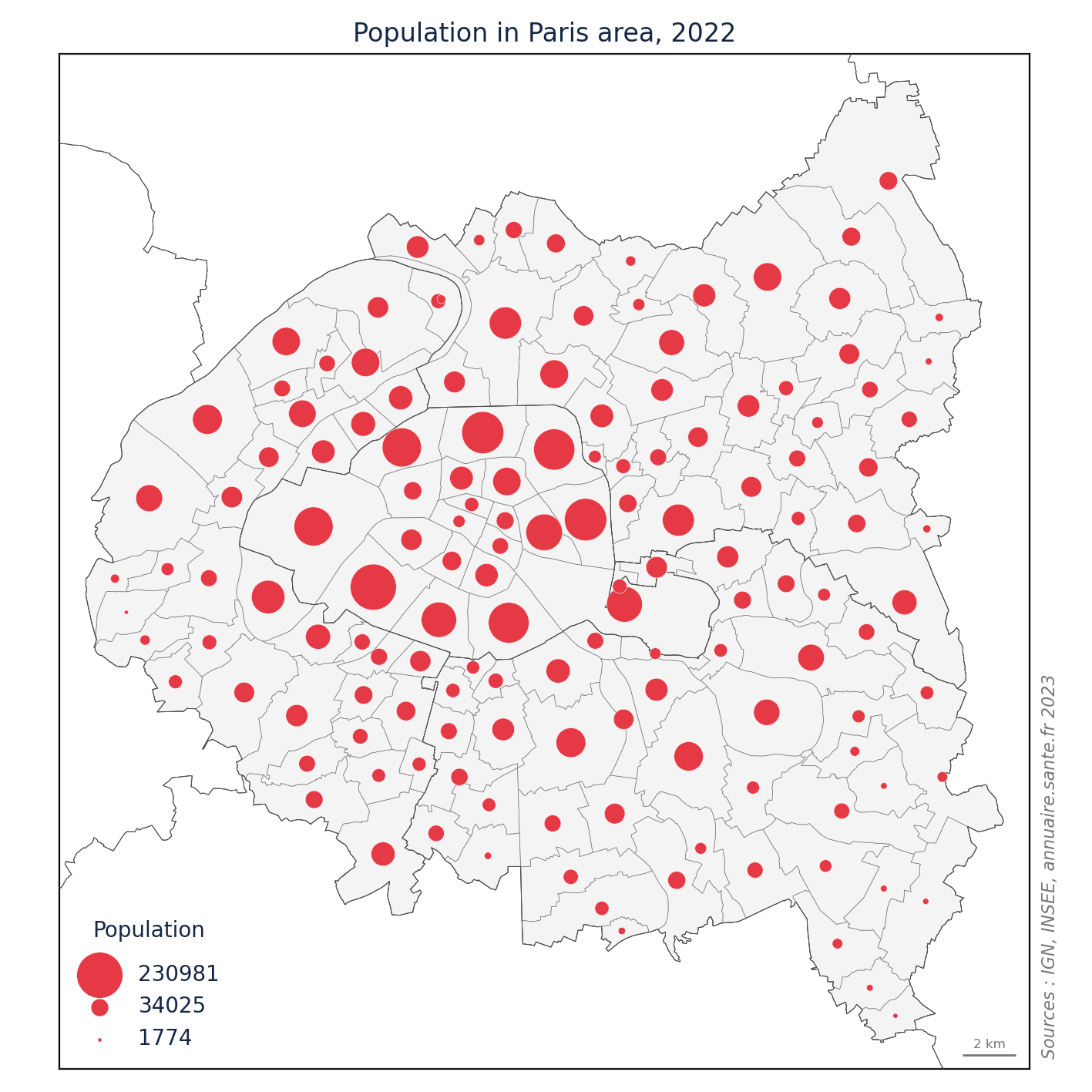
Indeed, this map may not provide much informative value, as the distribution of GPs closely mirrors the distribution of the population in the area.
def save_scattermap_plot(ax, data, column, title, xlabel, color1, color2, scale, filename):
plot_scattermap(ax, data, column, title, xlabel, color1, color2, scale)
fig = ax.get_figure()
fig.tight_layout()
fig.savefig(filename, dpi=200)
output_directory = "./assets/"
file_names = ["fig_gp.png", "fig_pop.png"]
file_paths = [os.path.join(output_directory, filename) for filename in file_names]
save_scattermap_plot(ax_gp, city_map, 'GPcount', "General practitioners in Paris area (aug. 2023)", "Number of GPs", Colors.blue, Colors.blue, 1, file_paths[0])
save_scattermap_plot(ax_pop, city_map, 'population', "Population in Paris area, 2022", "Population", Colors.blue, Colors.red, 0.002, file_paths[1])
html_code = f"""
<div style="display: flex; align-items: center;">
{" ".join([f'<div style="flex: 1;"><img src="{filepath}" width="600"></div>' for filepath in file_paths])}
</div>
"""
display(HTML(html_code))


We have just demonstrated that the most populated areas are also the areas with the highest number of GPs...
Faced with this remarkable revelation, it might be necessary to question the relevance and limitations of administrative boundaries when we are focusing on a spatial approach : The Modifiable Areal Unit Problem or MAUP.
The MAUP is a concern that demonstrates how administrative boundaries can create the illusion of patterns that are, in reality, artifacts.
To illustrate this concept, we will generate a 10-kilometer grid and a fictional administrative mesh. This will help demonstrate how the choice of spatial units or boundaries can influence the interpretation of data and potentially lead to misleading conclusions.
from shapely.geometry import box, Point, MultiPoint
from shapely.ops import orient, voronoi_diagram
import random
def create_grid(epsg_code, bounding_box, resolution, return_centroids=False):
"""
Create a grid of squares within a specified bounding box with a given resolution.
Parameters:
epsg_code (int): The EPSG code specifying the coordinate reference system (CRS) of the grid.
bounding_box (list): A list containing the coordinates of the bounding box in the form [xmin, ymin, xmax, ymax].
resolution (float): The resolution of each square in units of the specified CRS.
return_centroids (bool): If True, return only the centroids of the squares.
Returns:
geopandas.GeoDataFrame: A GeoDataFrame containing the grid of squares or centroids.
Example:
epsg = 2154
bounding_box = [632217, 6882276, 678065, 6838152]
resolution = 10000 # Resolution of each square in CRS units
grid = create_grid(epsg, bounding_box, resolution)
"""
crs = f"EPSG:{epsg_code}"
xmin, ymin, xmax, ymax = bounding_box
x_coords = list(range(int(xmin), int(xmax), int(resolution)))
y_coords = list(range(int(ymin), int(ymax), int(resolution)))
features = []
for x in x_coords:
for y in y_coords:
square = box(x, y, x + resolution, y + resolution)
if return_centroids:
centroid = square.centroid
features.append(centroid)
else:
features.append(square)
grid_gdf = gpd.GeoDataFrame({'geometry': features}, crs=crs)
grid_gdf.geometry = grid_gdf.geometry.apply(orient, args=(-1,)) # to avoid errors with Altair
if return_centroids:
grid_gdf["latitude"] = grid_gdf.geometry.y
grid_gdf["longitude"] = grid_gdf.geometry.x
else :
grid_gdf["latitude"] = grid_gdf.centroid.y
grid_gdf["longitude"] = grid_gdf.centroid.x
grid_gdf['OBJECTID'] = grid_gdf.index
return grid_gdf
We will generate a grid consisting of 16 squares, each measuring 10 kilometers by 10 kilometers, and distribute points evenly within this grid.
epsg=2154
bbox_city = city_map.total_bounds
grid_10km = create_grid(epsg, bbox_city, 10000)
bbox_grid = grid_10km.total_bounds
point_1km = create_grid(epsg, bbox_grid, 2000, True)
Additionally, we will construct a fictional administrative mesh by creating 16 Voronoi diagrams to partition the area.
This mesh will serve as a representation of how administrative boundaries can be artificially imposed on a geographical area.
def generate_random_points_voronoi(bbox, num_points, output_epsg):
"""
Generate a GeoDataFrame representing Voronoi polygons for random points within a specified bounding box.
Parameters:
bbox (tuple): A tuple containing the bounding box coordinates (bbox_min_x, bbox_min_y, bbox_max_x, bbox_max_y).
num_points (int): The number of random points to generate.
output_epsg (int): The EPSG code for the output coordinate reference system (CRS).
Returns:
geopandas.GeoDataFrame: A GeoDataFrame containing Voronoi polygons within the specified bounding box.
"""
random.seed(2)
bbox_min_x, bbox_min_y, bbox_max_x, bbox_max_y = bbox
random_points = []
for _ in range(num_points):
x = random.uniform(bbox_min_x, bbox_max_x)
y = random.uniform(bbox_min_y, bbox_max_y)
random_points.append(Point(x, y))
points = MultiPoint(random_points)
regions = voronoi_diagram(points)
# Create a GeoDataFrame from the Voronoi regions
gdf = gpd.GeoDataFrame(geometry=[regions], crs=f'EPSG:{output_epsg}')
# Use intersection to clip the GeoDataFrame with the bounding box
gdf = gdf.clip(bbox)
gdf = gdf.explode(index_parts=False).reset_index(drop=True)
gdf['OBJECTID'] = gdf.index
gdf["latitude"] = gdf.centroid.y
gdf["longitude"] = gdf.centroid.x
return gdf
voronoi_gdf = generate_random_points_voronoi(bbox_grid, 16, epsg)
def configure_axis(ax):
ax.title.set_color(Colors.blue)
ax.axes.get_xaxis().set_visible(False)
ax.axes.get_yaxis().set_visible(False)
for spine in ['top', 'right', 'bottom', 'left']:
ax.spines[spine].set_visible(False)
def main_maup(cm = 1 / 2.54, title1="10 km by 10 km grid", title2="Fictional administrative mesh", double_grid=False):
fig_mp, (ax1, ax2) = plt.subplots(1, 2, sharex='all', sharey='all', figsize=(25 * cm, 25 * cm))
configure_axis(ax1)
configure_axis(ax2)
grid_10km.plot(ax=ax1, color=Colors.lightgray, edgecolor=Colors.gray, linewidth=2, zorder=0)
ax1.set_title(title1)
if not double_grid :
voronoi_gdf.plot(ax=ax2, color=Colors.lightgray, edgecolor=Colors.gray, linewidth=2, zorder=0)
else :
grid_10km.plot(ax=ax2, color=Colors.lightgray, edgecolor=Colors.gray, linewidth=2, zorder=0)
ax2.set_title(title2)
return fig_mp, ax1, ax2
In both the grid and the fictional administrative mesh, we have evenly distributed several points.
fig_maup, ax_regu, ax_voro = main_maup()
point_1km.plot(ax=ax_regu, color=Colors.red, zorder=1, markersize=2)
point_1km.plot(ax=ax_voro, color=Colors.red, zorder=1, markersize=2)
fig_maup;
Now, let's aggregate these points within each administrative boundary.
grid_10km['count'] = grid_10km.sjoin(point_1km).groupby('OBJECTID_left').size()
voronoi_gdf['count'] = voronoi_gdf.sjoin(point_1km).groupby('OBJECTID_left').size()
fig_maup_s, ax_regu_s, ax_voro_s = main_maup()
plot_scattermap(ax_regu_s, grid_10km, 'count', "10 km by 10 km grid", "Population", Colors.blue, Colors.red, scale=15, legend=False)
plot_scattermap(ax_voro_s, voronoi_gdf, 'count', "Fictional administrative mesh", "Population", Colors.blue, Colors.red, scale=15, legend=False)
fig_maup_s;
This example highlights how the observed phenomenon can appear more significant in the northwest and weaker in the southeast due to the artificial administrative boundaries, even though in reality, it is evenly distributed across the entire study area.
And it's even worse if you don't adhere to the rules of graphic semiology (your eye cannot perceive proportionality with different shades of gray. Only size can convey this information).
def customize_legend(_legend):
_legend.set_frame_on(True)
_legend.get_frame().set_facecolor('w')
_legend.get_frame().set_edgecolor('w')
_legend.get_title().set_color(Colors.blue)
for line in _legend.get_lines():
line.set_markeredgecolor(Colors.gray)
line.set_markeredgewidth(0.5)
for text in _legend.get_texts():
text.set_color(Colors.blue)
title_text = _legend.get_title()
title_text.set_position((0, 15))
title_text.set_color(Colors.blue)
title_text.set_backgroundcolor('w')
fig_maup_c, ax_regu_c, ax_voro_c = main_maup()
legend = {'loc':'lower left', 'bbox_to_anchor':(0, -.35), 'markerscale':1,
'title_fontsize':'medium', 'fontsize':'small', 'title' : 'Population','labelcolor': Colors.legend_text, }
grid_10km.plot(ax=ax_regu_c, column='count', cmap='OrRd', scheme='quantiles', edgecolor=Colors.gray,
legend=True, legend_kwds=legend )
customize_legend(ax_regu_c.get_legend())
voronoi_gdf.plot(ax=ax_voro_c, column='count', cmap='OrRd', scheme='FisherJenks', k=4, edgecolor=Colors.gray, legend=True, legend_kwds=legend )
customize_legend(ax_voro_c.get_legend())
fig_maup_c;
An alternative approach is to normalize the results by introducing a denominator, such as area for density computation.
grid_10km['area'] = grid_10km.geometry.area /1000000
voronoi_gdf['area'] = voronoi_gdf.geometry.area /1000000
grid_10km['density'] = grid_10km['count'] / grid_10km['area']
voronoi_gdf['density'] = voronoi_gdf['count'] / voronoi_gdf['area']
fig_maup_d, ax_regu_d, ax_voro_d = main_maup()
legend['title']="Density (km²)"
grid_10km.plot(ax=ax_regu_d, column='density', cmap='OrRd', scheme='quantiles', edgecolor=Colors.gray,
legend=True,
legend_kwds=legend )
customize_legend(ax_regu_d.get_legend())
voronoi_gdf.plot(ax=ax_voro_d, column='density', cmap='OrRd', scheme='FisherJenks', k=4, edgecolor=Colors.gray,
legend=True,
legend_kwds=legend )
customize_legend(ax_voro_d.get_legend())
fig_maup_d;
Here is the result after applying the normalization method to our study area.
city_map['area'] = city_map.geometry.area /1000000
fig_gp_n, ax_gp_n = main_map(bbox_parispc)
legend = {'loc':'lower left', 'markerscale':1, 'title_fontsize':'medium', 'fontsize':'small'}
city_map.plot(ax=ax_gp_n, column='GPcount', cmap='OrRd', scheme='FisherJenks', k=4,
edgecolor=Colors.gray, linewidth=0.2, legend=True, legend_kwds=legend )
customize_legend(ax_gp_n.get_legend())
ax_gp_n.set_title("Number of GPs (avoid this representation)", color=Colors.blue)
fig_gp_n;
city_map['area'] = city_map.geometry.area /1000000
city_map["GP_density"] = city_map["GPcount"] / city_map['area']
city_map['GP_density'] = city_map['GP_density'].fillna(0)
fig_gp_d, ax_gp_d = main_map(bbox_parispc)
city_map.plot(ax=ax_gp_d, column='GP_density', cmap='OrRd', scheme='FisherJenks', k=4,
edgecolor=Colors.gray, linewidth=0.2,
legend=True, legend_kwds=legend )
customize_legend(ax_gp_d.get_legend())
ax_gp_d.set_title("Density of GPs (km²)", color=Colors.blue)
fig_gp_d;
Another more common solution is to divide by the population size of each area. While this operation may be closer to the issue at hand, it no longer standardizes the size of spatial units. Consequently, it may reintroduce the MAUP.
city_map["GP_pop"] = city_map["GPcount"] / city_map['population'] * 100000
city_map['GP_pop'] = city_map['GP_pop'].fillna(0)
fig_gp_p, ax_gp_p = main_map(bbox_parispc)
city_map.plot(ax=ax_gp_p, column='GP_pop', cmap='OrRd', scheme='FisherJenks', k=4,
edgecolor=Colors.gray, linewidth=0.2,
legend=True, legend_kwds=legend )
customize_legend(ax_gp_p.get_legend())
ax_gp_p.set_title("GPs per million population", color=Colors.blue)
fig_gp_p;
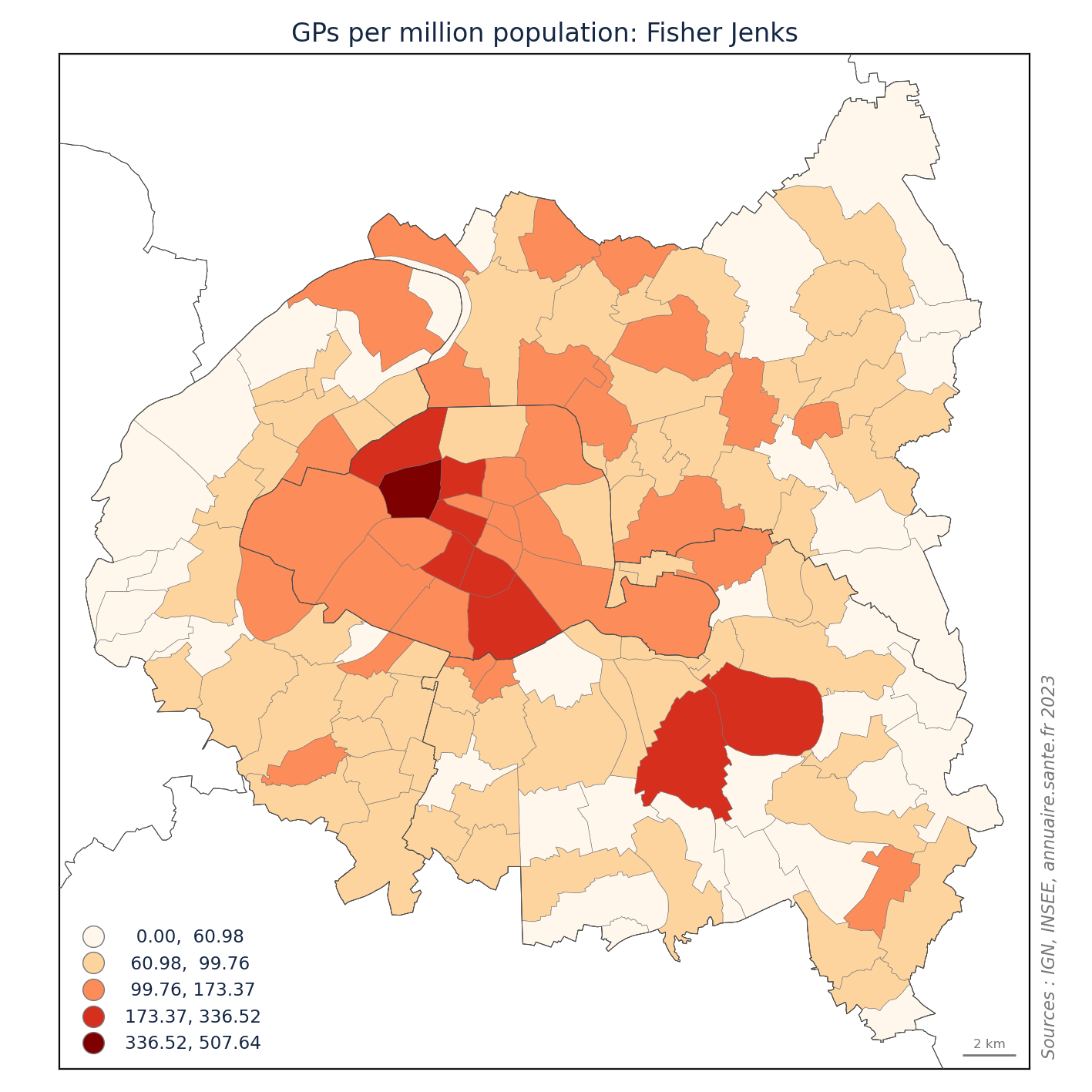
You might have noticed that the choropleth maps produced are classified using the Fisher-Jenks algorithm. This choice is non-trivial as it seeks to minimize the variance within each class while maximizing the variance between classes.
In essence, the values within the same class are grouped in a highly similar manner, ensuring significant dissimilarity between the classes themselves.
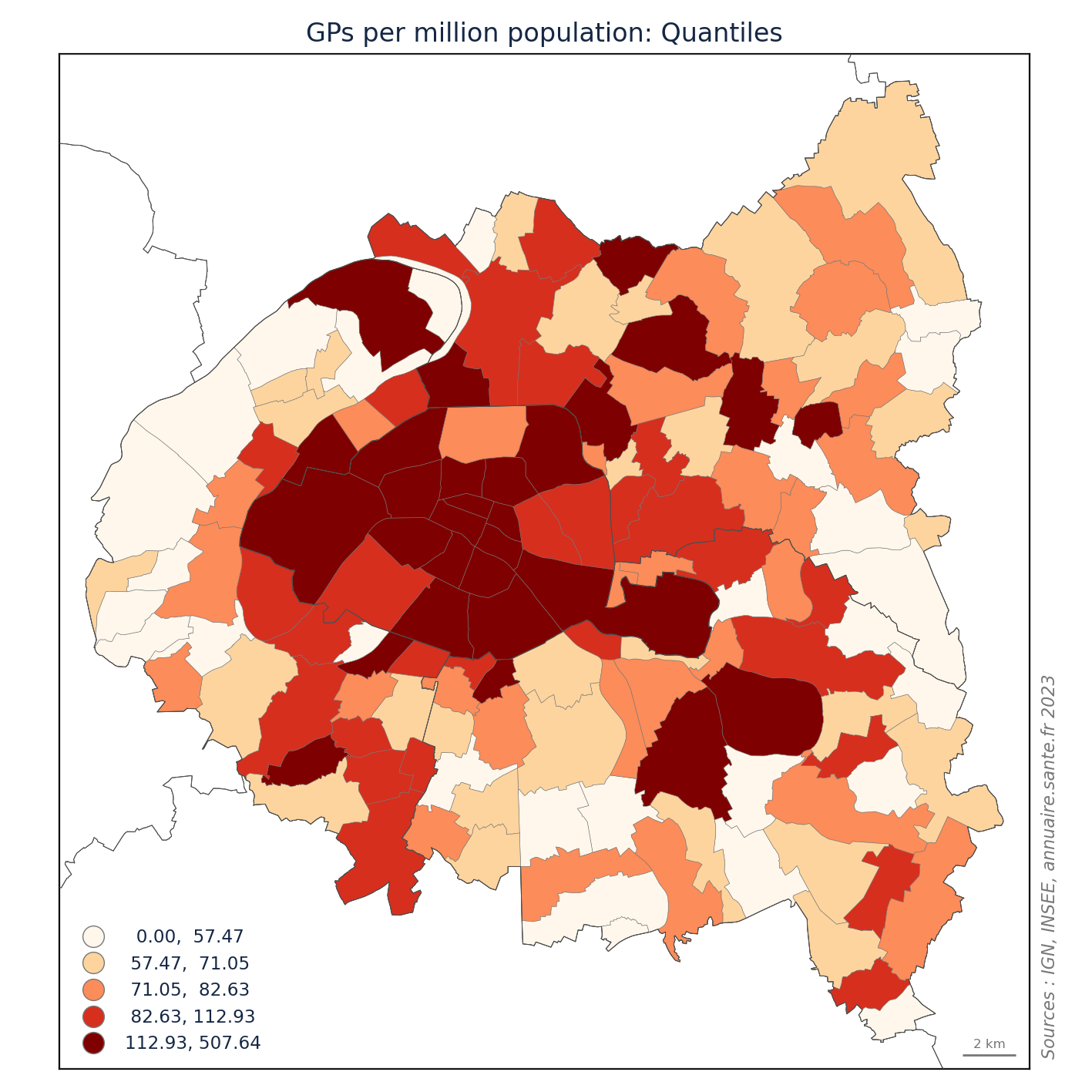
This methodology yields a visual representation that closely approximates reality. However, the objectives of your maps may steer you towards employing alternative techniques, particularly when conducting comparisons between maps.
While this issue of discretization goes beyond the scope of the MAUP, it is nevertheless a crucial step in creating a map. Inadequate discretization has the potential to result in misinterpretations of your findings.
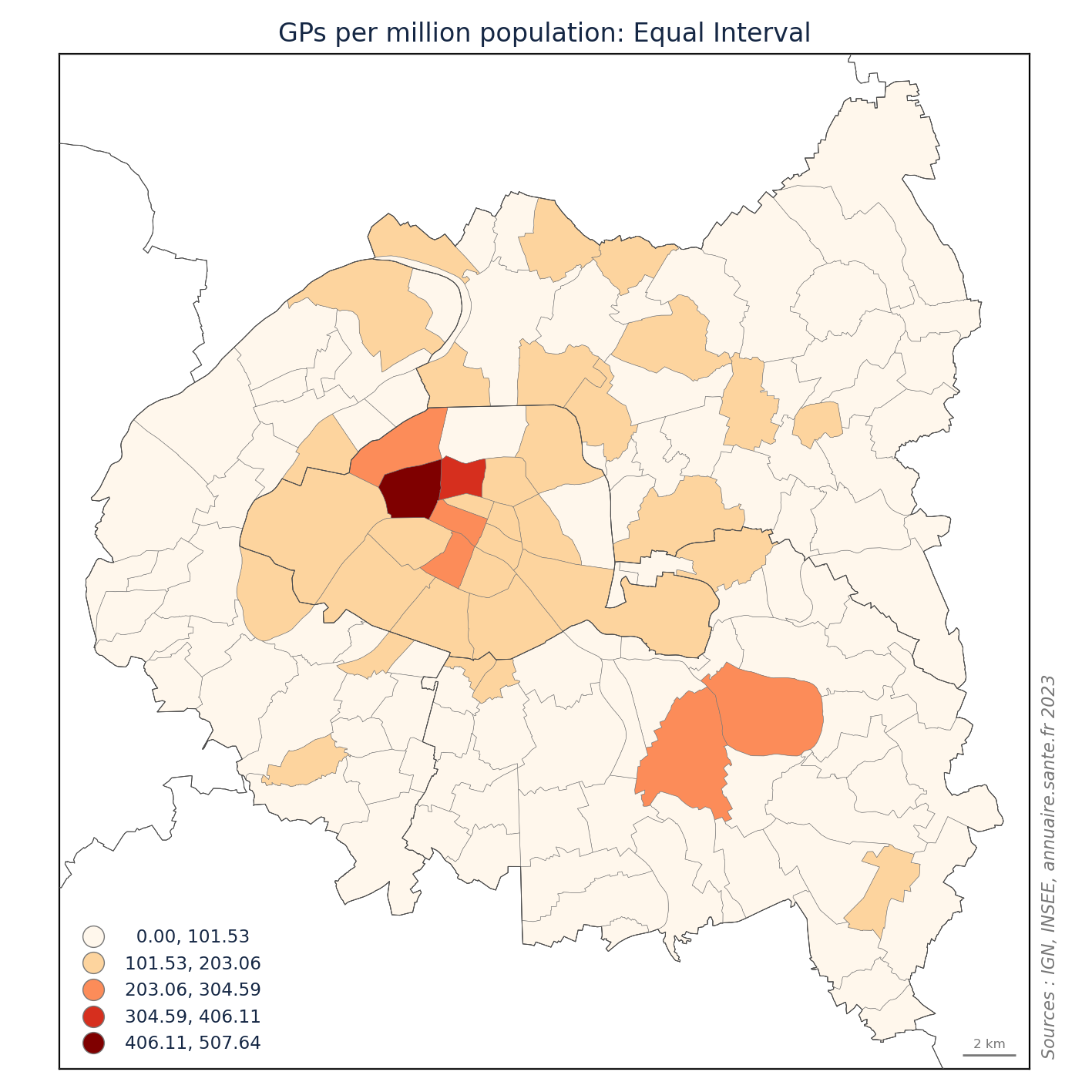
We will visualize the distribution of general practitioners per million inhabitants using three distinct classification methods.
schemes = [
{"scheme": "quantiles", "file_name": "fig_class_q5.png", "title": "Quantiles"},
{"scheme": "fisherjenks", "file_name": "fig_class_j5.png", "title": "Fisher Jenks"},
{"scheme": "equalinterval", "file_name": "fig_class_e5.png", "title": "Equal Interval"}
]
for scheme_params in schemes:
fig_gp_mc, ax_gp_mc = main_map(bbox_parispc)
plt.close()
city_map.plot(ax=ax_gp_mc, column='GP_pop', cmap='OrRd', scheme=scheme_params["scheme"], k=5,
edgecolor=Colors.gray, linewidth=0.2, legend=True, legend_kwds=legend)
customize_legend(ax_gp_mc.get_legend())
ax_gp_mc.set_title(f"GPs per million population: {scheme_params['title']}", color=Colors.blue)
file_path = f"./assets/{scheme_params['file_name']}"
fig_gp_mc.tight_layout()
fig_gp_mc.savefig(file_path, dpi=200)
plt.close()
With the same dataset, we can convey various messages by employing different classification methods.
html_code = f"""
<div style="display: flex; align-items: center;">
{" ".join([f'<div style="flex: 1;"><img src="./assets/{scheme_params["file_name"]}" width="600"></div>' for scheme_params in schemes])}
</div>
"""
display(HTML(html_code))


Another approach to mitigate the Modifiable Areal Unit Problem (MAUP) is to employ Kernel Density Estimation (KDE). However, it is essential for your source data to be on a relatively fine grid for this method to be effective.
KDE is a non-parametric technique used to estimate the probability density function of a continuous random variable. It serves as an alternative to histogram-based density estimation.
The process involves positioning a kernel with a specific function (e.g., Normal, Negative Exponential, Quartic, etc.) at each data point and then summing them to create a continuous and smooth density estimate.
The bandwidth parameter plays a critical role in this method, as it determines the width of the kernels and influences the smoothness of the estimate. A higher bandwidth value results in a smoother density estimate.
import numpy as np
from scipy.stats import gaussian_kde
def create_bimodal_kernel_density_plot(data_mode1_params, data_mode2_params, bw=0.5):
"""
Generate a bimodal kernel density plot using Matplotlib and SciPy.
Args:
data_mode1_params (tuple): Parameters for the first normal distribution (mean, standard deviation, number of samples).
data_mode2_params (tuple): Parameters for the second normal distribution (mean, standard deviation, number of samples).
bw(float): Estimator bandwidth
Returns:
tuple: A tuple containing the Matplotlib figure and axis objects representing the bimodal kernel density plot.
"""
np.random.seed(42)
data_mode1 = np.random.normal(data_mode1_params[0], data_mode1_params[1], data_mode1_params[2])
data_mode2 = np.random.normal(data_mode2_params[0], data_mode2_params[1], data_mode2_params[2])
data = np.concatenate((data_mode1, data_mode2))
kde = gaussian_kde(data,bw_method=bw)
x_values = np.linspace(min(data), max(data), 1000)
density_values = kde(x_values)
fig_kde, ax_kde = plt.subplots(figsize=(8, 6))
ax_kde.fill_between(x_values, density_values, alpha=0.5, label='Density', color=Colors.white)
ax_kde.scatter(data, np.zeros_like(data), color=Colors.red, s=20, label='Points at Y=0')
ax_kde.set_xlabel('X')
ax_kde.set_ylabel('Density estimation')
ax_kde.set_title(f'Bimodal Kernel Density Plot, bandwith: {bw}, Gaussian function', color=Colors.white)
ax_kde.legend(frameon=False, labelcolor=Colors.white)
return fig_kde, ax_kde
In this example, the density curve provides a succinct summary of the distribution of points' arrangement along a single dimension.
data1 = (-2, 1, 25)
data2 = (2, 1, 100)
fig_kde_uni, ax_kde_uni = create_bimodal_kernel_density_plot(data1, data2)
customize_axes(ax_kde_uni,fig_kde_uni)
fig_kde_uni;
Conversely, using a lower bandwidth captures finer details but can introduce noise into the density estimation:
fig_kde_uni2, ax_kde_uni2 = create_bimodal_kernel_density_plot(data1, data2, 0.05)
customize_axes(ax_kde_uni2,fig_kde_uni2)
fig_kde_uni2;
When the KDE function is applied to both spatial dimensions, it becomes feasible to circumvent the constraints imposed by territorial boundaries, allowing for the visualization of the distribution of points.
geo_gp_pc = geo_gp.clip(bbox_parispc)
fig_gp_frontier, ax_gp_frontier = main_map(bbox_parispc)
geo_gp_pc.plot(ax=ax_gp_frontier,markersize=0.1,color=Colors.red)
ax_gp_frontier.set_title('Geocoded General Practitionners', color=Colors.blue)
fig_gp_frontier;
This function will generate a spatial Kernel Density Estimation (KDE) using the gaussian_kde() function from the SciPy library.
A mobile window traverses the study area, assigning weights to the encountered points based on the density function.
def generate_density_contour(longitude, latitude, bw_method=0.12, area=150, weight=None):
"""
Generate a density contour plot of geographical data.
Parameters:
longitude (numpy.ndarray): Array of longitude values.
latitude (numpy.ndarray): Array of latitude values.
bw_method (float): Bandwidth for kernel density estimation (default is 0.12).
area (int): The number of points in the meshgrid for the contour plot (default is 150).
weight (numpy.ndarray, optional): An array of weights for kernel density estimation (default is None).
Returns:
x (numpy.ndarray): Meshgrid for longitude values.
y (numpy.ndarray): Meshgrid for latitude values.
z (numpy.ndarray): Density values for the contour plot.
"""
if weight is not None:
kde = gaussian_kde([longitude, latitude], bw_method=bw_method, weights=weight)
else:
kde = gaussian_kde([longitude, latitude], bw_method=bw_method)
x, y = np.meshgrid(np.linspace(longitude.min(), longitude.max(), area), np.linspace(latitude.min(), latitude.max(), area))
z = kde(np.vstack([x.ravel(), y.ravel()]))
relative_z = z / np.sum(z)
relative_z = relative_z.reshape(x.shape)
return x, y, relative_z
We will begin by creating an initial Kernel Density Estimation (KDE) with a broad bandwidth. Please keep in mind that in these examples, the results are not expressed in map units.
latitude = geo_gp_pc['latitude']
longitude = geo_gp_pc['longitude']
x, y, z = generate_density_contour(longitude,latitude,bw_method=0.2)
fig_gp_kde_12, ax_gp_kde_12 = main_map(bbox_parispc)
contour_kde12 = ax_gp_kde_12.contourf(x, y, z, levels=6, cmap='Reds', alpha=0.6)
cbar = plt.colorbar(contour_kde12, ax=ax_gp_kde_12, shrink=0.7)
fig_gp_kde_12 ;
A smaller bandwidth synthesizes the distribution less but, conversely, adds details to the spatial distribution of GPs.
latitude = geo_gp_pc['latitude']
longitude = geo_gp_pc['longitude']
x, y, z = generate_density_contour(longitude,latitude,bw_method=0.06)
fig_gp_kde_06, ax_gp_kde_06 = main_map(bbox_parispc)
contour = ax_gp_kde_06.contourf(x, y, z, levels=6, cmap='Reds', alpha=0.6)
cbar = plt.colorbar(contour, ax=ax_gp_kde_06, shrink=0.7)
fig_gp_kde_06 ;
--------------------------------------------------------------------------- NameError Traceback (most recent call last) Cell In[1], line 1 ----> 1 latitude = geo_gp_pc['latitude'] 2 longitude = geo_gp_pc['longitude'] 3 x, y, z = generate_density_contour(longitude,latitude,bw_method=0.06) NameError: name 'geo_gp_pc' is not defined
With the help of the KDE, the administrative mesh no longer acts as a fictitious barrier to the observed phenomena, as long as the data has a level of precision that is finer than that of the mesh.
For more information about KDE, see : Silverman, B. W. (1986). Density estimation for statistics and data analysis (Vol. 26). CRC press.
Another approach to circumvent the limitations addressed by the MAUP is to create regular grids within your study area.
This way, you won't be dependent on abstract administrative boundaries. However, border effects may occur (unlike with KDE).
For this, we will use H3pandas. In addition to creating hexagonal grids of various sizes with reusable IDs across different projects, H3pandas allows for performing aggregation operations within the grid.
import h3pandas
def aggregate_h3_grid(points, poly, aggregation_level):
"""
Aggregate point data into H3 hexagons and calculate density.
Args:
points (geopandas.GeoDataFrame): Input GeoDataFrame with point geometries.
poly (geopandas.GeoDataFrame): Polygon GeoDataFrame for the polyfill resampling.
aggregation_level (int): The H3 aggregation level to use.
Returns:
geopandas.GeoDataFrame: Aggregated GeoDataFrame with density calculated.
"""
crs = points.crs
points = points.to_crs(4326).copy()
points = points[['geometry']]
points["n"] = 1
poly = poly.to_crs(4326).copy()
poly = poly[['geometry']]
# polyfill is used instead of geo_to_h3_aggregate to fill all the area, instead empty regions will appear
h3 = poly.h3.polyfill_resample(aggregation_level)
h3["n"] = h3.sjoin(points).groupby('h3_polyfill').size()
h3["n"].fillna(0, inplace=True)
h3 = h3.to_crs(crs)
h3['dens'] = h3["n"] / h3.geometry.area
h3['dens'] = h3['dens'] * 1000000 if crs in (2154, 3857) else h3['dens']
return h3
fig_gp_h7, ax_gp_h7 = main_map(bbox_parispc)
grid_h7 = aggregate_h3_grid(geo_gp, gdf_cities, 7)
grid_h7.plot(ax=ax_gp_h7, column='dens', cmap='OrRd', scheme='FisherJenks', k=4,
edgecolor=Colors.gray, linewidth=0.2, alpha=0.7, zorder=3,
legend=True, legend_kwds=legend )
customize_legend(ax_gp_h7.get_legend())
ax_gp_h7.set_title("GPs density : H7", color=Colors.blue)
fig_gp_h7;
%%time
fig_gp_h8, ax_gp_h8 = main_map(bbox_parispc)
grid_h8 = aggregate_h3_grid(geo_gp,gdf_cities, 8)
grid_h8.plot(ax=ax_gp_h8, column='dens', cmap='OrRd', scheme='FisherJenks', k=4,
edgecolor=Colors.gray, linewidth=0.2, alpha=0.7, zorder=3,
legend=True, legend_kwds=legend )
customize_legend(ax_gp_h8.get_legend())
ax_gp_h8.set_title("GPs density : H8")
fig_gp_h8;
CPU times: user 41.8 s, sys: 0 ns, total: 41.8 s Wall time: 41.8 s
Another consequence of the MAUP is that as more data is aggregated at larger unit, the variance tends to decrease.
The data generated using H3pandas clearly illustrates this phenomenon, particularly when examining the variance in density.
Now, let's compute the variance in the density of GPs using 6 H3pandas grids.
var_dict = {}
for i in range(4, 10):
d = aggregate_h3_grid(geo_gp_pc, gdf_cities, i).dens
var_dict[f'h3_{i}'] = round(np.var(d))
keys = list(var_dict.keys())
values = list(var_dict.values())
Selecting an appropriate grid size is crucial to ensure it aligns well with the specific phenomenon under study.
It's essential to remember that the analysis of variance, and more broadly, covariances, plays a significant role in data analysis.
fig_var, ax_var = plt.subplots()
ax_var.plot(keys, values, marker='o', linestyle='-', color=Colors.red)
ax_var.set_xlabel('H3 aggregation level')
ax_var.set_ylabel('Variance')
ax_var.set_title('Smaller spatial units (H3), increased variance', color=Colors.white)
customize_axes(ax_var,fig_var)
fig_var;
As we've seen, the cartographic approach to interpreting a spatial phenomenon is not always straightforward: choosing the right indicator, map classification methods, issues with the Modifiable Areal Unit Problem (MAUP)...
However, some statistical tools used by geographers can help overcome these challenges. For instance, hotspot detection
This involves detecting spatial clusters of values that are higher or lower than expected.
Detecting hotspots and clusters in geography indeed warrants a full-day workshop. Today, we will only cover one method involving spatial autocorrelation :
The Moran's I index helps identify whether the data is spatially clustered (values close to each other are spatially grouped), random* or if they tend to repel each other (dispersed*) : the spatial autocorrelation*
Global Moran's $I$ is calculated with the following :
\begin{equation} I = \frac{n}{W} \sum_{i=1}^{n} \sum_{j=1}^{n} w_{ij} (x_i - \bar{X}) (x_j - \bar{x}) / \sum_{i=1}^{N} (x_i - \bar{X})^2 \end{equation}\ where \ \begin{align*} n & \text{ is the number of spatial units indexed }\\ x & \text{ is the variable of interest} \\ \bar{X} & \text{ is the mean of } x \\ w_{ij} & \text{ are spatial weights between } i \text{ and } j \\ W & \text{ is the sum of all } w_{ij} \text{ (i.e. } W = \sum_{i=1}^{N} \sum_{j=1}^{N} w_{ij}) \end{align*}
For each weighted values $w$ of $i$ and $j$ features, it calculates the deviation to the area mean and cross-products them. The larger the deviation from the mean, the larger the cross-product result.
$w_{ij}$ is the weighted distance matrix (binary or continuous), assessing the Spatial Lag. i.e. a weighted sum of the values observed at neighboring locations.
$I$ is standardized by the variance : it falls between -1 (dispersed) and +1 (clustered).
Let's create an example to illustrate the Moran's Index.
To do so, we will generate spatially clustered, random, and dispersed values within a grid.
grid_moran = grid_10km.sort_values(['latitude','longitude']).reset_index(drop=True)
np.random.seed(42)
size = len(grid_moran)
pos = np.sort(np.random.binomial(n=2, p=0.5, size=[size]))
pattern = np.array([1, 2])
neg = np.tile(pattern, size // 2)
grid_moran['positive'] = pos
grid_moran['negative'] = neg
grid_moran['random'] = np.random.randint(1, 4, size=size)
Let's add the contiguity matrix with a Queen metric. It will be used to assess the Spatial Lag
The library libpysal provides tools for calculating various matrices : rook, queen or continuous
Contiguity matrices are available in varying orders, with data weights usually diminishing as the order escalates
from libpysal.weights.contiguity import Queen
w = Queen.from_dataframe(grid_moran,use_index=True)
fig_matrix, ax_matrix_queen, ax_matrix_rook = main_maup(title1="Queen metric (order 1)", title2="Rook metric (order 1)", double_grid=True)
grid_10km["queen"] = [0,1,1,1,0,1,2,1,0,1,1,1,0,0,0,0]
grid_10km.plot(ax= ax_matrix_queen, column="queen", cmap='Reds', edgecolor=Colors.gray, linewidth=1)
grid_10km["rook"] = [0,0,1,0,0,1,2,1,0,0,1,0,0,0,0,0]
grid_10km.plot(ax= ax_matrix_rook, column="rook", cmap='Reds', edgecolor=Colors.gray, linewidth=1)
fig_matrix;
esda package (Exploratory Spatial Data Analysis) is used to calculate the Moran Index and its p-value
from esda.moran import Moran
def moran_index(values, w_matrix, significance_level=0.01):
"""
Calculate Moran's I and assess spatial clustering or dispersion.
Parameters:
values (array-like): Numeric data values.
w_matrix (scipy.sparse matrix): Spatial weights matrix.
significance_level (float): Significance level for p-value.
Returns:
tuple: Moran's I, p-value, and spatial pattern assessment result.
The result can be one of the following:
- "Significant clustering" if data is significantly clustered.
- "Significant dispersion" if data is significantly dispersed.
- "Random" if data is not significant.
Note: A positive Moran's I indicates clustering, and a negative Moran's I indicates dispersion.
"""
moran = Moran(values, w_matrix)
moran_I = moran.I
p_value = moran.p_norm
# Check if p-value is below the significance level
if p_value < significance_level:
# Determine if the data is clustered or dispersed
if moran_I > 0:
result = "Significant clustering"
elif moran_I < 0:
result = "Significant dispersion"
p_value_text = f"P-Value < {significance_level}"
else:
result = "Random"
p_value_text = f"P-Value = {p_value:.4f}"
# Return Moran's I, p-value, and the result
return moran_I, p_value_text, result
import matplotlib.pyplot as plt
from matplotlib.colors import ListedColormap
def main_moran(values, cm=1 / 2.54):
custom_colors = [Colors.blue, Colors.white, Colors.red]
custom_cmap = ListedColormap(custom_colors)
fig, axes = plt.subplots(1, 3, sharex='all', sharey='all', figsize=(25 * cm, 25 * cm))
plt.subplots_adjust(wspace=0.1)
for ax, title in zip(axes, moran_values.keys()):
configure_axis(ax)
grid_moran.plot(ax=ax, column=title, cmap=custom_cmap, edgecolor=Colors.gray, linewidth=2, zorder=0)
w.plot(grid_moran, ax=ax,
edge_kws=dict(color=Colors.darkgray, linestyle=':', linewidth=1, alpha=0.5),
node_kws=dict(marker=''))
moran_I, p_value, result = moran_index(grid_moran[title], w)
ax.set_title(title, color=Colors.blue)
ax.text(0.5, -0.3, f'Moran I: {moran_I:.3f}\nP-value: {p_value}\nResult: {result}', transform=ax.transAxes, ha='center', color=Colors.blue)
return fig, axes
moran_values = {
'positive': moran_index(grid_moran['positive'].values, w),
'random': moran_index(grid_moran['random'].values, w),
'negative': moran_index(grid_moran['negative'].values, w)
}
fig_moran, axes = main_moran(moran_values)
The Moran's $I$ is positive and statistically significant, indicating that the values are spatially clustered
w_h7 = Queen.from_dataframe(grid_h7,use_index=True, silence_warnings=True)
fig_gp_queens_h7, ax_gp_queens_h7 = main_map(bbox_parispc)
grid_h7.plot(ax=ax_gp_queens_h7, column='dens', cmap='OrRd', scheme='FisherJenks', k=4, edgecolor=Colors.gray, linewidth=0.2, alpha=0.7, zorder=3, legend=True, legend_kwds=legend )
customize_legend(ax_gp_queens_h7.get_legend())
w_h7.plot(grid_h7, ax=ax_gp_queens_h7, edge_kws=dict(color=Colors.darkgray, linestyle=':', linewidth=1, alpha=0.5), node_kws=dict(marker=''))
i, p, r = moran_index(grid_h7.dens,w_h7)
ax_gp_queens_h7.set_title(f"GPs density : H7. Moran's I:{i:.3f}, {p}\n\n{r}", color=Colors.blue)
fig_gp_queens_h7;
The results remain statistically significant, despite a decrease in Moran's $I$.
w_h8 = Queen.from_dataframe(grid_h8,use_index=True, silence_warnings=True)
fig_gp_queens_h8, ax_gp_queens_h8 = main_map(bbox_parispc)
grid_h8.plot(ax=ax_gp_queens_h8, column='dens', cmap='OrRd', scheme='FisherJenks', k=4,
edgecolor=Colors.gray, linewidth=0.2, alpha=0.7, zorder=3,
legend=True, legend_kwds=legend )
customize_legend(ax_gp_queens_h8.get_legend())
w_h8.plot(grid_h8,
ax=ax_gp_queens_h8,
edge_kws=dict(color=Colors.darkgray, linestyle=':', linewidth=1, alpha=0.5),
node_kws=dict(marker=''))
i, p, r = moran_index(grid_h8.dens,w_h8)
ax_gp_queens_h8.set_title(f"GPs density : H8. Moran's I:{i:.3f}, {p}\n\n{r}", color=Colors.blue)
fig_gp_queens_h8;
Moran's I is a metric employed to assess global spatial autocorrelation, which provides a singular value to encapsulate the spatial relationships within a particular study area. It operates under the assumption that autocorrelation is uniformly distributed across the entire geographical region being examined.
Nonetheless, it is often the case that the spatial autocorrelation is not uniform and exhibits local variations within the study area. These variations can manifest as clustered patterns in certain areas, random patterns in others, and dispersed patterns in yet another set of regions.
To address these localized patterns and relationships, the Local Indicators of Spatial Association ($LISA$) methodology is employed.
Anselin, L. (1995). Local indicators of spatial association—LISA. Geographical analysis, 27(2), 93-115.
The LISA uses the individual cross-products of the previous Global Moran's I to evaluate if each feature is surrounded by the same local values.
\begin{equation} I_i = \frac{x_i - \bar{X}}{S^2_i} \sum_{j=1}^{n} w_{ij} (x_j - \bar{X}) \end{equation}whith:
\begin{equation} {S^2_i} = \frac{\sum_{j=1}^{n}(x_j - \bar{X})^2}{n-1} \end{equation}where
\begin{align*} n & \text{ is the number of spatial units} \\ x_i & \text{ is the variable of interest of } i \\ x_j & \text{ is the variable of interest of } j \\ \bar{X} & \text{ is the mean of } x \\ w_{ij} & \text{ are spatial weights between } i \text{ and } j \\ \end{align*}Let's illustrate this concept with the standardized graph depicting the Spatial Lag of GPs density and the GPs density itself.
Given that the values have been standardized (with a mean of 0 and a standard deviation of 1), we can readily differentiate values that surpass the mean from those that fall below it. This principle holds true for both the original data and their respective spatial lags.
Consequently, we can categorize the data into four distinct groups that significantly deviate from the mean:
This scatterplot displays the local spatial correlation between the values of a variable in different geographic areas and the weighted average of values in neighboring areas (spatial lag).
note : There appears to be a random error in the package. The HL values are occasionally swapped with the LL values.
from splot.esda import moran_scatterplot, plot_local_autocorrelation
from esda.moran import Moran_Local
moran_h7 = Moran(grid_h7.dens, w_h7)
moran_loc_h7 = Moran_Local(grid_h7.dens, w_h7)
fig_moran_h7, ax_moran_h7 = moran_scatterplot(moran_loc_h7, aspect_equal=True, p=0.05)
ax_moran_h7.set_xlabel('GPs density', color=Colors.blue)
ax_moran_h7.set_ylabel('Spatial Lag of GPs density', color=Colors.blue)
ax_moran_h7.title.set_color(Colors.blue)
label_info = {
"HH": {"color": "#e7787a", "position": (3, 4)},
"HL": {"color": "#fcb16a", "position": (3, -1)},
"LH": {"color": "#abd9e9", "position": (-1, 1)},
"LL": {"color": "#2c7bb6", "position": (-1, -1)}
}
for label, info in label_info.items():
ax_moran_h7.text(info["position"][0], info["position"][1], label, fontsize=15, c=info["color"])
fig_moran_h7;
splot.esda also provides tools for easily visualizing the $LISA$ outputs
Paris and Créteil exhibit significant HH densities.
Note that the analysis area has deliberately been expanded to encompass neighboring entities along the borders
def plot_dep(ax):
for idx in [1, 2]:
gdf_dep.boundary.plot(ax=ax[idx], color=Colors.darkgray, linewidth=0.35, linestyle='-', facecolor="none", zorder=5)
fig_lisa_h7, axs_lisa_h7 = plot_local_autocorrelation(moran_loc_h7, grid_h7, 'dens', p=0.05)
plot_dep(axs_lisa_h7)
fig_lisa_h7;
The results are similar when reducing the grid size. New hotspots emerge, such as in the vicinity of Bobigny, Levallois-Perret or Neuilly-sur-Seine
moran_loc_h8 = Moran_Local(grid_h8.dens, w_h8)
fig_lisa_h8, axs_lisa_h8 = plot_local_autocorrelation(moran_loc_h8, grid_h8, 'dens', p=0.05)
plot_dep(axs_lisa_h8)
fig_lisa_h8;
Changing the grid does not alter the overall result. The Bobigny hot spot disappears, but those in Neuilly-sur-Seine and Levallois-Perret persist. It's worth noting that the 12th arrondissement of Paris transitions to LH
w_city_map = Queen.from_dataframe(city_map,use_index=True, silence_warnings=True)
moran_loc_poly = Moran_Local(city_map.GP_density, w_city_map)
plot_local_autocorrelation(moran_loc_poly, city_map, 'GP_density', p=0.05);
When considering the surroundings of the study area, we revert to a distribution of Hot Spots similar to what was observed with H7
city_map_large = gdf_cities.merge(city_gp,on='insee_com',how='left')
city_map_large['area'] = city_map_large.geometry.area /1000000
city_map_large["GP_density"] = city_map_large["GPcount"] / city_map_large['area']
city_map_large['GP_density'] = city_map_large['GP_density'].fillna(0)
w_city_map_large = Queen.from_dataframe(city_map_large,use_index=True, silence_warnings=True)
moran_loc_city_large = Moran_Local(city_map_large.GP_density, w_city_map_large)
fig_lisa_city_large, axs_lisa_city_large = plot_local_autocorrelation(moran_loc_city_large, city_map_large, 'GP_density', p=0.05);
plot_dep(axs_lisa_city_large)
fig_lisa_city_large;
The ideal approach is to consider the entire Ile-de-France region, and even its borders if possible. Naturally, the average density used in the calculation of Moran's indices will change
gdf_cities_idf = gpd.read_file(url_cities)
gdf_cities_idf = gdf_cities_idf.to_crs(2154)
idf_map = gdf_cities_idf.merge(city_gp,on='insee_com',how='left')
idf_map['area'] = idf_map.geometry.area /1000000
idf_map["GP_density"] = idf_map["GPcount"] / idf_map['area']
idf_map['GP_density'] = idf_map['GP_density'].fillna(0)
w_idf_map = Queen.from_dataframe(idf_map,use_index=True, silence_warnings=True)
moran_loc_idf = Moran_Local(idf_map.GP_density, w_idf_map)
fig_lisa_idf, axs_lisa_idf = plot_local_autocorrelation(moran_loc_idf, idf_map, 'GP_density', p=0.05);
plot_dep(axs_lisa_idf)
fig_lisa_idf;
Finally, for practical reasons, we used GP density, but it would be necessary to conduct the analyses by normalizing them with respect to the population
moran_loc_poly = Moran_Local(city_map.GP_pop, w_city_map)
plot_local_autocorrelation(moran_loc_poly, city_map, 'GP_pop', p=0.05);
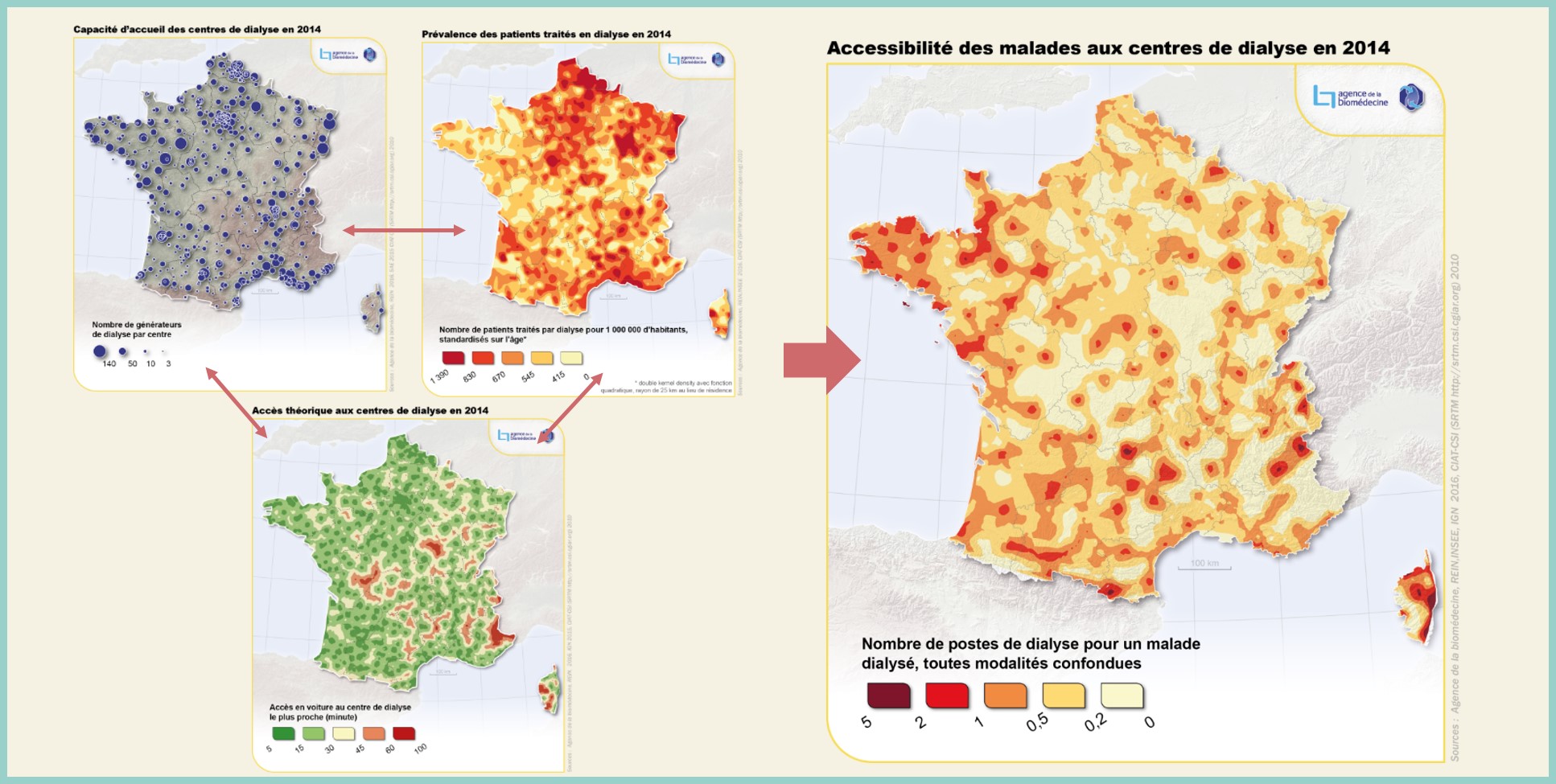
To simplify the workshop, we solely computed GPs densities within grids.
However, in practice, it would have been essential to complement this with other approaches, such as :
An example will be provided using the IGN API and INSEE data
path_insee = os.path.join(data_dir,"insee_example.geojson")
gdf_insee = gpd.read_file(path_insee)
map = gdf_insee.explore(tiles="CartoDB dark_matter")
map
We are selecting the GPs within a 25 meters radius around the study area
bbox_insee = gdf_insee.buffer(25).total_bounds
gp_example = geo_gp.clip(bbox_insee)
gp_example.explore(m=map, color='#e63946', name="GPs",)
gdf_insee["longitude_insee"] = gdf_insee.geometry.centroid.x
gdf_insee["latitude_insee"] = gdf_insee.geometry.centroid.y
gp_example = gp_example.drop_duplicates(subset="result_label") # avoid API's spamming
gdf_cross = gdf_insee[["Groupe","Ind","latitude_insee","longitude_insee"]].merge(gp_example[["latitude","longitude"]],how='cross')
gdf_cross.head()
| Groupe | Ind | latitude_insee | longitude_insee | latitude | longitude | |
|---|---|---|---|---|---|---|
| 0 | 870089 | 289.5 | 6.864278e+06 | 650578.211848 | 6.864182e+06 | 651001.020234 |
| 1 | 870089 | 289.5 | 6.864278e+06 | 650578.211848 | 6.864147e+06 | 650741.580695 |
| 2 | 870089 | 289.5 | 6.864278e+06 | 650578.211848 | 6.864192e+06 | 650736.535319 |
| 3 | 870089 | 289.5 | 6.864278e+06 | 650578.211848 | 6.864296e+06 | 650674.781277 |
| 4 | 870089 | 289.5 | 6.864278e+06 | 650578.211848 | 6.864475e+06 | 650645.130671 |
The calculation between the centroids of the grid cells and the general practitioners can be performed using the IGN API
import requests
def calculate_itinerary(start_lon, start_lat, end_lon, end_lat, url="https://wxs.ign.fr/calcul/geoportail/itineraire/rest/1.0.0/route", profile="car", crs="4326"):
"""
Calculate a route using the IGN Geoportail itinerary service.
Args:
start_lon (float): The longitude of the starting point.
start_lat (float): The latitude of the starting point.
end_lon (float): The longitude of the destination.
end_lat (float): The latitude of the destination.
url (str, optional): The URL of the IGN Geoportail itinerary service. Default is the official URL.
profile (str, optional): The profile for the route calculation, "car" or "pedestrian".
crs (int, optional): The CRS (Coordinate Reference System) code, either 4326 or 2154.
Returns:
dict or None: A dictionary containing the calculated itinerary or None if an error occurs.
Example:
start_lon = 2.3017215728759766
start_lat = 48.81876120037664
end_lon = 2.324380874633789
end_lat = 48.8287067867079
itinerary = calculate_itinerary(start_lon, start_lat, end_lon, end_lat)
if itinerary:
print(itinerary)
"""
start_coords = f"{start_lon},{start_lat}"
end_coords = f"{end_lon},{end_lat}"
params = {
"resource": "bdtopo-pgr",
"profile": profile,
"optimization": "shortest",
"start": start_coords,
"end": end_coords,
"intermediates": "",
"getSteps": "false",
"crs":f"EPSG:{crs}",
"constraints": '{"constraintType":"banned","key":"wayType","operator":"=","value":"tunnel"}'
}
response = requests.get(url, params=params)
if response.status_code == 200:
itinerary = response.json()
return itinerary
else:
print(f"Error {response.status_code}: Unable to calculate the itinerary.")
return None
import os
import pickle
import multiprocessing
def calculate_itinerary_parallel(row):
index, data = row
start_lon = data['longitude_insee']
start_lat = data['latitude_insee']
end_lon = data['longitude']
end_lat = data['latitude']
itinerary = calculate_itinerary(start_lon, start_lat, end_lon, end_lat, crs=2154, profile="pedestrian")
result = {
'duration': itinerary.get('duration', None) if itinerary else None,
'geometry': itinerary.get('geometry', None) if itinerary else None
}
return result
num_cores = multiprocessing.cpu_count() - 1
path_results = os.path.join(data_dir, 'results_ign.pkl')
if os.path.exists(path_results):
with open(path_results, 'rb') as f:
results = pickle.load(f)
else:
from tqdm import tqdm
rows = list(gdf_cross.iterrows())
with multiprocessing.Pool(processes=num_cores) as pool:
results_iterator = pool.imap(calculate_itinerary_parallel, rows)
results = list(tqdm(results_iterator, total=len(rows), desc="Calculating itineraries"))
with open(path_results, 'wb') as f:
pickle.dump(results, f)
from shapely.geometry import shape
geometry_list = [result['geometry'] for result in results]
geometries = [shape(geometry_dict) for geometry_dict in geometry_list]
geometry_gdf = gpd.GeoDataFrame(geometry=geometries, crs="EPSG:2154")
duration_list = [result['duration'] for result in results]
duration_list = np.round(duration_list,1)
geometry_gdf['duration'] = duration_list
geometry_gdf.explore(color='#e6394616', tiles="CartoDB dark_matter")
gdf_cross['duration'] = duration_list
durations = gdf_cross.groupby('Groupe')['duration'].mean().reset_index()
durations = np.round(durations,1)
gdf_insee = gdf_insee.merge(durations)
gdf_insee.explore("duration", tooltip = ['Groupe', 'Ind', 'duration'],
cmap="YlOrRd", tiles="CartoDB dark_matter")
filepath = "./assets/2scfa.jpg"
html_code = f"""
<div style="display: flex; align-items: center;">
<div style="flex: 1;"><img src="{filepath}" width="600"></div>
</div>
"""
HTML(html_code)