Summarizing and interpreting the posterior (analytic)
Matthew Stephens
University of ChicagoJanuary 8, 2026
Last updated: 2026-01-08
Checks: 6 1
Knit directory: fiveMinuteStats/analysis/
This reproducible R Markdown analysis was created with workflowr (version 1.7.1). The Checks tab describes the reproducibility checks that were applied when the results were created. The Past versions tab lists the development history.
The R Markdown file has unstaged changes. To know which version of
the R Markdown file created these results, you’ll want to first commit
it to the Git repo. If you’re still working on the analysis, you can
ignore this warning. When you’re finished, you can run
wflow_publish to commit the R Markdown file and build the
HTML.
Great job! The global environment was empty. Objects defined in the global environment can affect the analysis in your R Markdown file in unknown ways. For reproduciblity it’s best to always run the code in an empty environment.
The command set.seed(12345) was run prior to running the
code in the R Markdown file. Setting a seed ensures that any results
that rely on randomness, e.g. subsampling or permutations, are
reproducible.
Great job! Recording the operating system, R version, and package versions is critical for reproducibility.
Nice! There were no cached chunks for this analysis, so you can be confident that you successfully produced the results during this run.
Great job! Using relative paths to the files within your workflowr project makes it easier to run your code on other machines.
Great! You are using Git for version control. Tracking code development and connecting the code version to the results is critical for reproducibility.
The results in this page were generated with repository version 601244e. See the Past versions tab to see a history of the changes made to the R Markdown and HTML files.
Note that you need to be careful to ensure that all relevant files for
the analysis have been committed to Git prior to generating the results
(you can use wflow_publish or
wflow_git_commit). workflowr only checks the R Markdown
file, but you know if there are other scripts or data files that it
depends on. Below is the status of the Git repository when the results
were generated:
Untracked files:
    Untracked:  figure/
    Untracked:  temp.Rmd

Unstaged changes:
    Modified:   Makefile
    Modified:   analysis/bayes_beta_binomial.Rmd
    Modified:   analysis/index.Rmd
    Modified:   analysis/likelihood_function.Rmd
    Modified:   analysis/summarize_interpret_posterior.Rmd
Note that any generated files, e.g. HTML, png, CSS, etc., are not included in this status report because it is ok for generated content to have uncommitted changes.
These are the previous versions of the repository in which changes were
made to the R Markdown
(analysis/summarize_interpret_posterior.Rmd) and HTML
(docs/summarize_interpret_posterior.html) files. If you’ve
configured a remote Git repository (see ?wflow_git_remote),
click on the hyperlinks in the table below to view the files as they
were in that past version.
| File | Version | Author | Date | Message |
|---|---|---|---|---|
| Rmd | eababf2 | MatthiasEckhart | 2020-09-17 | Fixed minor mistake (Bayesian CI explanation). |
| html | 5f62ee6 | Matthew Stephens | 2019-03-31 | Build site. |
| Rmd | 0cd28bd | Matthew Stephens | 2019-03-31 | workflowr::wflow_publish(all = TRUE) |
| html | 34bcc51 | John Blischak | 2017-03-06 | Build site. |
| Rmd | 5fbc8b5 | John Blischak | 2017-03-06 | Update workflowr project with wflow_update (version 0.4.0). |
| html | 8e61683 | Marcus Davy | 2017-03-03 | rendered html using wflow_build(all=TRUE) |
| html | 5d0fa13 | Marcus Davy | 2017-03-02 | wflow_build() rendered html files |
| Rmd | d674141 | Marcus Davy | 2017-02-26 | typos, refs |
| html | dc8a1bb | stephens999 | 2017-01-28 | add html, figs |
| Rmd | c3e49d5 | stephens999 | 2017-01-28 | Files commited by wflow_commit. |
See here for a PDF version of this vignette.
Overview
This vignette illustrates how to summarize and interpret a posterior distribution that has been computed analytically.
You should be familiar with simple analytic calculations of the posterior distribution of a parameter, such as for a binomial proportion.
Summarising and interpreting a posterior
Suppose we have a parameter \(q\), whose posterior distribution we have computed to be Beta(31, 71) (as here for example). What does this mean? What statements can we make about \(q\)? How do we obtain interval estimates and point estimates for \(q\)?
Remember that the posterior distribution represents our uncertainty (or certainty) in \(q\), after combining the information in the data (the likelihood) with what we knew before collecting data (the prior).
To get some intuition, we could plot the posterior distribution so we can see what it looks like.
q = seq(0,1,length=100)
plot(q, dbeta(q, 31,71), main="Posterior for $q$", ylab="density", type="l")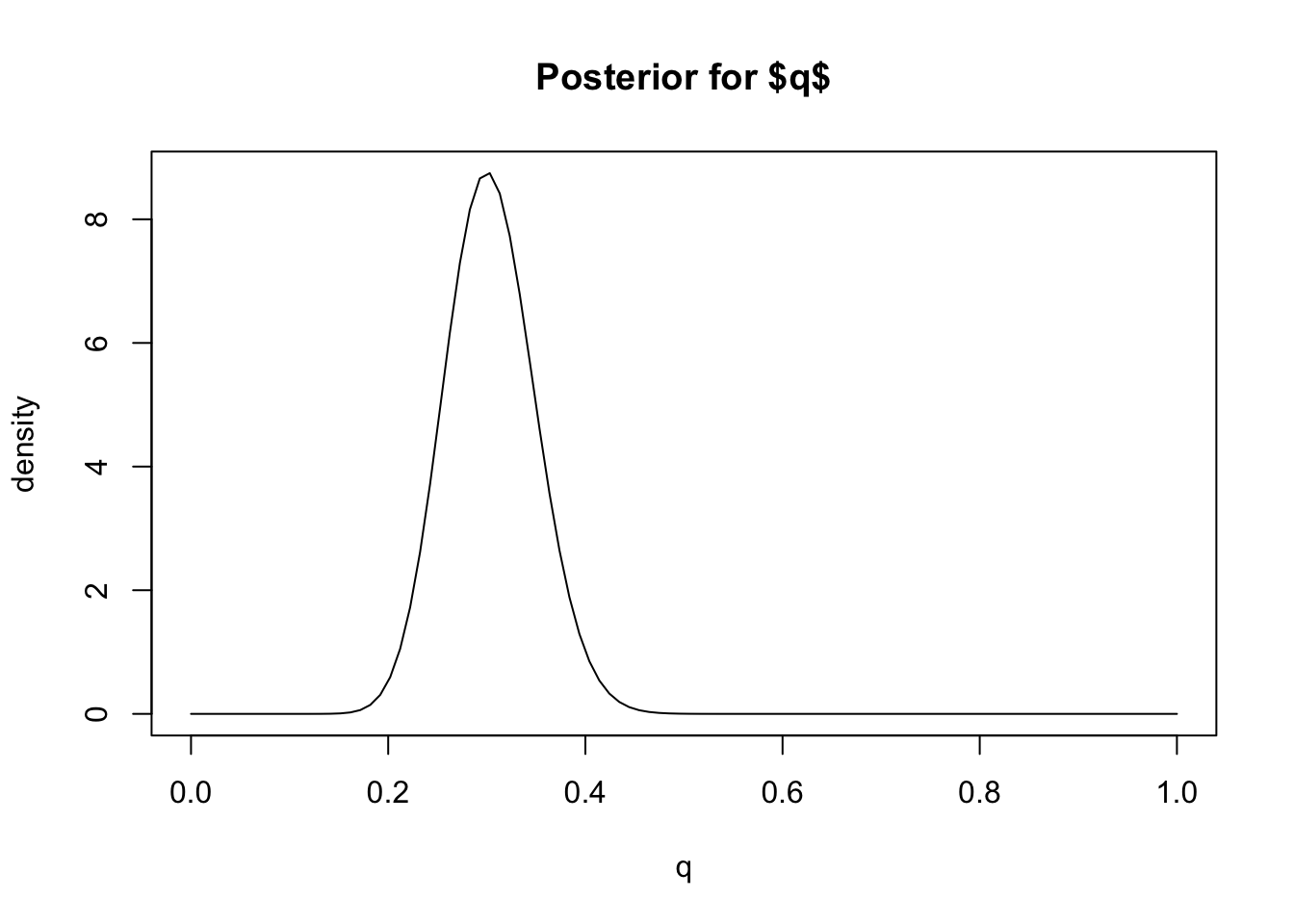
Based on this plot we can visually see that this posterior distribution has the property that \(q\) is highly likely to be less than 0.4 (say) because most of the mass of the distribution lies below 0.4. In Bayesian inference we quantify statements like this – that a particular event is “highly likely” – by computing the “posterior probability” of the event, which is the probability of the event under the posterior distribution.
For example, in this case we can compute the (posterior) probability
that \(q<0.4\), or \(\Pr(q <0.4 | D)\). Since we know the
posterior distribution is a Be(31,71) distribution, this probability is
easy to compute using the pbeta function:
pbeta(0.4,31,71)
# [1] 0.9792202
So we would say “The posterior probability that \(q<0.4\) is 0.98”.
Interval estimates
We can extend this idea to assess the certainty (or confidence) that
\(q\) lies in any interval. For
example, from the plot it looks like \(q\) will very likely lie in the interval
[0.2,0.4] because most of the posterior distribution mass lies between
these two numbers. To quantify how likely we compute the
(posterior) probability that \(q\) lies
in the interval \([0.2,0.4]\), \(\Pr(q \in [0.2,0.4] | D)\). Again, this can
be computed using the pbeta function:
pbeta(0.4,31,71) - pbeta(0.2,31,71)
# [1] 0.9721229
Thus, based on our prior and the data, we would be highly confident (probability approximately 97%) that \(q\) lies between 0.2 and 0.4. That is, \([0.2,0.4]\) is a 97% Bayesian Confidence Interval for \(q\). (Bayesian Confidence Intervals are often referred to as “Credible Intervals”, and also often abbreviated to CI.)
In practice, it is more common to compute Bayesian Confidence Intervals the other way around: specify the level of confidence we want to achieve and find an interval that achieves that level of confidence. This can be done by computing the quantiles of the posterior distribution. For example, the 0.05 and 0.95 quantiles of the posterior would define a 90% Bayesian Confidence Interval.
In our example, these quantiles of the Beta distribution can be
computed using the qbeta function, like this:
qbeta(0.05,31,71)
# [1] 0.2315858
qbeta(0.95,31,71)
# [1] 0.38065
So [0.23, 0.38] is a 90% Bayesian Confidence Interval for \(q\). (It is 90% because there is a 5% chance of it being below 0.23 and 5% of it being above 0.38).
Point Estimates
In some cases we might be happy to give our “best guess” for \(q\), rather than worrying about our uncertainty. That is, we might be interested in giving a “point estimate” for \(q\). Essentially this boils down to summarizing the posterior distribution by a single number.
When \(q\) is a continuous-valued variable, as here, the most common Bayesian point estimate is the mean (or expectation) of the posterior distribution, which is called the “posterior mean”. The mean of the Beta(31,71) distribution is 31/(31+71) = 0.3. So we would say “The posterior mean for \(q\) is 0.3.”
An alternative to the mean is the median. The median of the
Beta(31,71) distribution can be found using qbeta:
qbeta(0.5, 31,71)
# [1] 0.3026356
So we would say “The posterior median for \(q\) is 0.3”.
The mode of the posterior (“posterior mode”) is another possible summary, although this perhaps makes more sense in settings where \(q\) is a discrete variable rather than a continuous variable as here.
Summary
The most common summaries of a posterior distribution are interval estimates and point estimates.
Interval estimates can be obtained by computing quantiles of the posterior distribution. Bayesian Confidence intervals are often called “Credible Intervals”.
Point estimates are typically obtained by computing the mean or median (or mode) of the posterior distribution. These are called the “posterior mean” or the “posterior median” (or “posterior mode”).
Exercise
Suppose you are interested in a parameter \(\theta\) and obtain a posterior distribution for \(\theta\) to be normal with mean 0.2 and standard deviation 0.4. Find
- a 90% Credible Interval for \(\theta\).
- a 95% Credible Interval for \(\theta\).
- a point estimate for \(\theta\).
sessionInfo()
# R version 4.3.3 (2024-02-29)
# Platform: aarch64-apple-darwin20 (64-bit)
# Running under: macOS 15.7.1
#
# Matrix products: default
# BLAS:   /Library/Frameworks/R.framework/Versions/4.3-arm64/Resources/lib/libRblas.0.dylib
# LAPACK: /Library/Frameworks/R.framework/Versions/4.3-arm64/Resources/lib/libRlapack.dylib;  LAPACK version 3.11.0
#
# locale:
# [1] en_US.UTF-8/en_US.UTF-8/en_US.UTF-8/C/en_US.UTF-8/en_US.UTF-8
#
# time zone: America/Chicago
# tzcode source: internal
#
# attached base packages:
# [1] stats     graphics  grDevices utils     datasets  methods   base
#
# loaded via a namespace (and not attached):
#  [1] vctrs_0.6.5       cli_3.6.5         knitr_1.50        rlang_1.1.6
#  [5] xfun_0.52         stringi_1.8.7     promises_1.3.3    jsonlite_2.0.0
#  [9] workflowr_1.7.1   glue_1.8.0        rprojroot_2.0.4   git2r_0.33.0
# [13] htmltools_0.5.8.1 httpuv_1.6.14     sass_0.4.10       rmarkdown_2.29
# [17] evaluate_1.0.4    jquerylib_0.1.4   tibble_3.3.0      fastmap_1.2.0
# [21] yaml_2.3.10       lifecycle_1.0.4   whisker_0.4.1     stringr_1.5.1
# [25] compiler_4.3.3    fs_1.6.6          Rcpp_1.1.0        pkgconfig_2.0.3
# [29] later_1.4.2       digest_0.6.37     R6_2.6.1          pillar_1.11.0
# [33] magrittr_2.0.3    bslib_0.9.0       tools_4.3.3       cachem_1.1.0