Simmental Animal Locations
Troy Rowan
2020-07-31
Last updated: 2020-08-31
Checks: 6 1
Knit directory: local_adaptation_sequence/
This reproducible R Markdown analysis was created with workflowr (version 1.6.2). The Checks tab describes the reproducibility checks that were applied when the results were created. The Past versions tab lists the development history.
Great! Since the R Markdown file has been committed to the Git repository, you know the exact version of the code that produced these results.
Great job! The global environment was empty. Objects defined in the global environment can affect the analysis in your R Markdown file in unknown ways. For reproduciblity it’s best to always run the code in an empty environment.
The command set.seed(20200709) was run prior to running the code in the R Markdown file. Setting a seed ensures that any results that rely on randomness, e.g. subsampling or permutations, are reproducible.
Great job! Recording the operating system, R version, and package versions is critical for reproducibility.
Nice! There were no cached chunks for this analysis, so you can be confident that you successfully produced the results during this run.
Using absolute paths to the files within your workflowr project makes it difficult for you and others to run your code on a different machine. Change the absolute path(s) below to the suggested relative path(s) to make your code more reproducible.
| absolute | relative |
|---|---|
| C:/Users/troyrowan/Documents/GitHub/local_adaptation_sequence | . |
Great! You are using Git for version control. Tracking code development and connecting the code version to the results is critical for reproducibility.
The results in this page were generated with repository version 27eb0df. See the Past versions tab to see a history of the changes made to the R Markdown and HTML files.
Note that you need to be careful to ensure that all relevant files for the analysis have been committed to Git prior to generating the results (you can use wflow_publish or wflow_git_commit). workflowr only checks the R Markdown file, but you know if there are other scripts or data files that it depends on. Below is the status of the Git repository when the results were generated:
Ignored files:
    Ignored:    .Rhistory
    Ignored:    .Rproj.user/

Untracked files:
    Untracked:  data/200730_ASA_AllGenotypes.csv
    Untracked:  data/200820_sample_sheet.csv
    Untracked:  data/PRISM_ppt_30yr_normal_4kmM2_annual_asc.asc
    Untracked:  data/animal_table.rds
    Untracked:  data/license.txt
    Untracked:  data/mizzou-data-request/
    Untracked:  data/prism_climate_data/
    Untracked:  data/us-zip-code-latitude-and-longitude.csv
    Untracked:  data/uszips.csv
    Untracked:  data/uszips.xlsx
    Untracked:  desktop.ini
    Untracked:  output/200822_Lab_IDs.csv
    Untracked:  output/desktop.ini
    Untracked:  output/k10.allvars.seed2.rds
    Untracked:  output/k9.allvars.seed1.rds
    Untracked:  output/k9.allvars.seed2.rds
    Untracked:  output/k9.threevars.seed1.rds
    Untracked:  output/k9.threevars.seed2.rds
    Untracked:  output/kmeans_plotlist.RDS
    Untracked:  output/zipcode_zones.csv

Unstaged changes:
    Modified:   analysis/index.Rmd
    Modified:   code/map_functions.R
Note that any generated files, e.g. HTML, png, CSS, etc., are not included in this status report because it is ok for generated content to have uncommitted changes.
These are the previous versions of the repository in which changes were made to the R Markdown (analysis/animal_locations.Rmd) and HTML (docs/animal_locations.html) files. If you’ve configured a remote Git repository (see ?wflow_git_remote), click on the hyperlinks in the table below to view the files as they were in that past version.
| File | Version | Author | Date | Message |
|---|---|---|---|---|
| Rmd | 27eb0df | Troy Rowan | 2020-08-31 | Simmental data dump locations |
Reading in phenotypes, pedigree, etc.
Pulling lab IDs for genotype dump
This is from the animal table as of August 21st, 2020 Harly turned this into an RDS file using one of her scripts and weird suite of packages (almost broke her computer) This behaved a bit curiously as I kept dropping ~10 K animals from the Simmental data sheet that I read in. Turns out that they had repeated records for mature weight, so the same cow could be listed multiple times. Upon filtering those out and matching as many animals as possible to a Reg or Ref_ID based on their ASA Registration number, I get 100,559 distinct lab IDs. They’re written out and sent to Bob for a data dump on CIFS prior to imputation on Lewis.
There are 99,932 individuals that are adequately accoutned for in the database
# A tibble: 98,432 x 2
# Groups:   asa_nbr [98,432]
   asa_nbr     n
   <chr>   <int>
 1 2378503     7
 2 2585172     7
 3 2618240     7
 4 2671799     7
 5 2724093     7
 6 2724097     7
 7 2724108     7
 8 2724110     7
 9 2724117     7
10 2724129     7
# ... with 98,422 more rows
function (..., sep = " ", collapse = NULL)
.Internal(paste(list(...), sep, collapse))
<bytecode: 0x0000000014cf61e0>
<environment: namespace:base>[1] 99932Completeness of data
98,335 individuals (unique ASA reg numbers) match up to entries in the database
                 colSums(!is.na(sim_animals))
asa_nbr                                110710
breeder_zip                            109352
owner_zip                              105406
bw                                      96064
bw_adj                                 110710
bw_cg                                  109549
ww                                      89595
ww_adj                                 110710
ww_cg                                   86410
yw                                      64608
yw_adj                                 110293
mw                                      46580
international_id                       110703
# A tibble: 1 x 1
n
<int>
1 98335It actually looks
Simmental Location Counts
K=9 All Variables (Seed #1)
# A tibble: 9 x 2
# Groups:   region [9]
  region                 n
  <chr>              <int>
1 Arid Prairie        1069
2 Corn Belt          13887
3 Desert                16
4 Fescue Belt        24485
5 Foothills           1787
6 Forested Mountains  8912
7 High Plains        29195
8 Southeast           6733
9 Upper Midwest      20270
K=9 All Variables (Seed #2)
# A tibble: 8 x 2
# Groups:   region [8]
  region                 n
  <chr>              <int>
1 Arid Prairie        1501
2 Desert                16
3 Fescue Belt        30276
4 Foothills           1391
5 Forested Mountains  7606
6 High Plains        31632
7 Southeast          10518
8 Upper Midwest      25723
K=9 Three Variables ()
Seed doesn’t appear to cause any issues here
# A tibble: 9 x 2
# Groups:   region [9]
  region                 n
  <chr>              <int>
1 Arid Prairie        2460
2 Desert              1435
3 Fescue Belt        26561
4 Foothills          18684
5 Forested Mountains  1436
6 High Plains        34624
7 Rainforest            15
8 Southeast          11828
9 Upper Midwest      15700
K = 10 Counts
Something is up with these region assignments… Way too many individuals say that they’re from “VERY HOT PLACE”
Simmental Location Maps
K = 9 Map
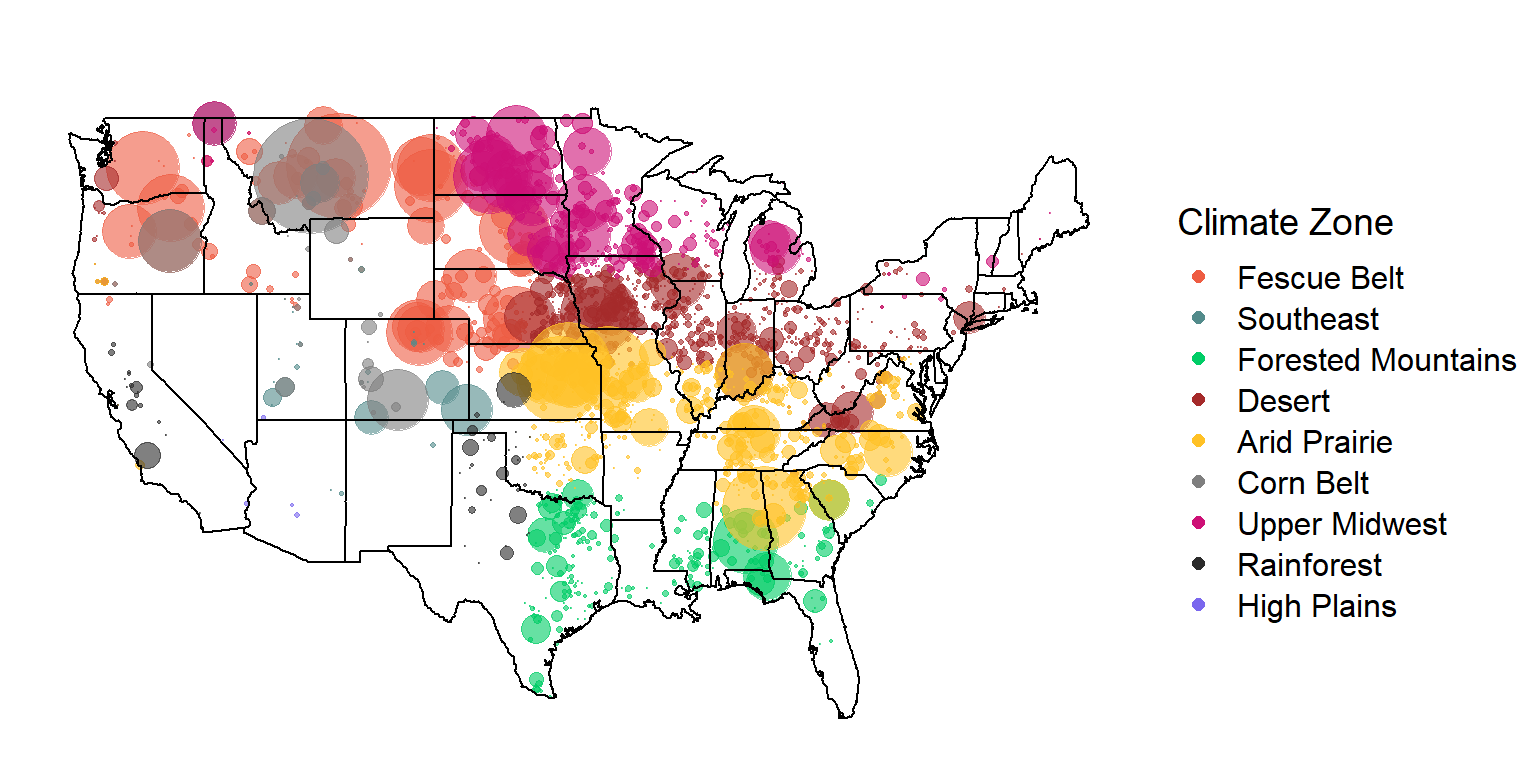
K=10 Map
R version 3.6.1 (2019-07-05)
Platform: x86_64-w64-mingw32/x64 (64-bit)
Running under: Windows 10 x64 (build 19041)

Matrix products: default

locale:
[1] LC_COLLATE=English_United States.1252
[2] LC_CTYPE=English_United States.1252
[3] LC_MONETARY=English_United States.1252
[4] LC_NUMERIC=C
[5] LC_TIME=English_United States.1252

attached base packages:
[1] stats     graphics  grDevices utils     datasets  methods   base

other attached packages:
 [1] forcats_0.5.0    stringr_1.4.0    dplyr_0.8.5      readr_1.3.1
 [5] tidyr_1.0.3      tibble_3.0.1     tidyverse_1.3.0  here_0.1
 [9] ggcorrplot_0.1.3 corrr_0.4.2      factoextra_1.0.7 ggplot2_3.3.0
[13] purrr_0.3.4      cowplot_1.0.0    ggthemes_4.2.0   maps_3.3.0
[17] RStoolbox_0.2.6  fpc_2.2-7        raster_3.3-7     rgdal_1.5-12
[21] sp_1.4-2         knitr_1.28       workflowr_1.6.2

loaded via a namespace (and not attached):
 [1] colorspace_1.4-1     ellipsis_0.3.0       class_7.3-15
 [4] modeltools_0.2-23    mclust_5.4.6         rprojroot_1.3-2
 [7] fs_1.4.1             rstudioapi_0.11      farver_2.0.3
[10] ggrepel_0.8.2        flexmix_2.3-15       prodlim_2019.11.13
[13] fansi_0.4.1          lubridate_1.7.8      xml2_1.3.2
[16] codetools_0.2-16     splines_3.6.1        doParallel_1.0.15
[19] robustbase_0.93-6    jsonlite_1.6.1       pROC_1.16.2
[22] caret_6.0-86         broom_0.5.6          cluster_2.1.0
[25] kernlab_0.9-29       dbplyr_1.4.3         rgeos_0.5-3
[28] compiler_3.6.1       httr_1.4.1           backports_1.1.6
[31] assertthat_0.2.1     Matrix_1.2-17        cli_2.0.2
[34] later_1.0.0          htmltools_0.4.0      tools_3.6.1
[37] gtable_0.3.0         glue_1.4.0           reshape2_1.4.4
[40] Rcpp_1.0.4.6         cellranger_1.1.0     vctrs_0.2.4
[43] nlme_3.1-140         iterators_1.0.12     timeDate_3043.102
[46] gower_0.2.2          xfun_0.13            rvest_0.3.5
[49] lifecycle_0.2.0      XML_3.99-0.3         DEoptimR_1.0-8
[52] MASS_7.3-51.4        scales_1.1.0         ipred_0.9-9
[55] hms_0.5.3            promises_1.1.0       parallel_3.6.1
[58] yaml_2.2.1           geosphere_1.5-10     rpart_4.1-15
[61] stringi_1.4.6        highr_0.8            foreach_1.5.0
[64] lava_1.6.7           rlang_0.4.6          pkgconfig_2.0.3
[67] prabclus_2.3-2       evaluate_0.14        lattice_0.20-38
[70] recipes_0.1.13       labeling_0.3         tidyselect_1.0.0
[73] plyr_1.8.6           magrittr_1.5         R6_2.4.1
[76] generics_0.0.2       DBI_1.1.0            pillar_1.4.4
[79] haven_2.2.0          whisker_0.4          withr_2.2.0
[82] survival_2.44-1.1    nnet_7.3-12          modelr_0.1.7
[85] crayon_1.3.4         utf8_1.1.4           rmarkdown_2.1
[88] grid_3.6.1           readxl_1.3.1         data.table_1.12.8
[91] git2r_0.27.1         ModelMetrics_1.2.2.2 reprex_0.3.0
[94] digest_0.6.25        diptest_0.75-7       httpuv_1.5.2
[97] stats4_3.6.1         munsell_0.5.0