Mapa Genético
Costa, W. G.
2025-03-25
Last updated: 2025-03-25
Checks: 6 1
Knit directory:
Importance-of-markers-for-QTL-detection-by-machine-learning-methods/
This reproducible R Markdown analysis was created with workflowr (version 1.7.1). The Checks tab describes the reproducibility checks that were applied when the results were created. The Past versions tab lists the development history.
The R Markdown is untracked by Git. To know which version of the R
Markdown file created these results, you’ll want to first commit it to
the Git repo. If you’re still working on the analysis, you can ignore
this warning. When you’re finished, you can run
wflow_publish to commit the R Markdown file and build the
HTML.
Great job! The global environment was empty. Objects defined in the global environment can affect the analysis in your R Markdown file in unknown ways. For reproduciblity it’s best to always run the code in an empty environment.
The command set.seed(20221222) was run prior to running
the code in the R Markdown file. Setting a seed ensures that any results
that rely on randomness, e.g. subsampling or permutations, are
reproducible.
Great job! Recording the operating system, R version, and package versions is critical for reproducibility.
Nice! There were no cached chunks for this analysis, so you can be confident that you successfully produced the results during this run.
Great job! Using relative paths to the files within your workflowr project makes it easier to run your code on other machines.
Great! You are using Git for version control. Tracking code development and connecting the code version to the results is critical for reproducibility.
The results in this page were generated with repository version 43b01f5. See the Past versions tab to see a history of the changes made to the R Markdown and HTML files.
Note that you need to be careful to ensure that all relevant files for
the analysis have been committed to Git prior to generating the results
(you can use wflow_publish or
wflow_git_commit). workflowr only checks the R Markdown
file, but you know if there are other scripts or data files that it
depends on. Below is the status of the Git repository when the results
were generated:
Ignored files:
    Ignored:    .Rproj.user/

Untracked files:
    Untracked:  analysis/GWAS.Rmd
    Untracked:  analysis/map.Rmd
    Untracked:  analysis/snpsOfInterest.RData
    Untracked:  data/GEN_T/
    Untracked:  data/GEN_V/
    Untracked:  data/PHEN_T/
    Untracked:  data/PHEN_V/
    Untracked:  data/imp/
    Untracked:  data/simulated_data/
    Untracked:  data/snpsOfInterest.RData
    Untracked:  indice_relativo.tiff
    Untracked:  percentagem_acerto.tiff
    Untracked:  percentagem_erro.tiff

Unstaged changes:
    Modified:   Importance-of-markers-for-QTL-detection-by-machine-learning-methods.Rproj
    Modified:   README.md
    Modified:   analysis/_site.yml
    Modified:   analysis/about.Rmd
    Modified:   analysis/license.Rmd
    Deleted:    data/res.imp.ad.RData
    Deleted:    data/res.imp.ad.xlsx
    Deleted:    data/res.imp.bag.RData
    Deleted:    data/res.imp.bag.xlsx
    Deleted:    data/res.imp.boost.RData
    Deleted:    data/res.imp.boost.xlsx
    Deleted:    data/res.imp.gblup.RData
    Deleted:    data/res.imp.gblup.xlsx
    Deleted:    data/res.imp.mars.update1.RData
    Deleted:    data/res.imp.mars.update2.RData
    Deleted:    data/res.imp.mars.update3.RData
    Deleted:    data/res.imp.mlp.RData
    Deleted:    data/res.imp.rbf.RData
    Deleted:    data/res.imp.rf.RData
    Deleted:    data/res.imp.rf.xlsx
Note that any generated files, e.g. HTML, png, CSS, etc., are not included in this status report because it is ok for generated content to have uncommitted changes.
There are no past versions. Publish this analysis with
wflow_publish() to start tracking its development.
Importance of markers for QTL detection by machine learning methods
Creating Genetic Map Chart
Libraries
Genetic map
Primeiro vamos definir nossos SNPs de interesse para as variáveis.
Essas informações foram pré-definidas e podem ser encontrados no arquivo
control_genetic. Vamos carregar o
arquivo snpsOfInterest.RData“ que comtemas infomações dos
snps considerados QTLs por variavel.
Agora vamos definir os nomes das colunas para nosso
snpsOfInterest e criar um objeto locus com as
informações de ininício e témino de cada grupo de ligação.
locus <-
  data.frame(
    c(
      1,
      401,
      402,
      802,
      803,
      1203,
      1204,
      1604,
      1605,
      2005,
      2006,
      2406,
      2407,
      2807,
      2808,
      3208,
      3209,
      3609,
      3610,
      4010
    )
  )

colnames(locus) <- c("marker")
Para facilitar a visualização criei um gráfico genético das
características map_plot. Para isso criei o
map com o número de marcadores e tamanho de cada grupo de
liagação.
map <-
  data.frame(rbind(
    cbind(seq(1, 401, 1), rep("LG 1", 401), seq(0, 200, 0.5)),
    cbind(seq(402, 802, 1), rep("LG 2", 401), seq(0, 200, 0.5)),
    cbind(seq(803, 1203, 1), rep("LG 3", 401), seq(0, 200, 0.5)),
    cbind(seq(1204, 1604, 1), rep("LG 4", 401), seq(0, 200, 0.5)),
    cbind(seq(1605, 2005, 1), rep("LG 5", 401), seq(0, 200, 0.5)),
    cbind(seq(2006, 2406, 1), rep("LG 6", 401), seq(0, 200, 0.5)),
    cbind(seq(2407, 2807, 1), rep("LG 7", 401), seq(0, 200, 0.5)),
    cbind(seq(2808, 3208, 1), rep("LG 8", 401), seq(0, 200, 0.5)),
    cbind(seq(3209, 3609, 1), rep("LG 9", 401), seq(0, 200, 0.5)),
    cbind(seq(3610, 4010, 1), rep("LG 10", 401), seq(0, 200, 0.5))
  ))

colnames(map) <- c("marker", "LG", "Size")

map <- map %>%
  mutate(
    marker = as.numeric(marker),
    Size = as.numeric(Size),
    LG = factor(
      LG,
      levels = c(
        "LG 1",
        "LG 2",
        "LG 3",
        "LG 4",
        "LG 5",
        "LG 6",
        "LG 7",
        "LG 8",
        "LG 9",
        "LG 10"
      )
    )
  )
Para dividir a figura e mostrar todos os maps genômicos das
características, dividi o snpsOfInterest e o
map para cada característica e inclui os SNPs de interesse
no map para cada característica.
snpsOfInterest1 <- snpsOfInterest %>%
  filter(variable == 1)

snpsOfInterest2 <- snpsOfInterest %>%
  filter(variable == 2)

snpsOfInterest3 <- snpsOfInterest %>%
  filter(variable == 3)

snpsOfInterest4 <- snpsOfInterest %>%
  filter(variable == 4)

snpsOfInterest5 <- snpsOfInterest %>%
  filter(variable == 5)

map1 <- map %>%
  mutate(
    is_highlight = ifelse(marker %in% snpsOfInterest1$marker, "yes", "no"),
    is_locus = ifelse(marker %in% locus$marker, "yes", "no")
  )

map2 <- map %>%
  mutate(
    is_highlight = ifelse(marker %in% snpsOfInterest2$marker, "yes", "no"),
    is_locus = ifelse(marker %in% locus$marker, "yes", "no")
  )

map3 <- map %>%
  mutate(
    is_highlight = ifelse(marker %in% snpsOfInterest3$marker, "yes", "no"),
    is_locus = ifelse(marker %in% locus$marker, "yes", "no")
  )

map4 <- map %>%
  mutate(
    is_highlight = ifelse(marker %in% snpsOfInterest4$marker, "yes", "no"),
    is_locus = ifelse(marker %in% locus$marker, "yes", "no")
  )

map5 <- map %>%
  mutate(
    is_highlight = ifelse(marker %in% snpsOfInterest5$marker, "yes", "no"),
    is_locus = ifelse(marker %in% locus$marker, "yes", "no")
  )
Agora cirei o gráfico de cada característica e depois agrupei eles em
apenas uma imagem maps.
map_plot1 <- ggplot(map1, aes(x = LG, y = Size)) +
  geom_segment(aes(
    yend = 200,
    y = 0,
    x = LG,
    xend = LG
  ),
  color = "skyblue",
  size = 1) +
  geom_point(
    data = subset(map1, is_locus == "yes"),
    color = "skyblue",
    size = 0.5
  ) +
  geom_point(
    data = subset(map1, is_highlight == "yes"),
    color = "Orange",
    size = 0.5
  ) +
  geom_text_repel(
    data = subset(map1, is_highlight == "yes"),
    aes(label = marker),
    size = 1.5,
    max.overlaps = Inf,
    min.segment.length = 0,
    force   = 0,
    nudge_x      = -0.55,
    nudge_y      = -1.5,
    direction    = "x",
    hjust        = 0.5,
    segment.curvature = -1e-20,
    segment.angle     = 45,
    segment.size = 0.1
  ) +
  geom_text_repel(
    data = subset(map1, is_locus == "yes"),
    aes(label = marker),
    size = 1.5,
    max.overlaps = Inf,
    min.segment.length = 0,
    force   = 0,
    nudge_x      = -0.55,
    nudge_y      = -1.5,
    direction    = "x",
    hjust        = 0.5,
    segment.curvature = -1e-20,
    segment.angle     = 45,
    segment.size = 0.1
  ) +
  scale_x_discrete(expand = expansion(mult = c(0.15, 0.05))) +
  scale_y_continuous(expand = expansion(mult = c(0.03, 0.05))) +
  theme_void() +
  theme(
    axis.text.y = element_blank(),
    axis.text.x = element_text(size = 4),
    axis.ticks = element_blank()
  ) +
  labs(y = "", x = "")

map_plot2 <- ggplot(map2, aes(x = LG, y = Size)) +
  geom_segment(aes(
    yend = 200,
    y = 0,
    x = LG,
    xend = LG
  ),
  color = "skyblue",
  size = 1) +
  geom_point(
    data = subset(map2, is_locus == "yes"),
    color = "skyblue",
    size = 0.5
  ) +
  geom_point(
    data = subset(map2, is_highlight == "yes"),
    color = "Orange",
    size = 0.5
  ) +
  geom_text_repel(
    data = subset(map2, is_highlight == "yes"),
    aes(label = marker),
    size = 1.5,
    max.overlaps = Inf,
    min.segment.length = 0,
    force   = 0,
    nudge_x      = -0.55,
    nudge_y      = -1.5,
    direction    = "x",
    hjust        = 0.5,
    segment.curvature = -1e-20,
    segment.angle     = 45,
    segment.size = 0.1
  ) +
  geom_text_repel(
    data = subset(map2, is_locus == "yes"),
    aes(label = marker),
    size = 1.5,
    max.overlaps = Inf,
    min.segment.length = 0,
    force   = 0,
    nudge_x      = -0.55,
    nudge_y      = -1.5,
    direction    = "x",
    hjust        = 0.5,
    segment.curvature = -1e-20,
    segment.angle     = 45,
    segment.size = 0.1
  ) +
  scale_x_discrete(expand = expansion(mult = c(0.15, 0.05))) +
  scale_y_continuous(expand = expansion(mult = c(0.03, 0.05))) +
  theme_void() +
  theme(
    axis.text.y = element_blank(),
    axis.text.x = element_text(size = 4),
    axis.ticks = element_blank()
  ) +
  labs(y = "", x = "")

map_plot3 <- ggplot(map3, aes(x = LG, y = Size)) +
  geom_segment(aes(
    yend = 200,
    y = 0,
    x = LG,
    xend = LG
  ),
  color = "skyblue",
  size = 1) +
  geom_point(
    data = subset(map3, is_locus == "yes"),
    color = "skyblue",
    size = 0.5
  ) +
  geom_point(
    data = subset(map3, is_highlight == "yes"),
    color = "Orange",
    size = 0.5
  ) +
  geom_text_repel(
    data = subset(map3, is_highlight == "yes"),
    aes(label = marker),
    size = 1.5,
    max.overlaps = Inf,
    min.segment.length = 0,
    force   = 0,
    nudge_x      = -0.55,
    nudge_y      = -1.5,
    direction    = "x",
    hjust        = 0.5,
    segment.curvature = -1e-20,
    segment.angle     = 45,
    segment.size = 0.1
  ) +
  geom_text_repel(
    data = subset(map3, is_locus == "yes"),
    aes(label = marker),
    size = 1.5,
    max.overlaps = Inf,
    min.segment.length = 0,
    force   = 0,
    nudge_x      = -0.55,
    nudge_y      = -1.5,
    direction    = "x",
    hjust        = 0.5,
    segment.curvature = -1e-20,
    segment.angle     = 45,
    segment.size = 0.1
  ) +
  scale_x_discrete(expand = expansion(mult = c(0.15, 0.05))) +
  scale_y_continuous(expand = expansion(mult = c(0.03, 0.05))) +
  theme_void() +
  theme(
    axis.text.y = element_blank(),
    axis.text.x = element_text(size = 4),
    axis.ticks = element_blank()
  ) +
  labs(y = "", x = "")

map_plot4 <- ggplot(map4, aes(x = LG, y = Size)) +
  geom_segment(aes(
    yend = 200,
    y = 0,
    x = LG,
    xend = LG
  ),
  color = "skyblue",
  size = 1) +
  geom_point(
    data = subset(map4, is_locus == "yes"),
    color = "skyblue",
    size = 0.5
  ) +
  geom_point(
    data = subset(map4, is_highlight == "yes"),
    color = "Orange",
    size = 0.5
  ) +
  geom_text_repel(
    data = subset(map4, is_highlight == "yes"),
    aes(label = marker),
    size = 1.5,
    max.overlaps = Inf,
    min.segment.length = 0,
    force   = 0,
    nudge_x      = -0.55,
    nudge_y      = -1.5,
    direction    = "x",
    hjust        = 0.5,
    segment.curvature = -1e-20,
    segment.angle     = 45,
    segment.size = 0.1
  ) +
  geom_text_repel(
    data = subset(map4, is_locus == "yes"),
    aes(label = marker),
    size = 1.5,
    max.overlaps = Inf,
    min.segment.length = 0,
    force   = 0,
    nudge_x      = -0.55,
    nudge_y      = -1.5,
    direction    = "x",
    hjust        = 0.5,
    segment.curvature = -1e-20,
    segment.angle     = 45,
    segment.size = 0.1
  ) +
  scale_x_discrete(expand = expansion(mult = c(0.15, 0.05))) +
  scale_y_continuous(expand = expansion(mult = c(0.03, 0.05))) +
  theme_void() +
  theme(
    axis.text.y = element_blank(),
    axis.text.x = element_text(size = 4),
    axis.ticks = element_blank()
  ) +
  labs(y = "", x = "")

map_plot5 <- ggplot(map5, aes(x = LG, y = Size)) +
  geom_segment(aes(
    yend = 200,
    y = 0,
    x = LG,
    xend = LG
  ),
  color = "skyblue",
  size = 1) +
  geom_point(
    data = subset(map5, is_locus == "yes"),
    color = "skyblue",
    size = 0.5
  ) +
  geom_point(
    data = subset(map5, is_highlight == "yes"),
    color = "Orange",
    size = 0.5
  ) +
  geom_text_repel(
    data = subset(map5, is_highlight == "yes"),
    aes(label = marker),
    size = 1.5,
    max.overlaps = Inf,
    min.segment.length = 0,
    force   = 0,
    nudge_x      = -0.55,
    nudge_y      = -1.5,
    direction    = "x",
    hjust        = 0.5,
    segment.curvature = -1e-20,
    segment.angle     = 45,
    segment.size = 0.1
  ) +
  geom_text_repel(
    data = subset(map5, is_locus == "yes"),
    aes(label = marker),
    size = 1.5,
    max.overlaps = Inf,
    min.segment.length = 0,
    force   = 0,
    nudge_x      = -0.55,
    nudge_y      = -1.5,
    direction    = "x",
    hjust        = 0.5,
    segment.curvature = -1e-20,
    segment.angle     = 45,
    segment.size = 0.1
  ) +
  scale_x_discrete(expand = expansion(mult = c(0.15, 0.05))) +
  scale_y_continuous(expand = expansion(mult = c(0.03, 0.05))) +
  theme_void() +
  theme(
    axis.text.y = element_blank(),
    axis.text.x = element_text(size = 4),
    axis.ticks = element_blank()
  ) +
  labs(y = "", x = "")

maps <- ggdraw() +
  draw_plot(
    map_plot1,
    x = 0.05,
    y = .5,
    width = .3,
    height = .5
  ) +
  draw_plot(
    map_plot2,
    x = .4,
    y = .5,
    width = .3,
    height = .5
  ) +
  draw_plot(
    map_plot3,
    x = .75,
    y = .5,
    width = .3,
    height = .5
  ) +
  draw_plot(
    map_plot4,
    x = 0.25,
    y = 0,
    width = 0.3,
    height = 0.5
  ) +
  draw_plot(
    map_plot5,
    x = 0.65,
    y = 0,
    width = 0.3,
    height = 0.5
  ) +
  draw_plot_label(
    label = c("A", "B", "C", "D", "E"),
    size = 15,
    x = c(0, 0.35, 0.7, 0.2, 0.6),
    y = c(1, 1, 1, 0.5, 0.5)
  )

print(maps)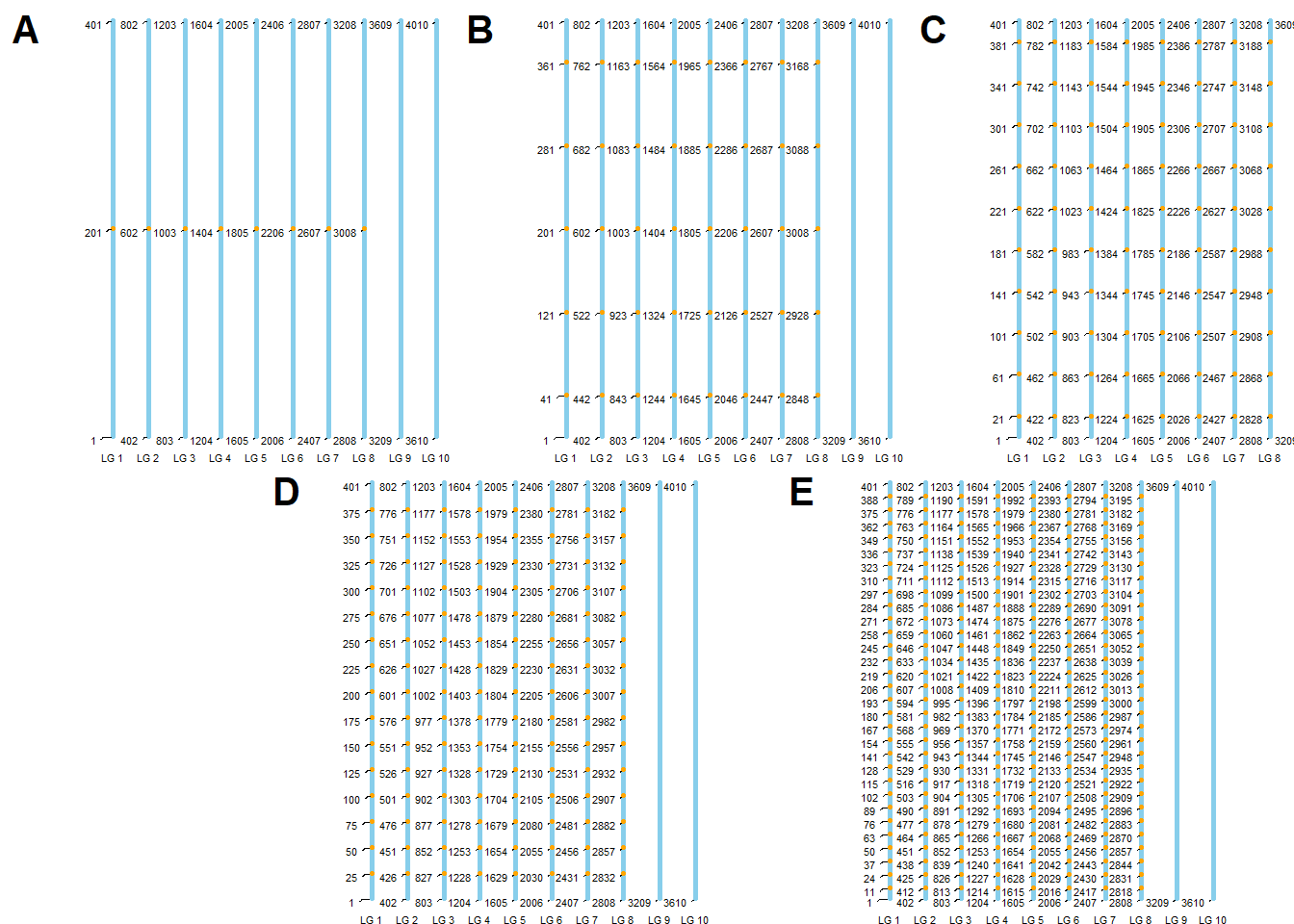
R version 4.4.3 (2025-02-28 ucrt)
Platform: x86_64-w64-mingw32/x64
Running under: Windows 11 x64 (build 26100)

Matrix products: default


locale:
[1] LC_COLLATE=Portuguese_Brazil.utf8  LC_CTYPE=Portuguese_Brazil.utf8
[3] LC_MONETARY=Portuguese_Brazil.utf8 LC_NUMERIC=C
[5] LC_TIME=Portuguese_Brazil.utf8

time zone: America/Sao_Paulo
tzcode source: internal

attached base packages:
[1] stats     graphics  grDevices utils     datasets  methods   base

other attached packages:
 [1] tidytext_0.4.2    cowplot_1.1.3     ggpubr_0.6.0      ggrepel_0.9.6
 [5] ggthemes_5.1.0    metan_1.19.0      data.table_1.17.0 lubridate_1.9.4
 [9] forcats_1.0.0     stringr_1.5.1     dplyr_1.1.4       purrr_1.0.4
[13] readr_2.1.5       tidyr_1.3.1       tibble_3.2.1      ggplot2_3.5.1
[17] tidyverse_2.0.0

loaded via a namespace (and not attached):
 [1] tidyselect_1.2.1    farver_2.1.2        fastmap_1.2.0
 [4] GGally_2.2.1        janeaustenr_1.0.0   tweenr_2.0.3
 [7] mathjaxr_1.6-0      promises_1.3.2      digest_0.6.37
[10] timechange_0.3.0    lifecycle_1.0.4     tokenizers_0.3.0
[13] magrittr_2.0.3      compiler_4.4.3      rlang_1.1.5
[16] sass_0.4.9          tools_4.4.3         yaml_2.3.10
[19] knitr_1.49          ggsignif_0.6.4      labeling_0.4.3
[22] plyr_1.8.9          RColorBrewer_1.1-3  abind_1.4-8
[25] workflowr_1.7.1     withr_3.0.2         numDeriv_2016.8-1.1
[28] grid_4.4.3          polyclip_1.10-7     git2r_0.35.0
[31] colorspace_2.1-1    scales_1.3.0        MASS_7.3-64
[34] cli_3.6.4           rmarkdown_2.29      reformulas_0.4.0
[37] generics_0.1.3      rstudioapi_0.17.1   tzdb_0.4.0
[40] minqa_1.2.8         cachem_1.1.0        ggforce_0.4.2
[43] splines_4.4.3       vctrs_0.6.5         boot_1.3-31
[46] Matrix_1.7-2        jsonlite_1.9.1      carData_3.0-5
[49] car_3.1-3           hms_1.1.3           patchwork_1.3.0
[52] rstatix_0.7.2       Formula_1.2-5       jquerylib_0.1.4
[55] glue_1.8.0          nloptr_2.2.1        ggstats_0.9.0
[58] stringi_1.8.4       gtable_0.3.6        later_1.4.1
[61] lme4_1.1-36         lmerTest_3.1-3      munsell_0.5.1
[64] pillar_1.10.1       htmltools_0.5.8.1   R6_2.6.1
[67] Rdpack_2.6.3        rprojroot_2.0.4     evaluate_1.0.3
[70] lattice_0.22-6      SnowballC_0.7.1     rbibutils_2.3
[73] backports_1.5.0     broom_1.0.7         httpuv_1.6.15
[76] bslib_0.9.0         Rcpp_1.0.14         nlme_3.1-167
[79] xfun_0.51           fs_1.6.5            pkgconfig_2.0.3