Data wrangling for Class Project
Maggie Douglas
2026-02-14
Last updated: 2026-02-23
Checks: 6 1
Knit directory: dickinson_power/
This reproducible R Markdown analysis was created with workflowr (version 1.7.1). The Checks tab describes the reproducibility checks that were applied when the results were created. The Past versions tab lists the development history.
The R Markdown file has unstaged changes. To know which version of
the R Markdown file created these results, you’ll want to first commit
it to the Git repo. If you’re still working on the analysis, you can
ignore this warning. When you’re finished, you can run
wflow_publish to commit the R Markdown file and build the
HTML.
Great job! The global environment was empty. Objects defined in the global environment can affect the analysis in your R Markdown file in unknown ways. For reproduciblity it’s best to always run the code in an empty environment.
The command set.seed(20260107) was run prior to running
the code in the R Markdown file. Setting a seed ensures that any results
that rely on randomness, e.g. subsampling or permutations, are
reproducible.
Great job! Recording the operating system, R version, and package versions is critical for reproducibility.
Nice! There were no cached chunks for this analysis, so you can be confident that you successfully produced the results during this run.
Great job! Using relative paths to the files within your workflowr project makes it easier to run your code on other machines.
Great! You are using Git for version control. Tracking code development and connecting the code version to the results is critical for reproducibility.
The results in this page were generated with repository version 182fffe. See the Past versions tab to see a history of the changes made to the R Markdown and HTML files.
Note that you need to be careful to ensure that all relevant files for
the analysis have been committed to Git prior to generating the results
(you can use wflow_publish or
wflow_git_commit). workflowr only checks the R Markdown
file, but you know if there are other scripts or data files that it
depends on. Below is the status of the Git repository when the results
were generated:
Ignored files:
    Ignored:    .DS_Store
    Ignored:    .Rhistory
    Ignored:    .Rproj.user/
    Ignored:    data/.DS_Store
    Ignored:    data/FY25 Main Meter Data.xlsx
    Ignored:    data/building_list_FY25_updated.xlsx
    Ignored:    data/graph_data_life_exp.csv
    Ignored:    output/annual_kwh.csv
    Ignored:    output/building_check.csv
    Ignored:    output/building_check.xlsx
    Ignored:    output/daily_kwh.csv
    Ignored:    output/kwh_annual.csv
    Ignored:    output/kwh_daily.csv
    Ignored:    output/kwh_main_annual.csv
    Ignored:    output/kwh_main_daily.csv

Untracked files:
    Untracked:  keys/fy25_building_list_updated.csv

Unstaged changes:
    Modified:   analysis/building_case_study.Rmd
    Modified:   analysis/data_wrangling_final.Rmd
    Modified:   keys/meter_building_key.csv
    Modified:   keys/temp_by_date.csv
Note that any generated files, e.g. HTML, png, CSS, etc., are not included in this status report because it is ok for generated content to have uncommitted changes.
These are the previous versions of the repository in which changes were
made to the R Markdown (analysis/data_wrangling_final.Rmd)
and HTML (docs/data_wrangling_final.html) files. If you’ve
configured a remote Git repository (see ?wflow_git_remote),
click on the hyperlinks in the table below to view the files as they
were in that past version.
| File | Version | Author | Date | Message |
|---|---|---|---|---|
| html | 10507be | maggiedouglas | 2026-02-14 | Build site. |
| html | 661b13b | maggiedouglas | 2026-02-14 | Build site. |
| Rmd | dfaee9a | maggiedouglas | 2026-02-14 | Integrate occupancy data |
| html | dfaee9a | maggiedouglas | 2026-02-14 | Integrate occupancy data |
| html | 40c81af | maggiedouglas | 2026-02-14 | Build site. |
| Rmd | f2835df | maggiedouglas | 2026-02-14 | adjust gitignore and improve data wrangling and main meter case study |
| html | f2835df | maggiedouglas | 2026-02-14 | adjust gitignore and improve data wrangling and main meter case study |
Purpose
This code is meant to match PPL data to building information and reorganize it to generate electricity data by building (or combinations of buildings for those metered together).
The main steps involved are:
- Read in the PPL electricity data, building information data, and a
key to connect them by name
- Create and store an annual summary of the electricity data by meter
- Restructure the building data to generate a single row for the Main Meter and Weis Meter buildings
- Join PPL electricity data (daily and annual) to building information using a key that connects the two by building name
- Aggregate electricity and square footage data by building and calculate electricity use per square foot, estimated cost, and estimated associated GHG emissions
- Inspect the data using a table
- Export the cleaned and reorganized data for downstream analyses
Load libraries + data
library(tidyverse) # load tidyverse── Attaching core tidyverse packages ──────────────────────── tidyverse 2.0.0 ──
✔ dplyr 1.1.4 ✔ readr 2.1.5
✔ forcats 1.0.0 ✔ stringr 1.5.1
✔ ggplot2 3.5.1 ✔ tibble 3.2.1
✔ lubridate 1.9.3 ✔ tidyr 1.3.1
✔ purrr 1.0.2
── Conflicts ────────────────────────────────────────── tidyverse_conflicts() ──
✖ dplyr::filter() masks stats::filter()
✖ dplyr::lag() masks stats::lag()
ℹ Use the conflicted package (<http://conflicted.r-lib.org/>) to force all conflicts to become errorslibrary(DT) # library to create tables
library(scales) # library to format dollars
Attaching package: 'scales'

The following object is masked from 'package:purrr':

    discard

The following object is masked from 'package:readr':

    col_factor
kwh <- read.csv("./data/FY25 PPL Electricity Data.csv", strip.white = T) # load PPL data
buildings <- read.csv("./keys/fy25_building_list_updated.csv", strip.white = T) # load building information
key <- read.csv("./keys/meter_building_key.csv", strip.white = T) # load key to link meters to buildings
occupants <- read.csv("./keys/housing_counts.csv", strip.white = T)
# generate electricity totals by meter for the year
kwh_annual <- kwh %>%
group_by(meter_origin) %>%
summarize(kwh = sum(total_kwh, na.rm = T))
# filter to AY24/25 and average across the year
occu_agg <- occupants %>%
mutate(sem_yr = paste(semester, year)) %>%
filter(sem_yr %in% c("Fall 2024", "Spring 2025")) %>%
group_by(NAME, sem_yr) %>%
summarize(occupants = sum(occupants),
n = n()) %>%
group_by(NAME) %>%
summarize(occupants = mean(occupants))`summarise()` has grouped output by 'NAME'. You can override using the
`.groups` argument.# store conversion factors
dollars_kwh <- 0.0813
co2_kg_kwh <- 0.299511787Check data
str(kwh)'data.frame': 55138 obs. of 6 variables:
$ account_number: num 1e+09 1e+09 1e+09 1e+09 1e+09 ...
$ meter_origin : chr "152 W Louther St *Apt 2" "152 W Louther St *Apt 2" "152 W Louther St *Apt 2" "152 W Louther St *Apt 2" ...
$ meter_number : int 300056642 300056642 300056642 300056642 300056642 300056642 300056642 300056642 300056642 300056642 ...
$ date : chr "7/18/24" "7/19/24" "7/20/24" "7/21/24" ...
$ total_kwh : num 28 26.4 26.5 26.3 27.2 ...
$ ave_temp : int 78 76 78 81 75 78 80 79 76 76 ...str(buildings)'data.frame': 133 obs. of 14 variables:
$ TYPE : chr "Academic" "Academic" "Academic" "Academic" ...
$ type_new : chr "Academic" "Academic" "Academic" "Academic" ...
$ banner_code: chr "1110" "1540" "1035" "1030" ...
$ NAME : chr "162-164 Dickinson Ave." "46 S. West St." "57 S. College" "East College" ...
$ occupant : chr "DEAL Archeology Labs" "Music office/rehearsal space" "Education Dept. Offices" "Humanities" ...
$ address : chr "162-164 Dickinson Ave." "46 S. West St." "57 S. College St." "50 N. West St." ...
$ date_constr: chr "" "" "" "1836" ...
$ date_acqd : int 1998 1982 1979 NA 1979 1966 NA NA NA 1950 ...
$ date_reno : int 2010 NA NA 2019 2000 NA 1997 2009 1940 2002 ...
$ sqft : int 2500 1775 4576 28050 30000 2500 4000 29133 33692 11039 ...
$ rental : int 0 0 0 0 0 0 1 0 0 0 ...
$ main_meter : int 0 0 0 0 0 0 0 1 1 1 ...
$ main_disagg: int 0 0 0 0 0 0 0 1 1 1 ...
$ weis_meter : int 0 0 0 0 0 0 0 0 0 0 ...str(key)'data.frame': 204 obs. of 3 variables:
$ meter_origin : chr "100 S College St" "100 S West St" "101 S College St" "102 S West St *Apt 1" ...
$ Sum.of.Total.Usage.kWh: int 269502 12628 14429 4609 4109 2070 7284 5457 3365 6181 ...
$ NAME : chr "Drayer Hall" "100 S. West St." "Landis House" "100 S. West St." ...Restructure building data
- Generate total square footage for buildings on the Main Meter and fill in values for other variables
- Similar operation for buildings on the Weis Meter
- Filter building info to those with individual meters and then add back in the Main Meter and Weis aggregated information
buildings_main <- buildings %>%
  filter(main_meter == 1) %>% # filter to main meter buildings
  summarize(sqft = sum(sqft, na.rm = T)) %>% # sum sqft for these buildings
  mutate(NAME = "Main Meter",
         type_new = "Main Meter",
         occupant = "Mixed",
         address = "Many different",
         date_constr = NA,
         date_acqd = NA,
         date_reno = NA,
         rental = 0)

buildings_weis <- buildings %>%
  filter(weis_meter == 1) %>% # filter to weis buildings
  summarize(sqft = sum(sqft, na.rm = T)) %>%
    mutate(NAME = "Weis Meter",
         type_new = "Weis Meter",
         occupant = "Mixed",
         address = "Many different",
         date_constr = NA,
         date_acqd = NA,
         date_reno = NA,
         rental = 0)

# Generate clean building lookup table
buildings_clean <- buildings %>%
  filter(main_meter == 0 & weis_meter == 0) %>% # keep only buildings on individual meters
  select(NAME, type_new, occupant, address, date_constr, date_acqd, date_reno, sqft, rental) %>% # select relevant columns
  rbind(buildings_main, buildings_weis)

# Sstore summary of building meter status
buildings_sum <- buildings %>%
    mutate(meter = ifelse(weis_meter == 1, "Weis Meter",
                        ifelse(main_meter == 1 & main_disagg == 1, "Main - Disagg.",
                               ifelse(main_meter == 1 & main_disagg == 0, "Main Meter", "Individual"))))
Wrangle datasets
joined <- kwh_annual %>%
  left_join(key, by = "meter_origin") %>% # join to key to match meters to building names
  full_join(buildings_clean, by = "NAME", relationship = "many-to-one") %>% # join to building info by name
  filter(!is.na(meter_origin)) %>% # filter out those with NA values for meter
  group_by(type_new, NAME, occupant, date_constr, date_acqd, date_reno, rental) %>% # group by building
  summarize(kwh = sum(kwh, na.rm = T), # sum kwh by building
            sqft = mean(sqft, na.rm = T)) %>% # take mean to preserve sqft data
  filter(!is.na(type_new)) %>% # filter out those with NA for type
  left_join(occu_agg, by = "NAME") %>%
  mutate(kwh_sqft = kwh/sqft, # calculate kwh per sqft
         kwh_person = kwh/occupants,
         dollars = kwh*dollars_kwh,
         ghg_kgCO2 = kwh*co2_kg_kwh,
         type = type_new) %>%
  ungroup() %>%
  mutate_all(~ifelse(is.nan(.), NA, .))
`summarise()` has grouped output by 'type_new', 'NAME', 'occupant',
'date_constr', 'date_acqd', 'date_reno'. You can override using the `.groups`
argument.joined_daily <- kwh %>%
left_join(key, by = "meter_origin") %>% # join to key to match meters to building names
full_join(buildings_clean, by = "NAME", relationship = "many-to-one") %>% # join to building info by name
filter(!is.na(meter_origin)) %>%
group_by(type_new, NAME, date) %>%
summarize(kwh = sum(total_kwh, na.rm = T),
sqft = mean(sqft, na.rm = T),
ave_temp = mean(ave_temp, na.rm = T)) %>%
filter(!is.na(type_new)) %>%
mutate(kwh_sqft = kwh/sqft, # calculate kwh per sqft
type = type_new) %>%
ungroup() %>%
select(-type_new) %>%
mutate_all(~ifelse(is.nan(.), NA, .)) # convert NaN to NAWarning in left_join(., key, by = "meter_origin"): Detected an unexpected many-to-many relationship between `x` and `y`.
ℹ Row 7250 of `x` matches multiple rows in `y`.
ℹ Row 39 of `y` matches multiple rows in `x`.
ℹ If a many-to-many relationship is expected, set `relationship =
"many-to-many"` to silence this warning.`summarise()` has grouped output by 'type_new', 'NAME'. You can override using
the `.groups` argument.Summary table
joined_pretty <- joined %>%
  mutate(kwh = round(kwh, digits = 0),
         dollars = paste("$",round(dollars, digits = 0)),
         sqft = round(sqft, digits = 0),
         kwh_sqft = round(kwh_sqft, digits = 1),
         occupants = round(occupants, digits = 0),
         kwh_person = round(kwh_person, digits = 0)) %>%
  select(type, NAME, date_constr, date_reno, rental, kwh, dollars, sqft, kwh_sqft, occupants, kwh_person) %>%
  arrange(desc(sqft))

datatable(joined_pretty,
          filter = 'top',
          rownames = FALSE,
          colnames = c("Building\ntype","Name","Date\nconstructed","Date\nrenovated",
                       "Rental?","kWh", "Est cost", "Square\nfootage","kWh\nper sqft",
                       "Acad yr\noccupants", "kWh\nper person"))
Summary graph by meter status
ggplot(filter(buildings_sum, type_new != "Res Hall - U"),
       aes(x = reorder(type_new, sqft, FUN = "sum"), y = sqft/1000, fill = meter)) +
  geom_col(position = "stack") +
  theme_bw() +
  labs(x = "", y = "Square footage (1000)", fill = "Meter status")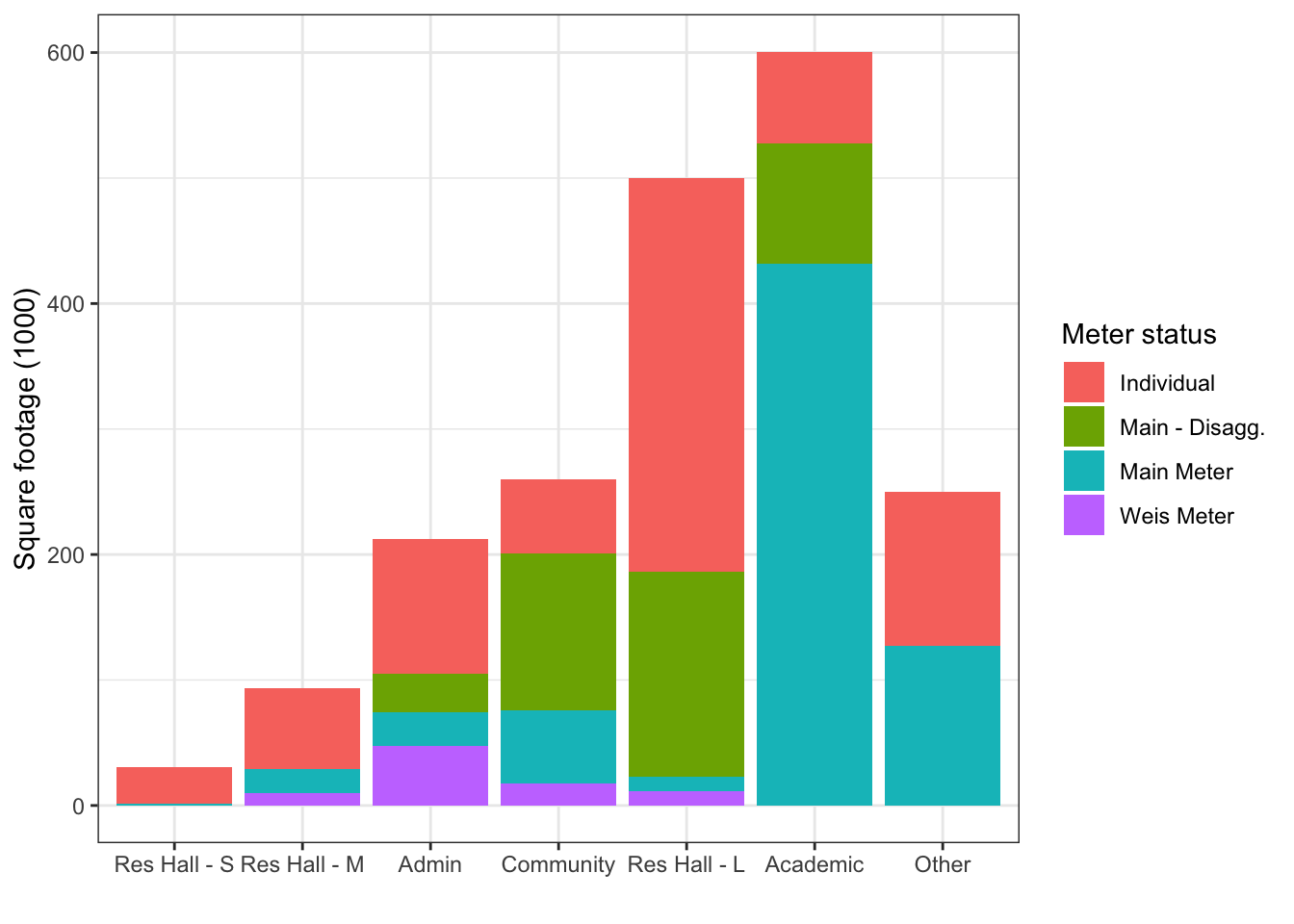
Export for downstream analyses
write.csv(joined_daily, "./output/kwh_daily.csv", row.names = F)
write.csv(joined, "./output/kwh_annual.csv", row.names = F)
sessionInfo()R version 4.3.2 (2023-10-31)
Platform: x86_64-apple-darwin20 (64-bit)
Running under: macOS Ventura 13.7.8
Matrix products: default
BLAS: /Library/Frameworks/R.framework/Versions/4.3-x86_64/Resources/lib/libRblas.0.dylib
LAPACK: /Library/Frameworks/R.framework/Versions/4.3-x86_64/Resources/lib/libRlapack.dylib; LAPACK version 3.11.0
locale:
[1] en_US.UTF-8/en_US.UTF-8/en_US.UTF-8/C/en_US.UTF-8/en_US.UTF-8
time zone: America/New_York
tzcode source: internal
attached base packages:
[1] stats graphics grDevices utils datasets methods base
other attached packages:
[1] scales_1.3.0 DT_0.33 lubridate_1.9.3 forcats_1.0.0
[5] stringr_1.5.1 dplyr_1.1.4 purrr_1.0.2 readr_2.1.5
[9] tidyr_1.3.1 tibble_3.2.1 ggplot2_3.5.1 tidyverse_2.0.0
loaded via a namespace (and not attached):
[1] sass_0.4.8 utf8_1.2.4 generics_0.1.3 stringi_1.8.3
[5] hms_1.1.3 digest_0.6.37 magrittr_2.0.3 timechange_0.3.0
[9] evaluate_0.23 grid_4.3.2 fastmap_1.1.1 rprojroot_2.0.4
[13] workflowr_1.7.1 jsonlite_1.8.8 whisker_0.4.1 promises_1.2.1
[17] fansi_1.0.6 crosstalk_1.2.1 jquerylib_0.1.4 cli_3.6.2
[21] rlang_1.1.3 ellipsis_0.3.2 munsell_0.5.0 withr_3.0.0
[25] cachem_1.0.8 yaml_2.3.8 tools_4.3.2 tzdb_0.4.0
[29] colorspace_2.1-0 httpuv_1.6.13 vctrs_0.6.5 R6_2.5.1
[33] lifecycle_1.0.4 git2r_0.33.0 htmlwidgets_1.6.4 fs_1.6.3
[37] pkgconfig_2.0.3 pillar_1.9.0 bslib_0.6.1 later_1.3.2
[41] gtable_0.3.4 glue_1.7.0 Rcpp_1.1.0 highr_0.10
[45] xfun_0.41 tidyselect_1.2.0 rstudioapi_0.16.0 knitr_1.45
[49] farver_2.1.1 htmltools_0.5.7 labeling_0.4.3 rmarkdown_2.25
[53] compiler_4.3.2